I wanted a Windows Server 2025 VM requested from the VCF Automation catalog to get its own host name and static IP, using the settings from my saved vCenter customization spec, ws2025-static. My Windows image had VMware Tools 13.1.0 running. I left it ungeneralized so vSphere could run Sysprep on each new VM.
Where does the customization spec name go?
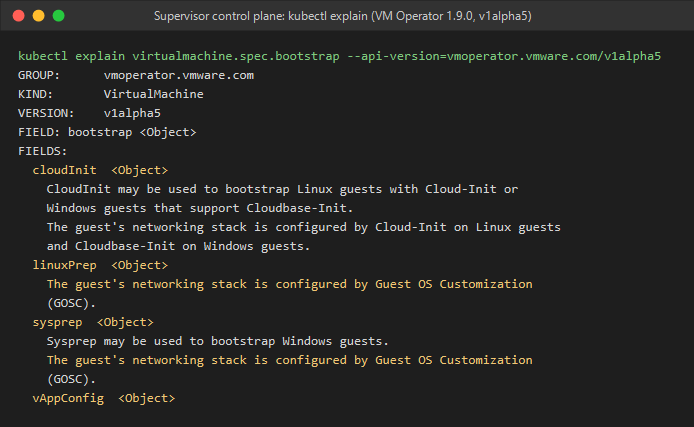
VM Service has no field that takes a saved vCenter customization spec by name. My VCF Automation 9.1 All Apps blueprint uses a CCI.Supervisor.Resource with a VirtualMachine manifest. Its Sysprep provider takes the Windows settings themselves.
I used the spec name when writing the blueprint. For example, this PowerCLI lookup shows where my /27 default came from:
$spec = (Get-View CustomizationSpecManager).GetCustomizationSpec('ws2025-static').Spec
$spec.NicSettingMap[0].Adapter.SubnetMask   # 255.255.255.224
Changing ws2025-static in vCenter later doesn’t update this blueprint. If you’re using a Cloud.vSphere.Machine instead, you can declare inputs.customizationSpec as a string and set customizationSpec: ${input.customizationSpec} under that machine’s properties. That’s the resource that can use the saved name directly.
Blueprint inputs for guest customization
The saved spec used the VM name as the computer name and prompted for an IP. In the catalog request I supplied the VM name, IPv4 address, a unique MAC for the NSX subnet, and an Administrator password. I used the spec’s subnet mask, gateway and DNS as form defaults. These are the relevant top-level inputs:
inputs:
  vmName:        {type: string, maxLength: 15}
  ipAddress:     {type: string}
  macAddress:    {type: string}
  adminPassword: {type: string, encrypted: true, minLength: 12}

  subnetName:    {type: string, default: win-static}
  prefixLength:  {type: integer, default: 27}
  gateway:       {type: string, default: 172.30.10.1}
  dnsServers:
    type: array
    items: {type: string}
    default: [10.1.1.1]
How the inputs reach Windows
Inside properties.manifest.spec, network connects the NIC to my NSX VPC subnet with static allocation. The same block tells guest customization which host name and address to apply:
network:
  hostName: ${input.vmName}
  interfaces:
    - name: eth0
      network:
        apiVersion: crd.nsx.vmware.com/v1alpha1
        kind: Subnet
        name: ${input.subnetName}
      macAddr: ${input.macAddress}
      addresses:
        - ${input.ipAddress}/${input.prefixLength}
      gateway4: ${input.gateway}
      nameservers: ${input.dnsServers}
I kept two values from the spec fixed in bootstrap.sysprep.sysprep: the WORKGROUP workgroup and time zone 35 (Eastern Standard Time). The Administrator password changes per request: the blueprint writes ${input.adminPassword} to the password key of a Secret named ${input.vmName}-admin. Sysprep reads that key:
bootstrap:
  sysprep:
    sysprep:
      guiUnattended:
        autoLogon: false
        password:
          name: ${input.vmName}-admin
          key: password
        timeZone: 35
      identification:
        joinWorkgroup: WORKGROUP
When I requested ws25-gosc-02 with 172.30.10.11, vCenter recorded CustomizationSucceeded. VMware Tools reported 172.30.10.11/27 on the Windows NIC with DHCP off.