When I started this upgrade on November 6, my offline depot had two VCF 9.1.1 patch levels: 9.1.1.0100 and 9.1.1.0200. I had already taken the fleet through the 9.1.1.0 management component upgrades. SDDC Manager, NSX, vCenter and my four ESX hosts were still on 9.1.0. I took those straight to their patch builds.
I used the same NSX bundle twice: first for NSX Manager, then for the Edges after vCenter and ESX. Between those two runs, NSX still reported 9.1.0. The Supervisor came last. vCenter didn’t offer v1.34.9 until I’d taken the Supervisor through v1.33.13.
Before You Begin
This was one VCF instance with a single management domain: one NSX Manager, four nested ESX hosts running vSAN ESA, and a single-node Supervisor control plane. Have current SDDC Manager, NSX and vCenter backups before starting. In my lab, the NSX Manager, Edge, VNA, VCF Services Runtime and VCF Automation VMs had snapshot.maxSnapshots = 0. I could snapshot vCenter, but that snapshot went away with the old appliance at switchover.
Run one fleet component at a time in production. In Build > Lifecycle > VCF Management > Upgrade, select one component and wait for it to finish on the Tasks tab. Broadcom KB 453246 explains why: if upgrades overlap on the same plan, a component can finish and still show Ready for upgrade, with the same build on both sides. That can block the next upgrade. Broadcom Support has to clear the stuck records. Skip Upgrade (All).
The Upgrade Order I Used
I ran steps 1 through 7 from VCF Operations. For the management domain I used SDDC Manager for NSX, vCenter and ESX, then vCenter for the Supervisor. The 9.1.1 release notes give the dependencies for a fleet starting on 9.1.0.x. My fleet followed those on the way to 9.1.1.0. On the later 0100/0200 pass, all 14 component prechecks passed with no dependencies listed. I didn’t test a direct fleet upgrade from 9.1.0 to those patches.
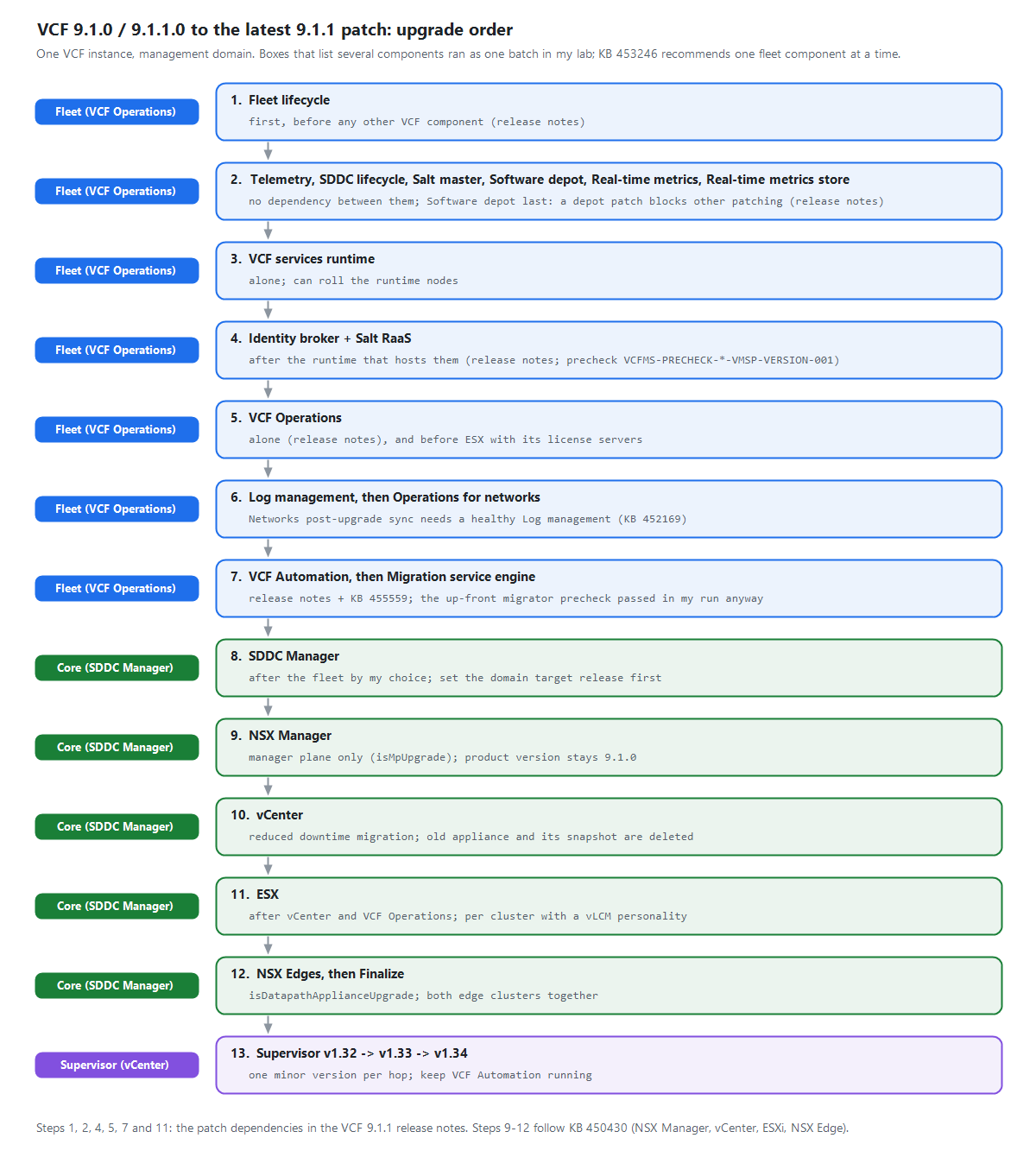
What ran together in my lab
I tried three groups: the platform services in step 2, Identity Broker with Salt RaaS, and Log Management with Operations for Networks. Software Depot was in the first request but ran by itself. All 14 rows finished ON_TARGET; Fleet Lifecycle upgrades itself outside that plan.
VCF Automation and the Migration Service Engine ran one after the other. The two Edge clusters in step 12 overlapped within a single SDDC Manager task. I didn’t overlap fleet and core upgrades or test parallel workload domains.
Step 1: Fleet Lifecycle
The release notes put Fleet Lifecycle first. On my first pass, the other 9.1.1 targets didn’t even appear until Fleet Lifecycle was on 9.1.1.0. On the patch pass it went to 9.1.1.0200 in 34 minutes. None of the runtime nodes rolled.
Step 2: Platform Services and Software Depot
I submitted Telemetry, SDDC Lifecycle, Salt Master, Real-Time Metrics, Real-Time Metrics Store and Software Depot together. Five upgrades ran at once. Software Depot waited for SDDC Lifecycle, then ran on its own from 21:42 to 22:21. That last detail matters even when patching sequentially: the other components can’t fetch their binaries while Software Depot is patching.
I patched Salt Master here on both passes. The release notes name Salt RaaS, specifically, as a service that must wait for its runtime. My earlier precheck made the same distinction.
Step 3: VCF Services Runtime
I ran the Services Runtime upgrade by itself. On the move to 9.1.1.0 it replaced the control plane, then each worker. While the runtime was still on 9.1.0, the Identity Broker and Salt RaaS prechecks returned:
VCF Services Runtime is at version 9.1.0 but this upgrade requires VSP >= 9.1.1 [VCFMS-PRECHECK-VIDB-VMSP-VERSION-001]
VSP platform is at version 9.1.0 but this upgrade requires VSP >= 9.1.1 [VCFMS-PRECHECK-RAAS-VMSP-VERSION-001]
On the patch pass, the first runtime attempt failed. A pre-upgrade step resized the workers, and the resulting node replacements evicted the pods running the upgrade workflow. I let the worker roll finish before I retried. The second attempt took 1 hour 27 minutes.
Step 4: Identity Broker and Salt RaaS
Once the runtime was up, Identity Broker and Salt RaaS finished in 49 minutes in one request. Neither triggered another node roll. If you have more than one runtime, check which one hosts each service.
Step 5: VCF Operations and the License Server
VCF Operations needs the window to itself. The release notes say to let other lifecycle tasks finish before starting Operations and to wait until Operations is done before starting anything else. I saw why that was useful: near the end of the patch, vCenter redeployed the Operations plug-in, each host got a vSAN configuration update, and the Supervisor took about three minutes to reconcile.
Check the connected license servers before moving on to ESX. The VCF Operations 9.1.1.0100 patch notes confirm that applying the Operations patch also patches the license server. There was no separate row for it in my fleet plan. After the run, Operations reported my license server on 9.1.1.0100.25795080.
KB 456235 documents the consequence of patching ESX first: hosts can reject subsequent license assignments and their current licenses can eventually expire. My lab hosts were in evaluation mode, so a healthy host wasn’t enough to tell me the license server had updated.
Step 6: Log Management, Then Operations for Networks
Operations for Networks creates a service account in Log Management during its post-upgrade inventory sync. KB 452169 describes a sync that failed because Logs was unreachable. I would finish the Logs upgrade and check that it’s healthy before starting Networks.
I submitted both in one request in the lab. Logs finished at 09:06 and Networks at 10:38. I wouldn’t count on the same timing in another environment.
Step 7: VCF Automation, Then the Migration Service Engine
On my 9.1.1.0 pass, the VCF Automation precheck required Services Runtime 9.1.1.0.25714471. The Migration Service Engine precheck passed while Automation was still on 9.1.0. I wouldn’t use a green precheck to decide the order. KB 455559 ties the 9.1.1.0 failure to the PostgreSQL version: starting the migration engine first can leave the task running for over six hours before it fails. Broadcom lists that issue as fixed in 9.1.1.0100.
I kept the same order on the patch pass. During the Automation node replacement the fleet briefly showed Deploying VCF Component Failed. The workflow retried on its own and finished in 3 hours 25 minutes. Only then did I start the migration engine; it took another 34 minutes.
If VCF Automation is integrated with Data Services Manager, check the DSM upgrade steps before patching Automation. I don’t have DSM in this lab.
Step 8: SDDC Manager
I waited until the fleet was done before starting SDDC Manager. That was my choice for this patch. KB 450430 covers the 9.0.2 to 9.1 upgrade, which puts SDDC Manager right after VCF Operations. I used its order for the core: NSX Manager, vCenter, ESX hosts, then NSX Edges. If you’re starting on another release, the VCF Upgrade Planner lets you select your own source and target.
I set the domain target release to 9.1.1.0, selected 9.1.1.0200 for SDDC Manager and 9.1.1.0100 for NSX, vCenter and ESX. SDDC Manager then offered those patch bundles directly from 9.1.0. If you’re setting the target through PATCH /v1/releases/domains/{id}, my 9.1.0 build accepted NSX_T_MANAGER, VCENTER and HOST as the productType values. Using NSX or ESX returned HTTP 400.
Step 9: NSX Manager Only
The first NSX run upgraded the management plane. In the SDDC Manager API, I set isMpUpgrade to true and isDatapathApplianceUpgrade to false. My request needed exactly one of those flags set, and nsxtId needed the NSX Manager VIP FQDN. The cluster ID was rejected.
After 50 minutes the manager upgrade had finished, but the NSX product version still read 9.1.0. The upgrade coordinator was paused with Edge and Finalize still pending. I left it there and went on to vCenter. I also checked my NSX backup schedule: SDDC Manager had turned scheduled backups back on.
Step 10: vCenter
The bundle was marked PATCH, but SDDC Manager used a reduced downtime migration. It deployed a new vCenter appliance alongside the old one. The two communicated over a link-local address, so I didn’t need a temporary IP. The migration took 1 hour 8 minutes, including a 12-minute switchover.
When the switchover finished, SDDC Manager deleted the old appliance and its snapshot. If you’re planning the rollback, make sure you have a vCenter backup you can restore after that point.
Step 11: ESX Hosts
My domain-level ESX upgrade request was rejected. When I tried again at the cluster level without an image, the precheck gave me UPGRADE_PRECHECK_VLCM_CLUSTER_WITHOUT_PERSONALITY. Here’s what worked:
- Import the ESX offline bundle into vSphere Lifecycle Manager (vLCM).
- Build the 9.1.1.0100 image on an empty cluster.
- Import that image into SDDC Manager as a cluster image (a personality).
- Select that image and start the upgrade against the cluster.
vLCM remediated one host at a time. When the first one came back I checked vSAN, the NSX transport nodes and the Supervisor. All four hosts took 1 hour 41 minutes. The image included the NSX host VIBs, so NSX showed the host cluster as upgraded without a separate NSX host run.
Step 12: NSX Edges and Finalize
I selected the same NSX bundle again, this time with isDatapathApplianceUpgrade set to true and isMpUpgrade set to false. The Edge cluster and the VNA cluster both showed In Progress within the same task. The run took 40 minutes, including Finalize.
This is when the NSX product version changed from 9.1.0 to 9.1.1.0100.25762940. Scheduled NSX backups were on again after this pass too.
Step 13: Supervisor, One Minor Version at a Time
I waited until vCenter and ESX were done because the Supervisor upgrade changes the cluster image and remediates the hosts again. From v1.32.9, vCenter offered v1.32.13 and v1.33.13. I took v1.33.13. Only then did v1.34.9 appear.
Each hop rolled the control plane first, then vLCM updated the Spherelet on each host. On the v1.34.9 hop there was an initial pass without maintenance mode; after that, hosts entered maintenance mode one at a time. That hop took 1 hour 29 minutes. These are the exact builds vCenter reported, in order:
v1.32.9+vmware.2-fips-vsc9.1.0.0-25370922v1.33.13+vmware.1-fips-vsc9.1.1.0100-25784172v1.34.9+vmware.1-vsc9.1.1.0100-25784172
The last string doesn’t have the -fips suffix. If FIPS is a requirement, verify that build against your requirements before taking the hop. The name alone doesn’t establish its status.
Keep VCF Automation reachable if your Supervisor services pull packages through it. In my lab, the image proxy forwarded those requests to the Automation VIP. While it was unreachable, the auto-attach, configuration and metrics-aggregator services couldn’t reconcile. They recovered once Automation was back.
Versions in My Lab
The 9.1.1.x patches are cumulative and released per component. That’s why my finished fleet shows a mix of 0100 and 0200. Below are the versions from my fleet plan, oldest to newest. Real-Time Metrics and its store weren’t in my 9.1.0 plan. I deployed Log Management (Logs) and Operations for Networks on 9.1.1.0.
The component names link to my earlier upgrade walkthroughs. Most cover 9.1.1.0. My Software Depot screenshots are from 9.1.0.0400, and my VCF Operations guide shows a manual PAK install. For this fleet I patched Operations through VCF Management.
| Fleet component | Versions in my plan |
|---|---|
| Fleet Lifecycle | 9.1.0.0.25371109 / 9.1.1.0.25713934 / 9.1.1.0200.25801070 |
| VCF Services Runtime | 9.1.0.0.25370367 / 9.1.1.0.25714471 / 9.1.1.0100.25801571 |
| SDDC Lifecycle | 9.1.0.0.25371107 / 9.1.1.0.25713940 / 9.1.1.0200.25801981 |
| Software Depot | 9.1.0.0.25371105 / 9.1.1.0.25713941 / 9.1.1.0200.25801072 |
| Telemetry | 9.1.0.0.25181946 / 9.1.1.0.25671600 / 9.1.1.0100.25741214 |
| Salt Master | 9.1.0.0.25346036 / 9.1.1.0.25679895 / 9.1.1.0100.25795075 |
| Salt RaaS | 9.1.0.0.25346036 / 9.1.1.0.25679895 / 9.1.1.0100.25795075 |
| Identity Broker | 9.1.0.0.25368698 / 9.1.1.0.25679886 / 9.1.1.0100.25796677 |
| Real-Time Metrics | 9.1.1.0.25679622 / 9.1.1.0100.25794546 |
| Real-Time Metrics Store | 9.1.1.0.25714471 / 9.1.1.0100.25801571 |
| VCF Operations | 9.1.0.0.25346025 / 9.1.1.0.25679751 / 9.1.1.0100.25795063 |
| Logs | 9.1.1.0.25679624 / 9.1.1.0100.25795095 |
| VCF Operations for Networks | 9.1.1.0.25682214 / 9.1.1.0100.25774578 |
| VCF Automation | 9.1.0.0.25370929 / 9.1.1.0.25714559 / 9.1.1.0200.25801570 |
| Migration Service Engine | 9.1.0.0.25370929 / 9.1.1.0.25714559 / 9.1.1.0200.25801570 |
One difference if you’re comparing the table to Broadcom’s Real-Time Metrics patch notes: Broadcom lists build 25801571 for Real-Time Metrics. My fleet showed that build for Real-Time Metrics Store and 25794546 for Real-Time Metrics.
For SDDC Manager I have a separate 9.1.1 walkthrough. The other rows link to the steps I used for this patch. For screenshots from my earlier 5.2.1 to 9.0 upgrade, see NSX, vCenter and ESX.
| Management domain component | Before and after |
|---|---|
| SDDC Manager | 9.1.0.0.25371088 to 9.1.1.0200.25801071 |
| NSX (after Finalize) | 9.1.0.0.25318225 to 9.1.1.0100.25762940 |
| vCenter | 9.1.0.0.25370922 to 9.1.1.0100.25784172 |
| ESX (four hosts) | 9.1.0.0.25370933 to 9.1.1.0100.25782009 |
| Supervisor | v1.32.9 to v1.33.13 to v1.34.9 |
Timings in My Lab
These are my task times for November 6 to 8, 2026, in Eastern Standard Time (UTC-5). The gaps include prechecks, downloads, the failed runtime attempt and time I spent checking the lab between upgrades.
| Component | Window (EST) | Upgrade time |
|---|---|---|
| Fleet Lifecycle | Nov 6, 17:27 to 18:01 | 34 min |
| Platform services and depot | Nov 6, 20:17 to 22:22 | 2 h 5 min |
| Services Runtime (retry) | Nov 7, 02:17 to 03:44 | 1 h 27 min |
| Identity Broker and Salt RaaS | 03:47 to 04:36 | 49 min |
| VCF Operations | 06:48 to 08:14 | 1 h 26 min |
| Log Management and Networks | 08:20 to 10:38 | 2 h 18 min |
| VCF Automation | 10:40 to 14:05 | 3 h 25 min |
| Migration Service Engine | 14:07 to 14:41 | 34 min |
| SDDC Manager | 14:43 to 15:07 | 24 min |
| NSX Manager | 16:49 to 17:39 | 50 min |
| vCenter | 17:49 to 18:57 | 1 h 8 min |
| ESX (four hosts) | 19:37 to 21:18 | 1 h 41 min |
| NSX Edges and Finalize | Nov 7, 23:38 to Nov 8, 00:18 | 40 min |
| Supervisor to v1.33.13 | Nov 8, 00:19 to 04:42 | 1 h 39 min active |
| Supervisor to v1.34.9 | 04:43 to 06:12 | 1 h 29 min |
The first Supervisor hop took 4 hours 23 minutes on the clock. The control plane ran from 00:19 to 00:45, and the hosts from 03:29 to 04:42. The 1 hour 39 minutes is the sum of those two periods; the hold between them was specific to my lab.
At 06:12 on November 8, vCenter showed the Supervisor on v1.34.9 and offered no further update. By then NSX had finalized, all four ESX hosts were on build 25782009, and every row in the fleet plan was on target.