Creating a Custom Role in vCenter for Aria Operations Monitoring

Introduction Monitoring your VMware infrastructure effectively is crucial for maintaining system health and performance. VMware’s Aria Operations (formerly vRealize Operations) provides comprehensive monitoring capabilities, but it requires specific permissions to function optimally. In this blog post, we’ll walk through the steps to create a custom role in vCenter specifically for the Aria Operations service account, ensuring it has the necessary permissions to monitor your infrastructure. Prerequisites Before we begin, ensure you have the following: ...

May 13, 2024 · Cosmin Trif

Enhancing vCenter Server Firewall Management with Ansible

In today’s dynamic IT environments, maintaining a secure and efficient infrastructure is paramount. For VMware vSphere administrators, managing the firewall settings on vCenter servers is a critical task that ensures the security of the entire virtualized infrastructure. Ansible, an open-source automation tool, offers a streamlined approach to managing firewall settings across multiple vCenter servers. This blog post will guide you through automating vCenter server firewall configurations using Ansible, showcasing how to apply these changes across multiple servers seamlessly. ...

March 21, 2024 · Cosmin Trif

Streamlining vCenter Server Firewall Management with SaltStack Config

In the realm of VMware vSphere management, securing your vCenter Server is critical to maintaining a robust and secure infrastructure. SaltStack Config, integrated into VMware’s vRealize Automation suite, offers a powerful way to automate and manage configurations across your VMware environment, including firewall settings. This blog explores how to leverage SaltStack Config to automate firewall adjustments on your vCenter servers, ensuring consistent security policies and simplifying the process across multiple instances. ...

March 21, 2024 · Cosmin Trif

Automating vCenter Server Firewall Configuration with PowerShell: A Guide for Scaling to Multiple Environments

The vCenter Server acts as the central nervous system for VMware vSphere environments, providing crucial management capabilities. As with any critical component of your infrastructure, ensuring the vCenter Server is secured is paramount. The firewall settings play a vital role in protecting your vCenter Server against unauthorized access. This blog post dives into how you can programmatically change the firewall settings on the vCenter Server using PowerShell, and how to scale this automation across multiple vCenter servers efficiently. ...

March 21, 2024 · Cosmin Trif

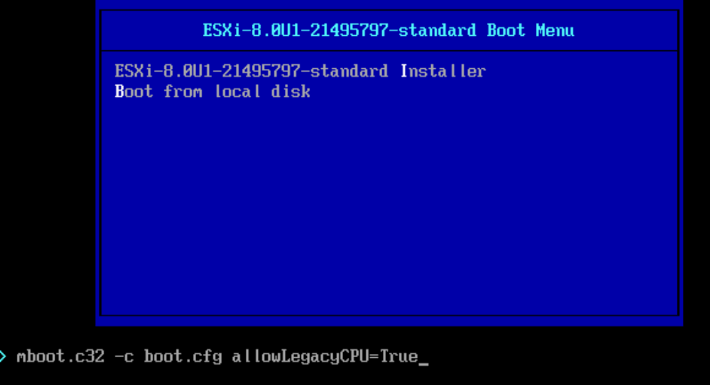
Install/Upgrade ESXi 8.0 on unsupported hardware.

As i was installing\upgrading my lab environment to ESXi 7.0 i received an error that the CPU was unsupported. As per the release notes vSphere 8.0 release notes my CPU is no longer on the compatibility list. Since this is a lab environment i wanted to continue using my current hardware. It goes without saying that this method should not be used in a production environment. To allow the legacy CPU all I had to do is boot up from the ISO, on the boot Menu I pressed TAB or Shift + O and added allowLegacyCPU=True option as seen in the screenshot below ...

April 26, 2023 · Cosmin Trif

A Step-by-Step Guide to Convert Native Cloud Virtual Machines to On-Prem vSphere with VMware Converter

Migrating virtual machines (VMs) from a cloud environment to an on-premises VMware vSphere infrastructure can be a daunting task. However, with the right tools and processes in place, it can be a seamless and efficient process. One such tool is the VMware Converter, which enables users to convert native cloud VMs\physical servers to vSphere machines. In this blog post, we will discuss the benefits and challenges of converting cloud VMs and provide a step-by-step guide for using VMware Converter to achieve this goal. ...

March 20, 2023 · Cosmin Trif

Removing NSX stale packages from ESXi host

I recently ran in to a problem where i wanted to perform a clean configuration of one of my ESXi hosts from an NSX perspective, however i ran in to a problem where NSX was reporting that the packages are already installed. To fix the issue i had to run the following to list the packages installed: esxcli software vib list | grep -i nsx Once i had the list all i had to do is uninstall them using: ...

March 3, 2023 · Cosmin Trif

Why Choose vRealize Automation (vRA) over Ansible

Ansible and vRealize Automation (vRA) are both popular DevOps tools for infrastructure automation and provisioning. However, the two tools have different strengths and use cases, and choosing the right one for your organization can be a challenge. In this blog post, we’ll explore the key differences between vRA and Ansible and why you might choose vRA over Ansible. Complexity of Deployment Ansible is a simple, agentless tool that is easy to install and configure. However, as the complexity of your deployment increases, the simplicity of Ansible can quickly become a hindrance. vRA, on the other hand, is a complex tool that is designed to handle complex deployments, making it an ideal choice for large, complex environments. ...

February 1, 2023 · Cosmin Trif

Why Choose VMware vRealize Automation Over Puppet

When it comes to managing large, complex IT infrastructure, two of the most popular tools are VMware vRealize Automation (vRA) and Puppet. Both tools have their strengths and weaknesses, but in this article, we will examine why you might choose vRealize Automation over Puppet. Integrated Management: vRA integrates with VMware’s vSphere virtualization platform, allowing for a seamless management of virtual machines (VMs). With Puppet, you would need to use additional tools to manage your virtual environment. Cloud Management: vRA is capable of managing both on-premise and cloud infrastructure, making it an ideal solution for hybrid cloud environments. Puppet, on the other hand, is primarily focused on on-premise deployments. Automation: Automation is at the core of both vRA and Puppet. However, vRA provides a more comprehensive automation solution with its built-in workflows and drag-and-drop design. This makes it easier for users to automate their infrastructure without having to write complex code. Self-Service: vRA provides a self-service portal for users to request and manage their own resources, reducing the burden on IT. Puppet does not have this capability, making it a less attractive option for organizations looking to implement a self-service model. Cost: vRA is a commercial product and is typically more expensive than Puppet. However, the added features and integration with other VMware products make it a more cost-effective solution in the long run. In conclusion, if you are looking for a comprehensive and integrated management solution that covers both on-premise and cloud environments, then vRealize Automation is the way to go. It provides a more user-friendly automation solution, with a self-service portal, making it easier for users to manage their infrastructure. However, if you are on a tight budget and have a primarily on-premise deployment, Puppet might be a better fit for your organization. ...

February 1, 2023 · Cosmin Trif

Why Choose VMware vRealize Automation (vRA) over Terraform

In the world of infrastructure as code (IAC), there are many tools to choose from. Two popular options are VMware vRealize Automation (vRA) and Terraform. While both have their strengths, there are compelling reasons to choose vRA over Terraform. End-to-End Automation: vRA automates the entire software-defined data center (SDDC) lifecycle, from provisioning to decommissioning. Terraform is more limited, focusing only on infrastructure provisioning. User Experience: vRA provides a user-friendly interface, making it easier for non-technical users to request and manage infrastructure. Terraform, on the other hand, requires more technical expertise to use effectively. Integration with VMware: vRA integrates with other VMware products, such as vSphere, NSX, and vSAN, allowing for a seamless experience. Terraform can also integrate with VMware, but it requires more manual effort to set up the integration. Enterprise-Grade Security: vRA includes enterprise-grade security features, such as role-based access control and multi-factor authentication. Terraform does not have built-in security features, requiring additional tools or manual effort to secure the environment. Robust Compliance Features: vRA includes compliance features, such as blueprints that enforce specific policies and standards, making it easier to meet regulatory requirements. Terraform does not have built-in compliance features, leaving it up to the user to ensure compliance. Strong Support: vRA has a large, global community of users and is backed by VMware, a well-established company in the tech industry. Terraform is a relatively new tool with a smaller community, making support and resources more limited. In conclusion, vRA offers a complete automation solution for the SDDC, making it a great choice for enterprises that want a user-friendly interface, strong security features, robust compliance features, and strong support. Terraform, while a powerful tool, is better suited for infrastructure provisioning and requires more technical expertise and manual effort to secure and ensure compliance. ...

February 1, 2023 · Cosmin Trif