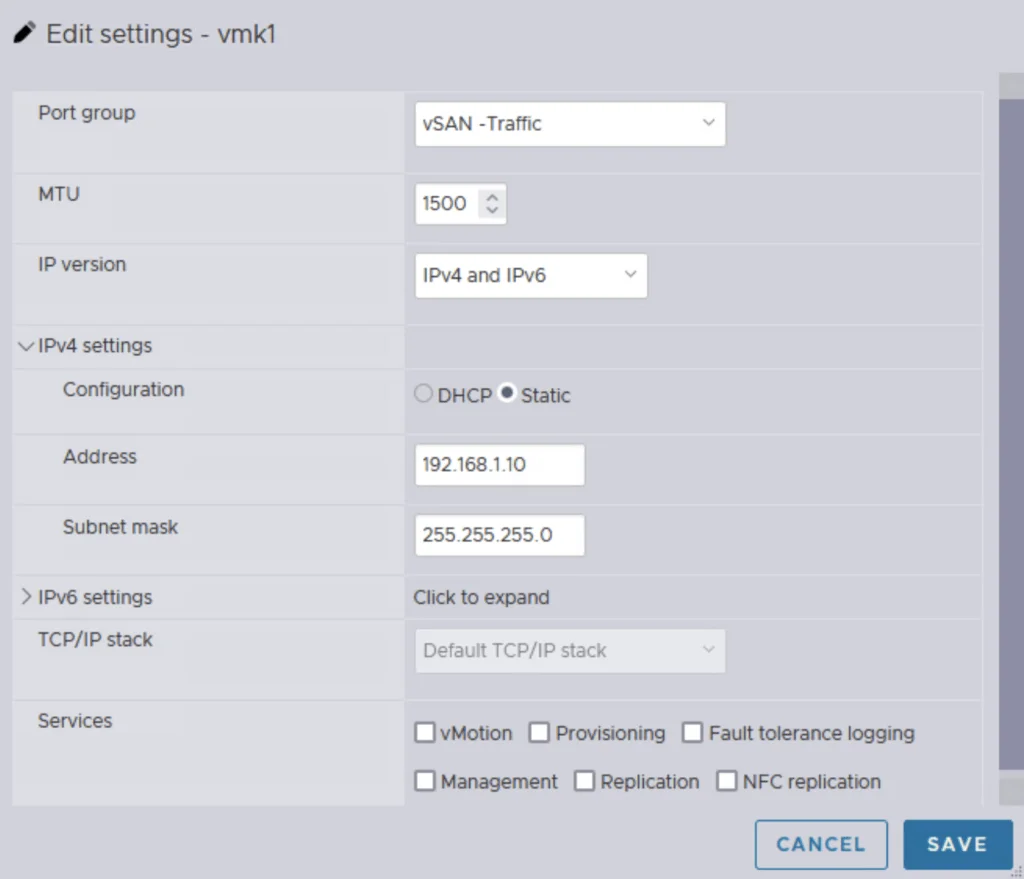
Editing vSAN traffic settings with IPv4 and IPv6, static IP, and service options.

Single Node vSAN

Setting up a vSAN cluster on a single ESXi host without vCenter is simpler than you might think. This guide walks you through a CLI-based method to configure VMware by Broadcom’s vSAN in a standalone environment. Whether you’re testing in a lab or laying the groundwork for a larger cluster, a single node vSAN deployment offers a flexible starting point that scales as your needs grow. What Is a Single Node vSAN? VMware by Broadcom’s vSAN is designed for multi-host clusters managed by vCenter, typically requiring at least two hosts for production resilience. However, with CLI tools, you can establish a vSAN cluster on a single ESXi host. This setup is ideal for experimentation or initiating a cluster, providing a solid base for later expansion with vCenter and additional nodes. ...

February 27, 2025 · Cosmin Trif
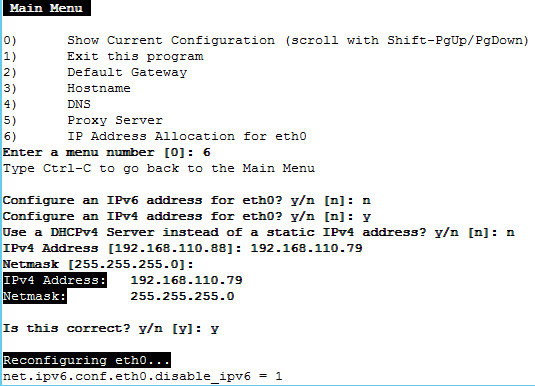
Configuring IPv4 and IPv6 addresses for eth0 in Workspace ONE Access 3.3.7.

Step-by-Step Guide for Changing the IP Address in Workspace ONE Access 3.3.7

Changing the IP address of the Workspace ONE Access 3.3.7 appliance is a multi-step process that requires careful attention to avoid service disruptions. Below are the key steps involved: 1. Stop Workspace ONE Access Services SSH into the appliance and stop all services to prevent any inconsistencies during the IP address change. service horizon-workspace stop 2. Update DNS Entries Modify both forward and reverse DNS records to reflect the new IP address. This is crucial for both name resolution and certificate validation. 3. Update the IP Address Access the vami configuration interface using the following command: /opt/vmware/share/vami/vami_config_net Follow the on-screen instructions to change the IP address, gateway, and subnet mask as needed. ...

September 5, 2024 · Cosmin Trif

Creating a Custom Role in vCenter for Aria for Logs (vRealize Log Insight): A Step-by-Step Guide

Introduction Logs play a pivotal role in the management and troubleshooting of IT environments. Aria for Logs (formerly known as vRealize Log Insight) provides powerful log management capabilities, enabling deep analytical insights and real-time monitoring of data from various sources, including vSphere. To ensure Aria for Logs effectively collects and analyzes log data, it requires specific permissions within your vCenter Server. This blog post will guide you through creating a custom role in vCenter tailored for the Aria for Logs service account. ...

May 13, 2024 · Cosmin Trif

Creating a Custom Role in vCenter for Aria Automation: A Step-by-Step Guide

Introduction Automation in VMware environments enhances efficiency, reduces human error, and improves the consistency of operations. Aria Automation (formerly vRealize Automation) is a powerful tool designed to automate processes in your VMware infrastructure. However, to fully leverage its capabilities, Aria Automation requires specific permissions in vCenter. This blog post will guide you through creating a custom role in vCenter with all necessary permissions for the Aria Automation service account. Prerequisites ...

May 13, 2024 · Cosmin Trif

Creating a Custom Role in vCenter for Aria Operations Actions

Introduction Monitoring your VMware infrastructure effectively is crucial for maintaining system health and performance. VMware’s Aria Operations (formerly vRealize Operations) provides comprehensive monitoring capabilities, but it requires specific permissions to function optimally. In this blog post, we’ll walk through the steps to create a custom role in vCenter specifically for the Aria Operations service account, ensuring it has the necessary permissions to monitor and take actions in your infrastructure. Prerequisites Before we begin, ensure you have the following: ...

May 13, 2024 · Cosmin Trif

Creating a Custom Role in vCenter for Aria Operations Monitoring

Introduction Monitoring your VMware infrastructure effectively is crucial for maintaining system health and performance. VMware’s Aria Operations (formerly vRealize Operations) provides comprehensive monitoring capabilities, but it requires specific permissions to function optimally. In this blog post, we’ll walk through the steps to create a custom role in vCenter specifically for the Aria Operations service account, ensuring it has the necessary permissions to monitor your infrastructure. Prerequisites Before we begin, ensure you have the following: ...

May 13, 2024 · Cosmin Trif

VCF depot build numbers

Bundle Product Version Size Bundle Component Bundle Type bundle-111778 5.1.1.0 605.7 ESX_HOST-8.0.2-23305546 PATCH bundle-111779 5.1.1.0 11381.3 NSX_T_MANAGER-4.1.2.3.0-23382408 PATCH bundle-111777 5.1.1.0 0 SDDC_MANAGER_VCF-5.1.1.0-23480823 PATCH (Drift) bundle-111776 5.1.1.0 2331.6 SDDC_MANAGER_VCF-5.1.1.0-23480823 PATCH bundle-111781 5.1.1.0 17064.2 VCENTER-8.0.2.00200-23319993 PATCH bundle-111780 5.1.1.0 14664.6 NSX_T_MANAGER-4.1.2.3.0-23382408 INSTALL bundle-111782 5.1.1.0 10742.4 VCENTER-8.0.2.00200-23319993 INSTALL bundle-110346 5.1.1.0 1847.9 VRSLCM-8.16.0-23377566 INSTALL bundle-99536 5.1.0.0 640 ESX_HOST-8.0.2-22380479 PATCH bundle-99541 5.1.0.0 10500.4 NSX_T_MANAGER-4.1.2.1.0-22667789 PATCH bundle-99539 5.1.0.0 2089.2 SDDC_MANAGER_VCF-5.1.0.0-22688368 PATCH bundle-99540 5.1.0.0 0 SDDC_MANAGER_VCF-5.1.0.0-22688368 PATCH (Drift) bundle-99537 5.1.0.0 16801.6 VCENTER-8.0.2.00100-22617221 PATCH bundle-99542 5.1.0.0 14606.2 NSX_T_MANAGER-4.1.2.1.0-22667789 INSTALL bundle-99538 5.1.0.0 10493 VCENTER-8.0.2.00100-22617221 INSTALL bundle-98366 5.1.0.0 1817.8 VRSLCM-8.14.0-22630472 INSTALL bundle-94375 5.0.0.1 2044.9 SDDC_MANAGER_VCF-5.0.0.1-22485660 PATCH bundle-94376 5.0.0.1 251.5 SDDC_MANAGER_VCF-5.0.0.1-22485660 PATCH (Drift) bundle-80035 5.0.0.0 599.5 ESX_HOST-8.0.1-21813344 PATCH bundle-80031 5.0.0.0 10089.9 NSX_T_MANAGER-4.1.0.2.0-21761691 PATCH bundle-80030 5.0.0.0 251.3 SDDC_MANAGER_VCF-5.0.0.0-21822418 PATCH (Drift) bundle-80029 5.0.0.0 2044.7 SDDC_MANAGER_VCF-5.0.0.0-21822418 PATCH bundle-80033 5.0.0.0 9867.6 VCENTER-8.0.1.00100-21815093 PATCH bundle-80032 5.0.0.0 13874.6 NSX_T_MANAGER-4.1.0.2.0-21761691 INSTALL bundle-80034 5.0.0.0 9867.6 VCENTER-8.0.1.00100-21815093 INSTALL bundle-79587 5.0.0.0 1091.8 VRSLCM-8.10.0-21331275 INSTALL bundle-83610 4.5.2.0 382.1 ESX_HOST-7.0.3-21930508 PATCH bundle-87318 4.5.2.0 8615.4 NSX_T_MANAGER-3.2.3.1.0-22104592 PATCH bundle-88445 4.5.2.0 2012.6 SDDC_MANAGER_VCF-4.5.2.0-22223457 PATCH bundle-88446 4.5.2.0 250.5 SDDC_MANAGER_VCF-4.5.2.0-22223457 PATCH (Drift) bundle-81146 4.5.2.0 6420 VCENTER-7.0.3.01500-21784236 PATCH bundle-87319 4.5.2.0 10618.2 NSX_T_MANAGER-3.2.3.1.0-22104592 INSTALL bundle-81147 4.5.2.0 8575.4 VCENTER-7.0.3.01500-21784236 INSTALL bundle-84015 4.5.2.0 1091.3 VRSLCM-8.10.0-21950667 INSTALL bundle-73789 4.5.1.0 381.8 ESX_HOST-7.0.3-21424296 PATCH bundle-73785 4.5.1.0 8402.7 NSX_T_MANAGER-3.2.2.1.0-21487560 PATCH bundle-77261 4.5.1.0 2150 SDDC_MANAGER_VCF-4.5.1.0-21682411 PATCH bundle-77262 4.5.1.0 250.2 SDDC_MANAGER_VCF-4.5.1.0-21682411 PATCH (Drift) bundle-73787 4.5.1.0 6419.8 VCENTER-7.0.3.01400-21477706 PATCH bundle-73786 4.5.1.0 10461.8 NSX_T_MANAGER-3.2.2.1.0-21487560 INSTALL bundle-73788 4.5.1.0 8575.1 VCENTER-7.0.3.01400-21477706 INSTALL bundle-61598 4.5.0.0 382.9 ESX_HOST-7.0.3-20328353 PATCH bundle-62768 4.5.0.0 8064 NSX_T_MANAGER-3.2.1.2.0-20541212 PATCH bundle-63600 4.5.0.0 247.6 SDDC_MANAGER_VCF-4.5.0.0-20612863 PATCH (Drift) bundle-63599 4.5.0.0 2106 SDDC_MANAGER_VCF-4.5.0.0-20612863 PATCH bundle-61594 4.5.0.0 6381.1 VCENTER-7.0.3.01000-20395099 PATCH bundle-62769 4.5.0.0 10053.7 NSX_T_MANAGER-3.2.1.2.0-20541212 INSTALL bundle-61596 4.5.0.0 8344.2 VCENTER-7.0.3.01000-20395099 INSTALL bundle-62801 4.5.0.0 1085.4 VRSLCM-8.8.2-20080494 INSTALL bundle-58347 4.4.1.1 10246.1 SDDC_MANAGER_VCF-4.4.1.1-19948546 PATCH bundle-58348 4.4.1.1 233.8 SDDC_MANAGER_VCF-4.4.1.1-19948546 PATCH (Drift) bundle-56937 4.4.1.0 395.5 ESX_HOST-7.0.3-19482537 PATCH bundle-57347 4.4.1.0 7127.2 NSX_T_MANAGER-3.1.3.7.4-19762317 PATCH bundle-57344 4.4.1.0 10246.2 SDDC_MANAGER_VCF-4.4.1.0-19766960 PATCH bundle-57346 4.4.1.0 233.8 SDDC_MANAGER_VCF-4.4.1.0-19766960 PATCH (Drift) bundle-55743 4.4.1.0 7139 VCENTER-7.0.3.00500-19480866 PATCH bundle-57348 4.4.1.0 8535.7 NSX_T_MANAGER-3.1.3.7.4-19762317 INSTALL bundle-55745 4.4.1.0 9202.7 VCENTER-7.0.3.00500-19480866 INSTALL bundle-52995 4.4.0.0 395.3 ESX_HOST-7.0.3-19193900 PATCH bundle-52980 4.4.0.0 7154.5 NSX_T_MANAGER-3.1.3.5.0-19068434 PATCH bundle-56535 4.4.0.0 230.4 SDDC_MANAGER_VCF-4.4.0.0-19617653 PATCH (Drift) bundle-53432 4.4.0.0 230.3 SDDC_MANAGER_VCF-4.4.0.0-19312029 PATCH (Drift) bundle-53431 4.4.0.0 10188.6 SDDC_MANAGER_VCF-4.4.0.0-19312029 PATCH bundle-52986 4.4.0.0 7223.8 VCENTER-7.0.3.00300-19234570 PATCH bundle-52611 4.4.0.0 905.6 VRSLCM-8.6.2-19221620 PATCH bundle-52982 4.4.0.0 8610 NSX_T_MANAGER-3.1.3.5.0-19068434 INSTALL bundle-52990 4.4.0.0 9244.9 VCENTER-7.0.3.00300-19234570 INSTALL bundle-52610 4.4.0.0 1111.3 VRSLCM-8.6.2-19221620 INSTALL bundle-52704 4.3.1.1 10695.5 SDDC_MANAGER_VCF-4.3.1.1-19235535 PATCH bundle-52705 4.3.1.1 230.5 SDDC_MANAGER_VCF-4.3.1.1-19235535 PATCH (Drift) bundle-47505 4.3.1.0 389.4 ESX_HOST-7.0.2-18426014 PATCH bundle-47501 4.3.1.0 7105.9 NSX_T_MANAGER-3.1.3.1.0-18504668 PATCH bundle-48392 4.3.1.0 230.5 SDDC_MANAGER_VCF-4.3.1.0-18624509 PATCH (Drift) bundle-48390 4.3.1.0 10336.5 SDDC_MANAGER_VCF-4.3.1.0-18624509 PATCH bundle-47503 4.3.1.0 5394 VCENTER-7.0.2.00500-18455184 PATCH bundle-47700 4.3.1.0 6207.1 VRA-8.5.0-18472703 PATCH bundle-47696 4.3.1.0 759.9 VRLI-8.4.1-18136317 PATCH bundle-47698 4.3.1.0 3141.6 VROPS-8.5.0-18255622 PATCH bundle-47703 4.3.1.0 847.8 VRSLCM-8.4.1-18537943 PATCH bundle-47502 4.3.1.0 8501.4 NSX_T_MANAGER-3.1.3.1.0-18504668 INSTALL bundle-47504 4.3.1.0 7383.3 VCENTER-7.0.2.00500-18455184 INSTALL bundle-47701 4.3.1.0 6632.3 VRA-8.5.0-18472703 INSTALL bundle-47695 4.3.1.0 1414.8 VRLI-8.4.1-18136317 INSTALL bundle-47697 4.3.1.0 2563.3 VROPS-8.5.0-18255622 INSTALL bundle-47702 4.3.1.0 1037.1 VRSLCM-8.4.1-18537943 INSTALL bundle-43745 4.3.0.0 390.1 ESX_HOST-7.0.2-17867351 PATCH bundle-46466 4.3.0.0 7123.1 NSX_T_MANAGER-3.1.3.0.0-18328989 PATCH bundle-47006 4.3.0.0 10331.2 SDDC_MANAGER_VCF-4.3.0.0-18433963 PATCH bundle-47008 4.3.0.0 230.3 SDDC_MANAGER_VCF-4.3.0.0-18433963 PATCH (Drift) bundle-46468 4.3.0.0 5394.4 VCENTER-7.0.2.00400-18356314 PATCH bundle-40064 4.3.0.0 6360.7 VRA-8.4.1-18054500 PATCH bundle-43778 4.3.0.0 742.7 VRLI-8.4.0-17828109 PATCH bundle-39857 4.3.0.0 2191.3 VROPS-8.4.0-17863947 PATCH bundle-40066 4.3.0.0 841.3 VRSLCM-8.4.1-18067607 PATCH bundle-40908 4.3.0.0 3478.7 WSA-3.3.5-18049997 PATCH bundle-46467 4.3.0.0 8568.5 NSX_T_MANAGER-3.1.3.0.0-18328989 INSTALL bundle-46469 4.3.0.0 7383.7 VCENTER-7.0.2.00400-18356314 INSTALL bundle-40080 4.3.0.0 6773.8 VRA-8.4.1-18054500 INSTALL bundle-43777 4.3.0.0 1414.2 VRLI-8.4.0-17828109 INSTALL bundle-43774 4.3.0.0 2538.2 VROPS-8.4.0-17863947 INSTALL bundle-40906 4.3.0.0 1032.7 VRSLCM-8.4.1-18067607 INSTALL bundle-40907 4.3.0.0 4180.7 WSA-3.3.5-18049997 INSTALL bundle-42515 4.2.1.0 6995.1 NSX_T_MANAGER-3.1.2.0.0-17883596 PATCH bundle-42906 4.2.1.0 209.3 SDDC_MANAGER_VCF-4.2.1.0-18016307 PATCH (Drift) bundle-42905 4.2.1.0 10142.7 SDDC_MANAGER_VCF-4.2.1.0-18016307 PATCH bundle-42521 4.2.1.0 5114.4 VCENTER-7.0.1.00301-17956102 PATCH bundle-42519 4.2.1.0 8394.9 NSX_T_MANAGER-3.1.2.0.0-17883596 INSTALL bundle-42522 4.2.1.0 7722.8 VCENTER-7.0.1.00301-17956102 INSTALL bundle-37983 4.2.0.0 369 ESX_HOST-7.0.1-17551050 PATCH bundle-32810 4.2.0.0 7057.7 NSX_T_MANAGER-3.1.0.0.0-17107167 PATCH bundle-37979 4.2.0.0 10070 SDDC_MANAGER_VCF-4.2.0.0-17559673 PATCH bundle-37982 4.2.0.0 209.3 SDDC_MANAGER_VCF-4.2.0.0-17559673 PATCH (Drift) bundle-35321 4.2.0.0 5140.8 VCENTER-7.0.1.00200-17327517 PATCH bundle-31385 4.2.0.0 5706 VRA-8.2.0-17018654 PATCH bundle-31221 4.2.0.0 687.3 VRLI-8.2.0-16957702 PATCH bundle-31219 4.2.0.0 2560.1 VROPS-8.2.0-16949153 PATCH bundle-32076 4.2.0.0 947 VRSLCM-8.2.0-17513665 PATCH bundle-32079 4.2.0.0 3286.2 WSA-3.3.4-17498518 PATCH bundle-32811 4.2.0.0 8427.7 NSX_T_MANAGER-3.1.0.0.0-17107167 INSTALL bundle-35322 4.2.0.0 7749.3 VCENTER-7.0.1.00200-17327517 INSTALL bundle-30921 4.2.0.0 6515.4 VRA-8.2.0-16980951 INSTALL bundle-32927 4.2.0.0 1325.1 VRLI-8.2.0-16957702 INSTALL bundle-30919 4.2.0.0 2861.4 VROPS-8.2.0-16949153 INSTALL bundle-32074 4.2.0.0 1138.9 VRSLCM-8.2.0-17513665 INSTALL bundle-32078 4.2.0.0 4115.3 WSA-3.3.4-17498518 INSTALL bundle-33257 4.1.0.1 343.9 ESX_HOST-7.0.1-17168206 PATCH bundle-33416 4.1.0.1 9787.6 SDDC_MANAGER_VCF-4.1.0.1-17206953 PATCH bundle-52820 4.1.0.1 1132.9 SDDC_MANAGER_VCF-4.1.0.1-17206953 PATCH (Drift) How to use: Downloading specific VCF bundles via CLI ...

April 1, 2024 · Cosmin Trif

Enhancing vCenter Server Firewall Management with Ansible

In today’s dynamic IT environments, maintaining a secure and efficient infrastructure is paramount. For VMware vSphere administrators, managing the firewall settings on vCenter servers is a critical task that ensures the security of the entire virtualized infrastructure. Ansible, an open-source automation tool, offers a streamlined approach to managing firewall settings across multiple vCenter servers. This blog post will guide you through automating vCenter server firewall configurations using Ansible, showcasing how to apply these changes across multiple servers seamlessly. ...

March 21, 2024 · Cosmin Trif

Streamlining vCenter Server Firewall Management with SaltStack Config

In the realm of VMware vSphere management, securing your vCenter Server is critical to maintaining a robust and secure infrastructure. SaltStack Config, integrated into VMware’s vRealize Automation suite, offers a powerful way to automate and manage configurations across your VMware environment, including firewall settings. This blog explores how to leverage SaltStack Config to automate firewall adjustments on your vCenter servers, ensuring consistent security policies and simplifying the process across multiple instances. ...

March 21, 2024 · Cosmin Trif

Automating vCenter Server Firewall Configuration with PowerShell: A Guide for Scaling to Multiple Environments

The vCenter Server acts as the central nervous system for VMware vSphere environments, providing crucial management capabilities. As with any critical component of your infrastructure, ensuring the vCenter Server is secured is paramount. The firewall settings play a vital role in protecting your vCenter Server against unauthorized access. This blog post dives into how you can programmatically change the firewall settings on the vCenter Server using PowerShell, and how to scale this automation across multiple vCenter servers efficiently. ...

March 21, 2024 · Cosmin Trif