Safely Removing an SDDC Manager-Deployed NSX Edge Cluster from VCF

This is the corrected follow-up to my older article about simplifying NSX Edge removal in VCF. The most important correction is that the Edge Cluster Deployment Removal Tool does not preserve everything attached to an Edge cluster. Broadcom requires added dependencies to be removed or disconnected before the cleaner runs. The procedure below is based on Broadcom KB 316110, reviewed on August 25, 2026. Always reopen the KB before a change because the attachment, checksum, prerequisites, and supported releases can change. ...
Safely Removing an SDDC Manager-Deployed NSX Edge Cluster from VCF

Safely Removing Stale NSX VIBs from an ESXi Host

This post replaces the unsafe package-removal command that appeared in my older article about removing stale NSX packages from an ESXi host. Broadcom now documents a clear distinction between removing NSX through its management workflow and cleaning up VIBs that remain afterward. Warning: Do not manually remove individual NSX VIBs with esxcli software vib remove. Broadcom identifies that method as unsupported. It can break distributed-switch state, disconnect host networking, and in some failure cases leave reimaging as the recovery path. ...

Safely Removing Stale NSX VIBs from an ESXi Host

Fixing Swagger’s localhost:8600 URL in VCF Automation 9.1

While putting together the VCF Automation 9.1 API getting started post, I spent some time in the in-product API Help Center. Log into the VM Apps tenant, click your username, API Help Center > Explore Automation APIs. The Swagger pages render fine, but the moment you try an actual call, it fails. The Servers box for the VCF Automation (Blueprint) API shows: http://localhost:8600 Swagger UI builds Try It Out requests from servers[0].url, so the browser dutifully sends every request to port 8600 on your own workstation. Connection refused, every time. The documentation is correct; the advertised host is not. ...

 · Updated  · 
Fixing Swagger’s localhost:8600 URL in VCF Automation 9.1

VCF Operations 9.1 Patch Stuck at “Installing PAK File”

The 9.1.0.0300 patch went through this lab without drama at the beginning of July. Three weeks later, the 9.1.0.0400 express patch for VCF Operations hit the same single-node appliance and stopped dead at Installing PAK file: no progress, no error, and a reboot later, still nothing. What followed was a proper archaeology dig through every layer of state the upgrade machinery keeps, and almost every layer turned out to be holding a different version of the truth. ...

 · Updated  · 
VCF Operations 9.1 Patch Stuck at “Installing PAK File”

VCF 9.1 NSX Rotation Error: PASSWORD_MANAGER_NSX_USER_API_FAILED

Continuing the credential cleanup in the same 9.1 environment from the expired password sync and VCFOPSPWID03 posts, one credential refused to settle: the service account SDDC Manager uses to talk to the NSX Manager API, svc-sddcmanager-a-nsx-mgmt--8199 in my lab. It showed up as disconnected, every remediation attempt failed, and the environment kept trying to rotate it in a loop. This one took several wrong turns before the actual root cause surfaced, and almost every wrong turn taught me something worth writing down. The short version: ...

 · Updated  · 
VCF 9.1 NSX Rotation Error: PASSWORD_MANAGER_NSX_USER_API_FAILED
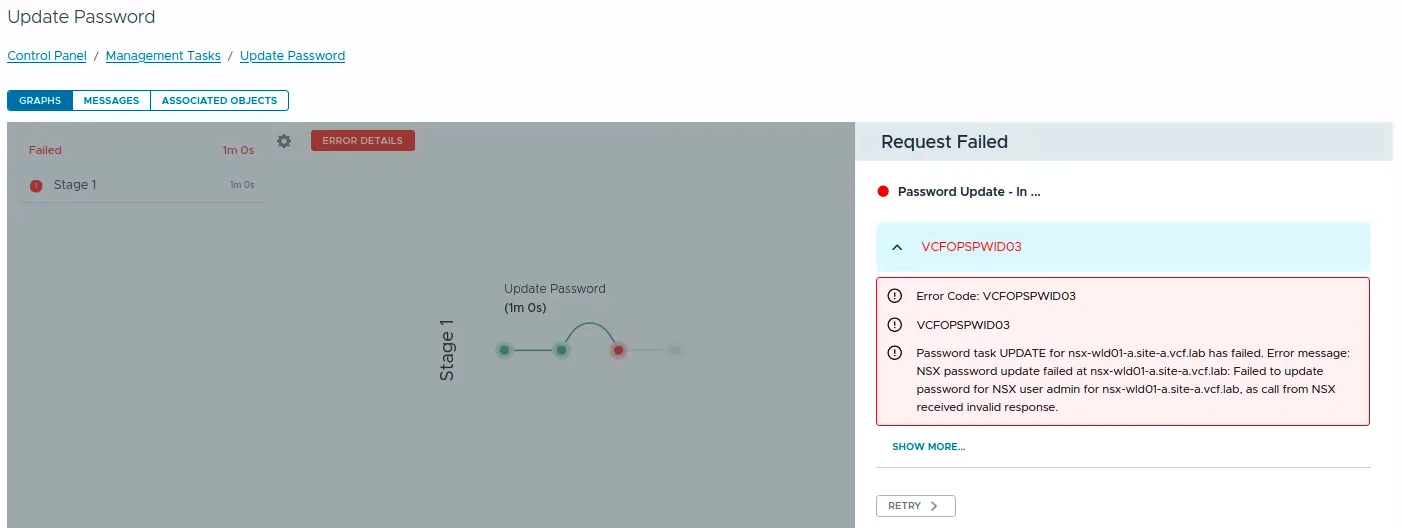
VCF Operations Update Password task failed with error code VCFOPSPWID03.

Fixing VCFOPSPWID03: NSX Password Update Failed as Call from NSX Received Invalid Response (VCF 9.1)

While rotating credentials in the same 9.1 environment I covered in the expired password sync post, an Update of the NSX Manager admin password (credential type API) from VCF Operations kept failing after about a minute with error code VCFOPSPWID03 and a spectacularly unhelpful message: “call from NSX received invalid response.” The actual cause turned out to be simple, NSX rejected the new password because it had already been used on that manager. This being a lab, I was deliberately recycling a previous password. That goes against best practices, and NSX enforces it. But the way the error surfaces (and the way the reuse policy behaves in this build) is worth writing down. ...

 · Updated  · 
Fixing VCFOPSPWID03: NSX Password Update Failed as Call from NSX Received Invalid Response (VCF 9.1)

Fixing Expired Password Sync in VCF 9.1 Fleet Management

In VCF 9.1, Fleet Password Management accounts can get stuck in EXPIRED status, and the password workflows changed compared to 9.0. In 9.0, you may have seen UI actions such as Disconnected or Remediate. In the 9.1 environment I was working on, those actions were not available. The UI exposed Update, and the Fleet Password Management API provides the same kind of workflow: query password accounts, then update or rotate the password. ...

 · Updated  · 
Fixing Expired Password Sync in VCF 9.1 Fleet Management

Exporting and Restoring vCenter 8.x Permissions Before Breaking Enhanced Linked Mode

Breaking Enhanced Linked Mode is one of those changes where the technical command is not the hardest part. The hard part is making sure administrators, service accounts, and external products can still log in and do their jobs after the vCenters no longer share the same SSO domain. In this post I will walk through a repeatable way to export and restore vCenter 8.x RBAC data before splitting Enhanced Linked Mode. The focus is on three permission layers: ...

 · Updated  · 
Exporting and Restoring vCenter 8.x Permissions Before Breaking Enhanced Linked Mode

Fixing "Error attempting Upgrade Database Schema" When Upgrading vCenter 8.0 U3x to 9.1.0.0

If you’re moving vCenter Server from 8.0 U3x to 9.1.0.0 (typically as part of a VCF 9.1 deployment or a VVF 9.1 upgrade) the run can fail partway through with: Error attempting Upgrade Database Schema Please check vcintegrity migration logs for details. This is one of those failures that looks scary in the UI but has a clean, well-understood root cause: a handful of orphaned rows in the vcIntegrity database that trip a new foreign-key constraint introduced in 9.1. Below is the whole story; what the error means, how to read the logs, why it happens, and how to clear it so the upgrade completes. It’s the same shape of problem I wrote about in fixing PostgreSQL on Fleet Management 9.0.1: a schema change colliding with pre-existing data. ...

Fixing "Error attempting Upgrade Database Schema" When Upgrading vCenter 8.0 U3x to 9.1.0.0

Fix: Unable to Update BOM Components, "Compatibility File Is Missing" in SDDC Manager

If you have upgraded your VMware Cloud Foundation (VCF) environment to version 5.x from an earlier release, you may find yourself unable to update BOM (Bill of Materials) components from the SDDC Manager UI. The “Update Now” or “Configure Update” button is greyed out and you see a frustrating error: “Update cannot be started now as compatibility file is missing” This post walks through the symptoms, root cause, and the step-by-step fix based on Broadcom KB 396202. ...

Fix: Unable to Update BOM Components, "Compatibility File Is Missing" in SDDC Manager