Simplifying NSX Edge Removal in VMware Cloud Foundation (VCF) Environment

Important correction (August 25, 2026): The original article incorrectly implied that the NSX Edge Removal Tool preserves attached dependencies and that dependencies could be addressed after removal. Broadcom’s current instructions require administrators to remove or disconnect added services, interfaces, segments, and other dependencies before running the cleaner. The tool must not be used for an Edge cluster serving Workload Control Plane (WCP). The old direct-download link, version-specific filename, executable command, and post-removal dependency workflow have been removed so they cannot be mistaken for current instructions. ...

 · Updated  · 
Simplifying NSX Edge Removal in VMware Cloud Foundation (VCF) Environment
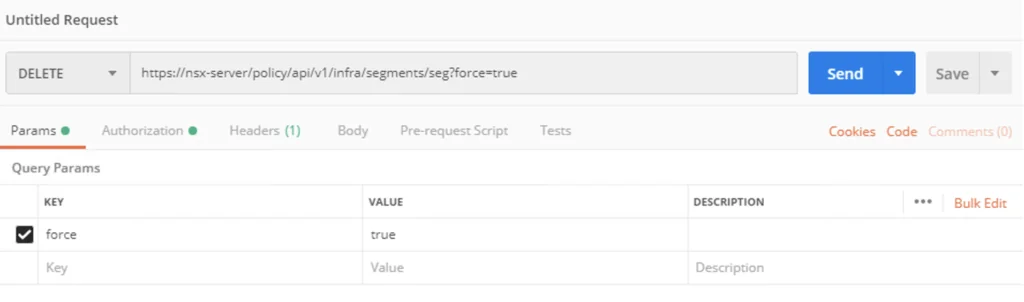
API request setup for forcibly deleting an NSX-T 3 segment using Postman.

How to forcibly delete an NSX-T 3 Segment

I recently ran in to a problem where I couldn’t delete an NSX segment so I went exploring the API. The API guide can be found here The method used is delete policy/api/v1/infra/segments/{segment-id}?force=true It would look like this in Postman: To list the segments we can use a get request towards /policy/api/v1/infra/segments/ ...

How to forcibly delete an NSX-T 3 Segment

Removing NSX stale packages from ESXi host

Important safety update (August 25, 2026): Do not manually remove NSX VIBs with esxcli software vib remove. Broadcom documents that this method is unsupported and can cause loss of management or workload networking. The executable removal guidance previously shown on this page has been removed. Use the current follow-up instead: Safely Removing Stale NSX VIBs from an ESXi Host. It starts with the NSX Manager removal workflow and covers the narrower stale-package condition where Broadcom directs administrators to use nsxcli -c del nsx while the host is in maintenance mode. ...

 · Updated  · 
Removing NSX stale packages from ESXi host
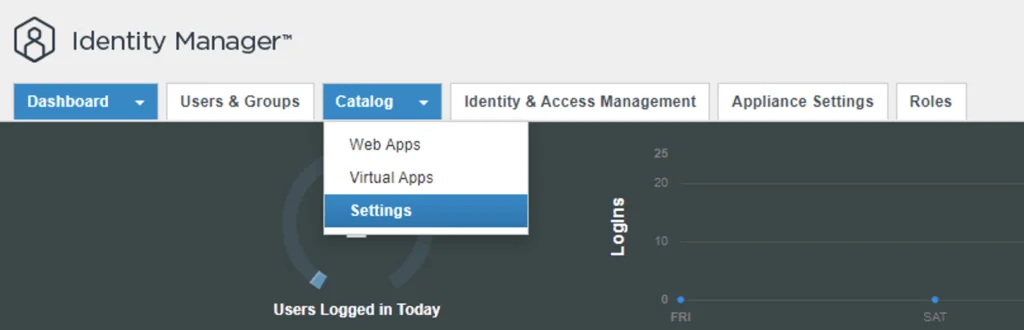
Identity Manager dashboard showing Catalog and Settings options.

Configure NSX-T to use vIDM as authentication

I needed to create a few additional accounts in NSX-T for outside sources. Instead of creating individual accounts I wanted to use the existing ones from AD. To get started we need to get the certificate from the vIDM server. Log on to the vIDM server as root and run the following: openssl1 s_client -connect <FQDN of vIDM host>:443 < /dev/null 2> /dev/null | openssl x509 -sha256 -fingerprint -noout -in /dev/stdin Next, create the OAuth client ID in vIDM. Log in to the vIDM UI as an administrator at https://<FQDN-of-vIDM-host>/SAAS/admin/app/page#!/dashboard, then navigate to Catalog -> Settings. ...

Configure NSX-T to use vIDM as authentication

Why Choose vRealize Automation (vRA) over Ansible

Ansible and vRealize Automation (vRA) are both popular DevOps tools for infrastructure automation and provisioning. However, the two tools have different strengths and use cases, and choosing the right one for your organization can be a challenge. In this blog post, we’ll explore the key differences between vRA and Ansible and why you might choose vRA over Ansible. Deployment Complexity and Integrations Complexity of Deployment Ansible is a simple, agentless tool that is easy to install and configure. However, as the complexity of your deployment increases, the simplicity of Ansible can quickly become a hindrance. vRA, on the other hand, is a complex tool that is designed to handle complex deployments, making it an ideal choice for large, complex environments. ...

Why Choose vRealize Automation (vRA) over Ansible

Why Choose VMware vRealize Automation (vRA) over Terraform

VMware vRealize Automation (vRA) and Terraform target different infrastructure workflows. This comparison covers SDDC automation, user experience, VMware integration, security, compliance, and support. End-to-End Automation: vRA automates the entire software-defined data center (SDDC) lifecycle, from provisioning to decommissioning. Terraform is more limited, focusing only on infrastructure provisioning. User Experience: vRA provides a user-friendly interface, making it easier for non-technical users to request and manage infrastructure. Terraform, on the other hand, requires more technical expertise to use effectively. Integration with VMware: vRA integrates with other VMware products, such as vSphere, NSX, and vSAN, allowing for a seamless experience. Terraform can also integrate with VMware, but it requires more manual effort to set up the integration. Enterprise-Grade Security: vRA includes enterprise-grade security features, such as role-based access control and multi-factor authentication. Terraform does not have built-in security features, requiring additional tools or manual effort to secure the environment. Robust Compliance Features: vRA includes compliance features, such as blueprints that enforce specific policies and standards, making it easier to meet regulatory requirements. Terraform does not have built-in compliance features, leaving it up to the user to ensure compliance. Strong Support: vRA has a large, global community of users and is backed by VMware, a well-established company in the tech industry. Terraform is a relatively new tool with a smaller community, making support and resources more limited. vRA fits an SDDC workflow that needs VMware integrations, a self-service interface, and policy controls in one platform. Terraform fits infrastructure provisioning when the team is comfortable managing state and adding separate controls. I compared both approaches in the three-tier application walkthrough.
Why Choose VMware vRealize Automation (vRA) over Terraform

ccp-backups folder missing in NSX-T backup

If you like me tried to to cleanup the backups in NSX-T and ran into error Cleanup script works only in folders, that contains subfolders "cluster-node-backups", "ccp-backups" and "inventory-summary" this post is for you. I was trying to cleanup the backups before going to the next major release of nsx and I kept getting an error running the nsx_backup_cleaner.py script. It would seem that the ccp-backups folder has been removed from the backup job so it simply doesn’t exist. VMware did fix the script with the 3.2 release. ...

ccp-backups folder missing in NSX-T backup

Extracting SSL Thumbprint

I recently ran in to an issue where I had to re-register my NSX server with vIDM. The ask was to extract the Thumbprint from vIDM. The command I ran to extract it was: echo -n | openssl s_client -connect hostname:443 2>/dev/null | openssl x509 -noout -fingerprint -sha256 This can be used across multiple products where the Thumbprint needs to be extracted

 · Updated  · 
Extracting SSL Thumbprint
Error message shows upgrade issue; run "restart service install-upgrade" on NSX Manager.

NSX 2.5.0 to NSX 2.5.1 fails with error “restart service install-upgrade” on the NSX Manager.

I’ve recently ran through a problem when trying to upgrade NSX-T from version 2.5.0 to 2.5.1. When using the Upgrade function within the UI I was getting the following error: This page is only available on the NSX Manager where Upgrade Coordinator is running. To configure the service, run the command restart service install-upgrade on the NSX Manager. ...

 · Updated  · 
NSX 2.5.0 to NSX 2.5.1 fails with error “restart service install-upgrade” on the NSX Manager.
