Updating ESXi with the Authenticated Broadcom Depot or an Offline Bundle

This is the corrected follow-up to my earlier ESXi command-line upgrade articles. The shared public VMware host-update depot used in those examples is no longer valid. Broadcom now uses customer-specific authenticated download URLs, and its current standalone command-line procedure documents an offline depot ZIP with esxcli software profile update. The procedure and release information below were reviewed on August 25, 2026. Reopen the linked Broadcom articles during every change: depot authentication, entitlements, available profiles, release builds and support status can change. ...

August 25, 2026 · Cosmin Trif

VMSA-2025-0004: Current Remediation and Fixed Versions

Broadcom published VMSA-2025-0004 on March 4, 2025, for three vulnerabilities affecting VMware ESXi and related desktop and cloud products. Fixed versions are available, and the advisory lists no workarounds for any of the three vulnerabilities. The practical response is therefore straightforward: identify every affected product, move it to a fixed or later supported build using its supported update method, and verify the resulting build. Access restrictions and monitoring remain useful defense-in-depth controls, but they do not replace the update. ...

August 25, 2026 · Cosmin Trif

Safely Removing Stale NSX VIBs from an ESXi Host

This post replaces the unsafe package-removal command that appeared in my older article about removing stale NSX packages from an ESXi host. Broadcom now documents a clear distinction between removing NSX through its management workflow and cleaning up VIBs that remain afterward. Warning: Do not manually remove individual NSX VIBs with esxcli software vib remove. Broadcom identifies that method as unsupported. It can break distributed-switch state, disconnect host networking, and in some failure cases leave reimaging as the recovery path. ...

August 25, 2026 · Cosmin Trif

Clearing a Full vSAN Trace Ramdisk Across ESXi Hosts in Parallel

While reviewing an SOS support bundle from a VMware Cloud Foundation environment, I noticed every ESXi host in the management cluster was logging the same warning, over and over, right up to the moment the bundle was collected: [vob.visorfs.ramdisk.full] Cannot extend visorfs file /vsantraces/vsantracesLSOMVerbose--...zst because its ramdisk (vsantraceFailover) is full. These are -INFO level VOB events, not errors, and they do not touch your data or VMs. But when the same symptom appears on all hosts at once, fires continuously, and never clears on its own, it is worth understanding what is actually happening and fixing it cluster-wide rather than logging into each host by hand. This post walks through the diagnosis and a small Bash script that queries, fixes, and reclaims space on every host in parallel. ...

June 24, 2026 · Cosmin Trif

Temporarily Bypassing VCF Compatibility Checks: A Reversible, Version-Specific Procedure

VCF compatibility checks are safety controls, not generic obstacles to an upgrade or bring-up. Broadcom documents temporary bypasses for two narrowly defined missing-compatibility-data failures. The files and properties differ by release and workflow, so the procedures must not be mixed. This article covers: VCF 5.x and VCF on VxRail 5.x upgrades that match Broadcom KB 323368. VCF 9.0.x bring-up failures on the VCF Installer appliance that match Broadcom KB 403075. Do Not Use This as a General Compatibility Bypass Use the applicable workaround only after confirming that the error matches the linked KB and that the compatibility data is current. ...

February 9, 2026 · Cosmin Trif
VMware Cloud Foundation Operations fleet management download page shows release details and file info.

Deploying VCF Fleet Management 9 from OVA: A Step-by-Step Guide

Deploying the VCF Fleet Management (Operations / Fleet Manager) appliance using an OVA is a common approach when standing up a new VMware Cloud Foundation (VCF) 9 environment or re-deploying the component. Below is a refined guide covering the deployment, configuration, and integration steps. 1. Prerequisites & Downloading Binaries Before you deploy the OVA: Log into the Broadcom Support Portal and obtain the required binaries and OVA files for the Fleet Manager. Direct link can be found here. ...

October 9, 2025 · Cosmin Trif
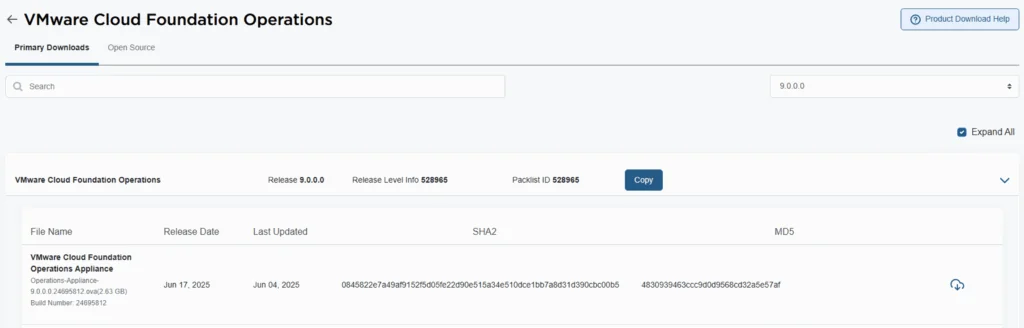
VMware Cloud Foundation Operations 9.0.0.0 release details with file name, release date, and SHA2/MD5 checksums.

Deploying VCF Operations 9 from OVA: A Step-by-Step Guide

VMware Cloud Foundation 9 (VCF 9) introduces a streamlined deployment experience with the VCF Installer appliance, replacing the older Cloud Builder model. One of the core components in that workflow is VCF Operations, which provides unified lifecycle, monitoring, and fleet management across your private cloud environment. In this guide, we walk through deploying VCF Operations 9 from an OVA, detailing prerequisites, deployment steps, and post-deploy tasks. 1. Prerequisites & Preparation Before you deploy, make sure these items are in place: ...

October 3, 2025 · Cosmin Trif
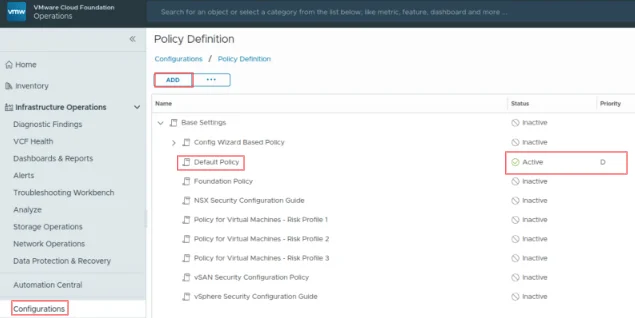
VCF Operations UI showing policy definition with "Default Policy" active.

Suppress ESXi Host Alerts in VCF Operations 9 When a Host Enters Maintenance Mode

When a vSphere admin places an ESXi host in vCenter maintenance mode, VCF Operations should automatically suppress host alerts for that object, without pausing metric collection, and then restore alerting when maintenance ends. Why this approach? In VCF 9, you can avoid alert noise during maintenance in two ways: Maintenance Schedules , pause both collection and alerts during a defined window (best for planned maintenance). Policy-based alert suppression (this post) , keep metrics flowing but disable host alert definitions while the host is in maintenance. This is done with a policy attached to a dynamic custom group keyed to the host’s Maintenance Mode property. Note on naming: In VCF 9, VCF Operations is the successor to Aria/vRealize Operations and is part of the unified Cloud Foundation experience. If you’re upgrading from Aria Operations, see Broadcom’s “Upgrade to VCF Operations 9.0.” ...

July 30, 2025 · Cosmin Trif

Understanding VMSA-2025-0004 and Protecting Your VMware Environment

Current update: This March 2025 article is retained as historical context. Its original version incorrectly said patches were not yet available, but Broadcom’s initial advisory already included fixed versions. Use VMSA-2025-0004: Current Remediation and Fixed Versions for current, remediation-first guidance. Broadcom released VMSA-2025-0004 on March 4, 2025. The advisory covers serious vulnerabilities in VMware ESXi, Workstation, and Fusion, plus products that consume ESXi such as VMware Cloud Foundation and VMware Telco Cloud Platform. Fixed versions were available in the advisory’s response matrix at publication. ...

March 4, 2025 · Cosmin Trif
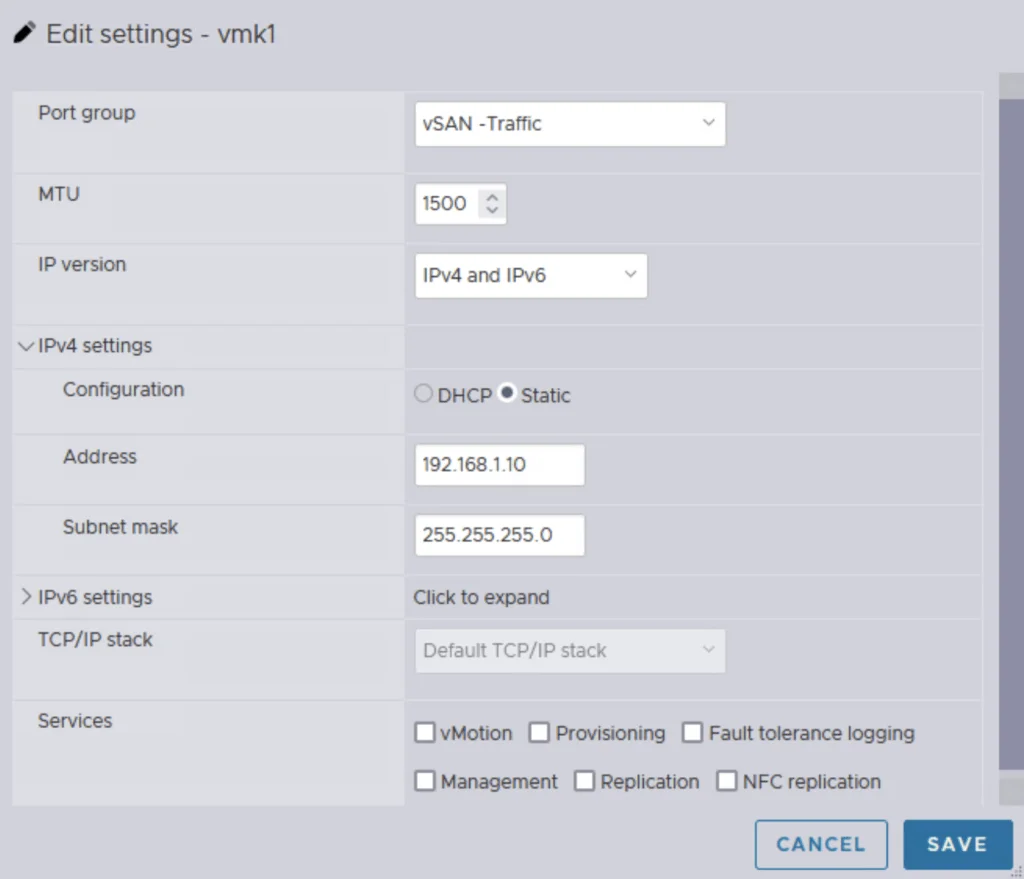
Editing vSAN traffic settings with IPv4 and IPv6, static IP, and service options.

Single Node vSAN

Setting up a vSAN cluster on a single ESXi host without vCenter is simpler than you might think. This guide walks you through a CLI-based method to configure VMware by Broadcom’s vSAN in a standalone environment. Whether you’re testing in a lab or laying the groundwork for a larger cluster, a single node vSAN deployment offers a flexible starting point that scales as your needs grow. What Is a Single Node vSAN? VMware by Broadcom’s vSAN is designed for multi-host clusters managed by vCenter, typically requiring at least two hosts for production resilience. However, with CLI tools, you can establish a vSAN cluster on a single ESXi host. This setup is ideal for experimentation or initiating a cluster, providing a solid base for later expansion with vCenter and additional nodes. ...

February 27, 2025 · Cosmin Trif