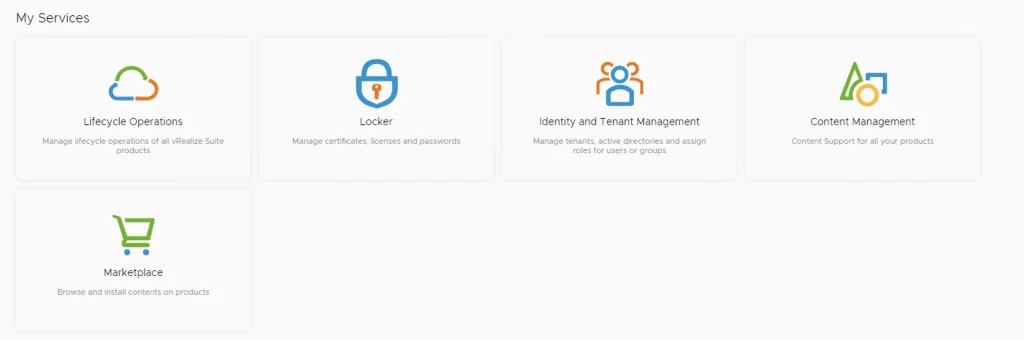
The image shows vRSLCM services: Lifecycle Operations, Locker, Identity and Tenant Management, Content Management, and Marketplace.

vRSLCM (vRealize Lifecycle Manager) Product Support Pack

In this guide i will go over the steps of getting an existing 8.x vRSLCM appliance to support the latest product releases available. Here is a great blog that goes in to the details about what the Product Support Pack is https://blogs.vmware.com/management/2019/01/vrslcm-pspak.html. Typically the newer Product Support Pack is included part of the upgrade for LCM, however sometimes there are product releases in between releases where product support packs come in handy. ...

August 4, 2021 · Cosmin Trif
UI showing lifecycle operations, locker, identity management, content, and marketplace options.

Patching vRSLCM (vRealize Lifecycle Manager) to 8.4.1.1 Patch 1

In this guide i will go over the steps of getting an existing 8.x vRSLCM appliance upgraded to the latest 8.4.1 Patch 1 release. The release notes can be found here The first step is to lo in to vRealize Suite Lifecycle Manager under the Lifecycle Operations section ...

August 4, 2021 · Cosmin Trif
The image shows vRSLCM services: Lifecycle Operations, Locker, Identity and Tenant Management, Content Management, and Marketplace.

Upgrading vRSLCM (vRealize Lifecycle Manager) to 8.4.1.1

In this guide i will go over the steps of getting an existing 8.x vRSLCM appliance upgraded to the latest 8.4 release. The release notes can be found here The first step is to lo in to vRealize Suite Lifecycle Manager under the Lifecycle Operations section Go to settings -> System Upgrade ...

August 4, 2021 · Cosmin Trif
UI shows services for managing lifecycle operations, locker, identity, content, and marketplace in vRealize Suite Lifecycle Manager.

Changing passwords for the vRealize suite via vRSLCM (vRealize Suite Lifecycle Manager)

In this guide i will go over one of the Locker feature in vRealize Lifecycle Manager specifically the password management. As a reminder vRSLCM can manage the following: Type of Password Change vRealize Product Name Admin Password Change vRealize Automation, vRealize Operations Manager, vRealize Network Insight, vRealize Log Insight, VMware Identity Manager Root Password Change vRealize Automation, vRealize Operations Manager, vRealize Network Insight, vRealize Log Insight, VMware Identity Manager Support Password Change vRealize Network Insight Console User Password Change vRealize Network Insight SSH User Password Change VMware Identity Manager The first step is to create a new password. We can do so by going to Locker from the welcome screen or the menu on top right ...

May 19, 2021 · Cosmin Trif
Settings page with options for System Administration and Servers & Accounts.

Upgrading vRA (vRealize Automation) to 8.4

In this post i will go over upgrading my 8.x vRA appliance to 8.4. As a pre requirement we do need to have vRSLCM (vRealize Lifecycle Manager) upgraded to 8.4. Instructions can be found here To get started we can go to vRealize Lifecycle Manager -> Lifecycle Operations -> Settings -> Binary Mapping. (If you havent added your My VMware credentials you will need to do that first by going to vRealize Lifecycle Manager -> Lifecycle Operations -> Settings -> My VMware) ...

May 19, 2021 · Cosmin Trif
This image shows vRSLCM services: Lifecycle Operations, Locker, Identity and Tenant Management, Content Management, and Marketplace.

Upgrading vRSLCM (vRealize Lifecycle Manager) to 8.4

In this guide i will go over the steps of getting an existing 8.x vRSLCM appliance upgraded to the latest 8.4 release. The release notes can be found here The first step is to lo in to vRealize Suite Lifecycle Manager under the Lifecycle Operations section ...

May 19, 2021 · Cosmin Trif
Running an update installer for vIDM 3.3.4 online upgrade.

vIDM 3.3.4 online upgrade

I wanted to go through the upgrade of vIDM 3.3.4 outside of lifecycle manager. I wanted to do it using the online upgrade via the console. Official documentation can be found here. First step is to log on to the console via the root credentials and upgrade the upgrade manager to 3.3.4 /usr/local/horizon/update/updatemgr.hzn updateinstaller Set the upgrade version that you are upgrading from in my case was 3.3.2 so i ran ...

February 17, 2021 · Cosmin Trif
Settings page for vRA 8.3 upgrade, showing various administration and server management options.

Upgrading vRA (vRealize Automation) to 8.3

In this post i will go over upgrading my 8.2 vRA appliance to 8.3. As a pre requirement we do need to have vRSLCM (vRealize Lifecycle Manager) upgraded to 8.3. Instructions can be found here To get started we can go to vRealize Lifecycle Manager -> Lifecycle Operations -> Settings -> Binary Mapping. (If you havent added your My VMware credentials you will need to do that first by going to vRealize Lifecycle Manager -> Lifecycle Operations -> Settings -> My VMware) ...

February 4, 2021 · Cosmin Trif
The image shows a screenshot of vRealize Lifecycle Manager's 'My Services' section with icons and labels for Lifecycle Operations, Locker, Identity and Tenant Management, Content Management, and Ma...

Upgrading vRSLCM (vRealize Lifecycle Manager) to 8.3

In this guide i will go over the steps of getting an existing 8.x vRSLCM appliance upgraded to the latest 8.3 release The first step is to lo in to vRealize Suite Lifecycle Manager under the Lifecycle Operations section Go to settings -> System Upgrade ...

February 4, 2021 · Cosmin Trif
UI shows environment management in VRA, with options like Rename, Delete, and Add Product.

Deploying SaltStack Config via Lifecycle Manager in a VRA environment

Assuming that you already downloaded the SaltStack Config binaries in this guide we will go over the deployment of SaltStack Config in an existing VRA 8.3 environment via Lifecycle Manager 8.3 Log on to Lifecycle Manager -> Go to environments, on the vRA environment click on the Menu and go to Add Product Select the checkbox next to vRealize Automation SaltStack Config and click Next ...

February 2, 2021 · Cosmin Trif