Mastering the /v1/credentials API in SDDC Manager for Enhanced Security Management

In the rapidly evolving landscape of VMware’s Cloud Foundation, security management is a cornerstone for maintaining the integrity and confidentiality of the software-defined data center (SDDC). The SDDC Manager, a critical component of VMware’s Cloud Foundation, offers a comprehensive suite of APIs for managing various aspects of the SDDC, including credentials management. This blog post delves into the specifics of leveraging the /v1/credentials API in SDDC Manager, offering a detailed guide for VMware professionals to enhance their security posture through efficient credentials management. ...

March 16, 2024 · Cosmin Trif

vROPs DRS requirements across multiple data centers

vSphere Resource Management with vRealize Operations (vROPs) DRS across multiple data centers is a critical requirement for managing large-scale virtualized environments. In this blog, we’ll discuss the requirements for using DRS in vROPs across multiple data centers. Cross vCenter vMotion (CVC-vMotion) Support: CVC-vMotion enables vMotion of virtual machines across multiple vCenter servers. This capability is a pre-requisite for vROPs DRS across multiple data centers. vCenter Server 6.7 Update 1 or later: vROPs DRS across multiple data centers requires vCenter Server 6.7 Update 1 or later. This ensures that the necessary APIs are available to enable vROPs to manage resources across multiple vCenter servers. Network Connectivity: All data centers should have a reliable and high-speed network connectivity, with the necessary firewall ports opened for communication between vCenter servers and vROPs instances. vROPs Replication: vROPs instances in different data centers must be able to communicate with each other. vROPs replication can be used to keep the data in all vROPs instances in sync, ensuring that the vROPs DRS decisions are based on consistent data. Same vROPs version: All vROPs instances must be running the same version of vROPs to ensure compatibility and prevent any issues with data consistency. Same vROPs license: All vROPs instances must be licensed with the same vROPs license, and the license should include the vROPs DRS capability. Cluster Configuration: The virtual machines that need to be managed by vROPs DRS must be in a vSphere cluster that spans across multiple vCenter servers. The vSphere cluster must be configured with the appropriate DRS settings, such as automated DRS, to ensure that vROPs DRS can make effective resource management decisions. In conclusion, vROPs DRS across multiple data centers is a powerful tool for managing virtualized environments at scale. By following these requirements, organizations can ensure that their vROPs DRS implementation is effective, efficient, and reliable.
January 30, 2023 · Cosmin Trif

SSC 8.8 sseapi_rpc_queue: could not connect to SSE server

I recently upgraded my LCM deployed SSC server to 8.8. If you need a guide to go through the upgrade you can find my other post here. After the upgrade was completed I was noticing strange behavior in the SSC UI so I checked the status of the services. Here are the errors I found and how I fixed them The first step was to check the status of the service ...

May 15, 2022 · Cosmin Trif
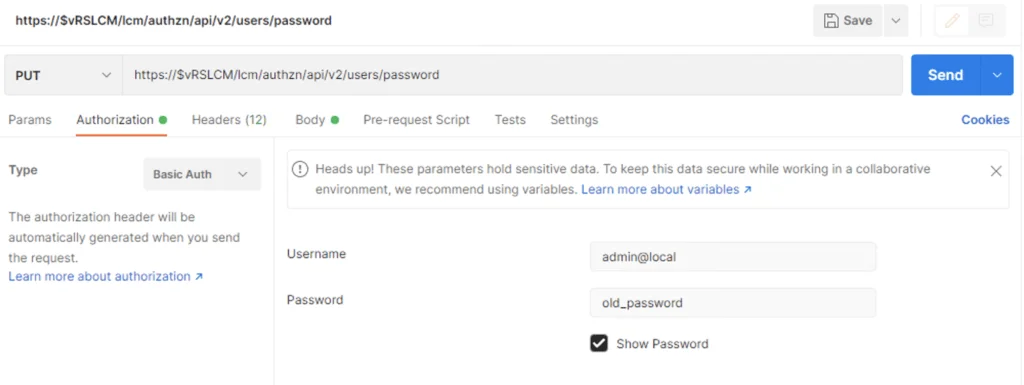
API request setup for changing vRSLCM admin password via Postman.

vRSLCM 8.x change admin@local password via API

I recently had an use case where I wanted to change the admin@local LCM password via an API call in order to automate the password rotation. If you need a guide to get started you can find my other blog here To change the password we can use postmanPUT call to https://$vRLCM/lcm/authzn/api/v2/users/password Don`t forget to include the new password under the body field formatted in JSON format ex: ...

April 13, 2022 · Cosmin Trif
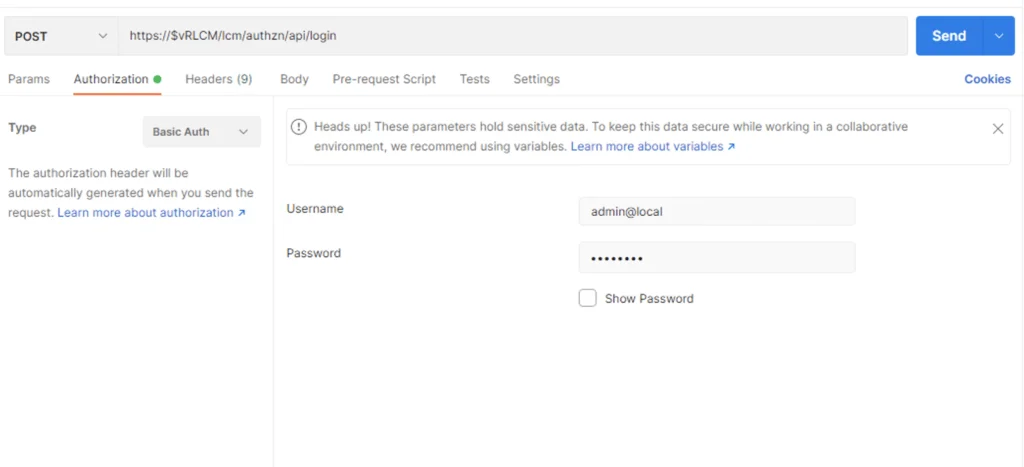
API login form showing username and password fields for vRSLCM 8.

vRSLCM 8 API getting started

I’ve been having a hard time finding one article that covers the vRSLCM (vRealize Suite Lifecycle Manager) API. The official documentation can be found here As we can see we can leverage the swagger UI by going to https://$vRLCM/api/swagger-ui.html but… I wanted to leverage curl from the cli or postman and as per best practices I wanted to generate a Bearer token. Authenticating via Postman First step was to authenticate using the credentials. We can do so in Postman by completing the Authorization fields using basic auth and running an POST against https://$vRLCM/lcm/authzn/api/login Example: ...

April 4, 2022 · Cosmin Trif

vRA 8 API getting started

I wanted to keep track of what needs to be done prior to actually being able to query API on vRA 8. I’ve been having a hard time finding the documentation I needed in the past. If you are looking for the Cloud version it can be found here First step is to get an API token for the specific username. We can do this by using curl or postman. The call would look similar: ...

January 31, 2022 · Cosmin Trif
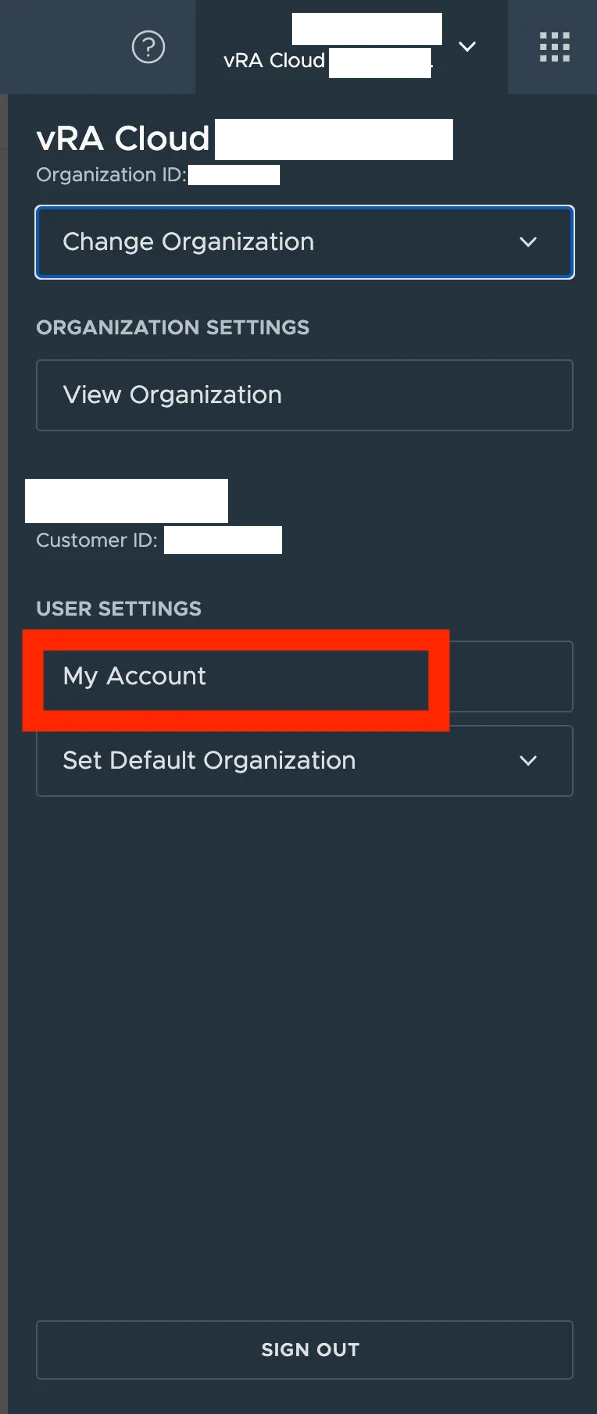
User interface for managing cloud organization settings in vRA Cloud, with options to change organization, view settings, and access user account details.

vROps cloud API getting started

I wanted to keep track of what needs to be done prior to actually being able to query API on vROps cloud. I’ve been having a hard time finding the documentation I needed in the past First step is to get an API token for the specific username. We can do this by going to My account under User Settings in vROps Cloud ...

August 4, 2021 · Cosmin Trif
VRA Cloud dashboard with options to change organization, view settings, and manage user account.

vRA cloud API getting started

I wanted to keep track of what needs to be done prior to actually being able to query API on vRA cloud. I’ve been having a hard time finding the documentation I needed in the past First step is to get an API token for the specific username. We can do this by going to My account under User Settings in vRA Cloud ...

February 26, 2021 · Cosmin Trif