Plan Upgrade for VMware Cloud Foundation shows version selection and upgrade summary for components.

Upgrading VCF 5.x to VCF 5.2.1 Step by Step

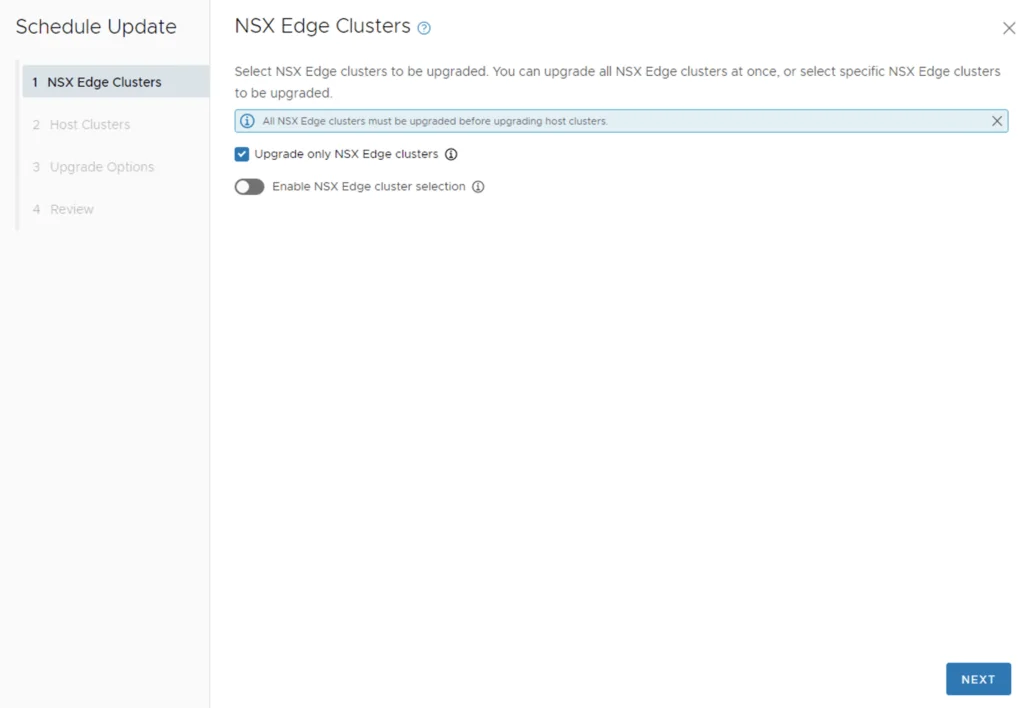
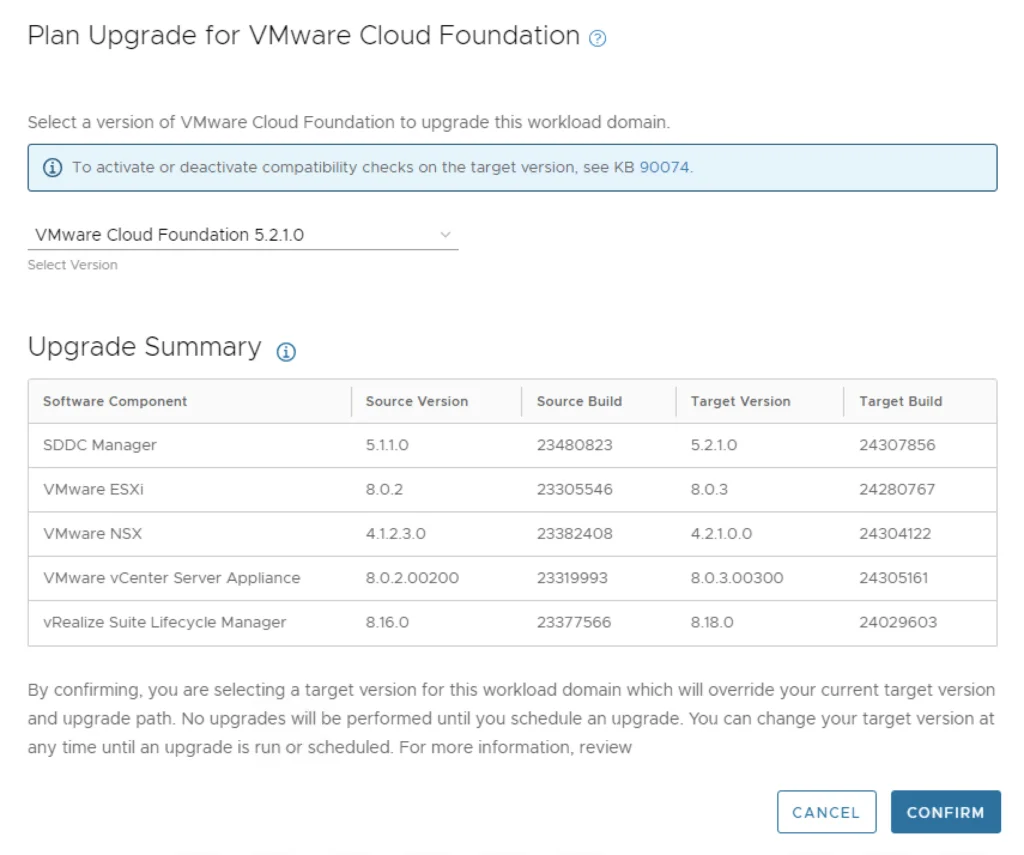
With the release of VCF 5.2.1 I wanted to get my lab upgraded. The release blog can be found here and the release notes are here Please note that some of the components within the VCF will still need additional upgrading. Please read the release notes for additional details. Planning the Upgrade and Updating SDDC Manager We can start by going to Inventory -> Workload Domains -> Select the domain -> Updates -> Plan Upgrade. Select VMware Cloud Foundation 5.2.1.0 -> Confirm ...

Upgrading VCF 5.x to VCF 5.2.1 Step by Step
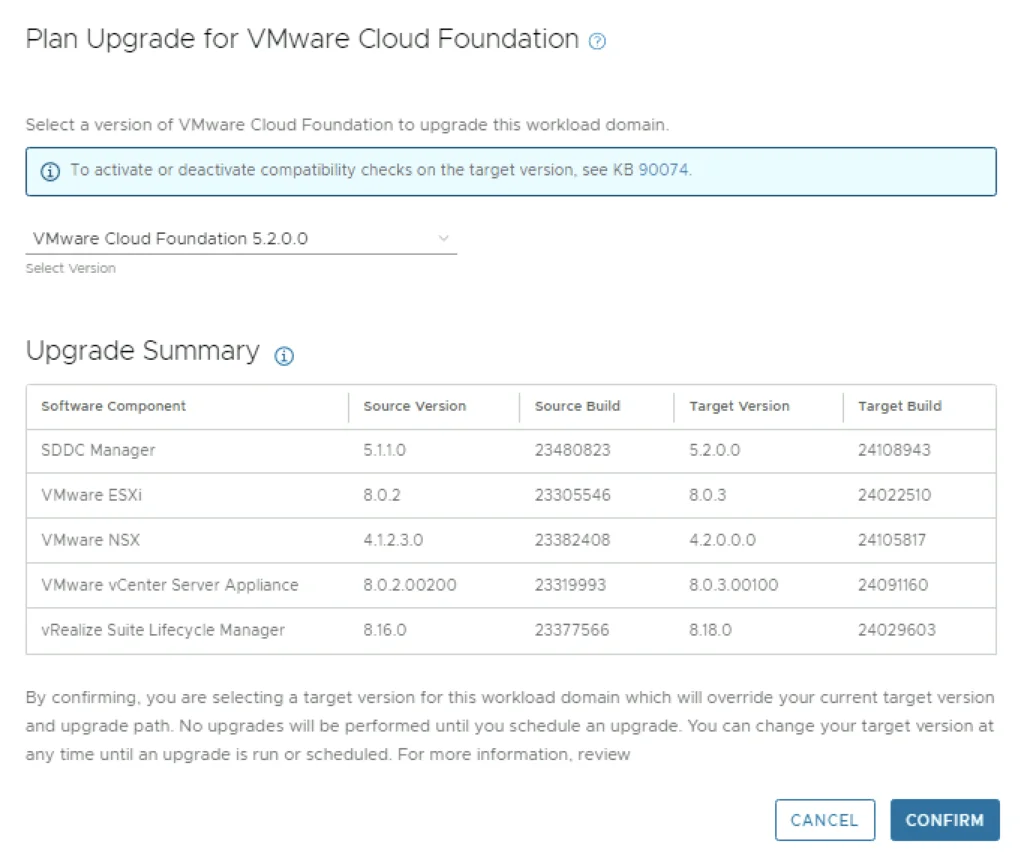
Plan Upgrade for VMware Cloud Foundation shows version selection and upgrade summary for VCF 5.2.

Upgrading VCF 5.x to VCF 5.2 Step by Step

With the release of VCF 5.2 I wanted to get my lab upgraded. The release blog can be found here and the release notes are here Please note that some of the components within the VCF will still need additional upgrading. Please read the release notes for additional details. Planning the Upgrade in SDDC Manager We can start by going to Inventory -> Workload Domains -> Select the domain -> Updates -> Plan Upgrade. Select VMware Cloud Foundation 5.2.0.0 -> Confirm ...

Upgrading VCF 5.x to VCF 5.2 Step by Step
Upgrade details for VMware Cloud Foundation 5.1.1, including version, bundles, and download options.

Upgrading VCF 5.x to VCF 5.1.1 Step by Step

With the release of of VCF 5.1.1 I wanted to get my lab upgraded. The release blog can be found here and the release notes are here Please note that some of the components within the VCF will still need additional upgrading. Please read the release notes for additional details. Downloading the VCF 5.1.1 Bundles We can start by going to Inventory -> Workload Domains -> Select the domain -> Update/Patches -> Select the VCF version -> Download now. If you do not see the newest releases go to Administration -> Online Depot and add a VMware Customer Connect account that has access to perform downloads. ...

Upgrading VCF 5.x to VCF 5.1.1 Step by Step
'NSX Edge Clusters' step in a VCF upgrade wizard, with options to upgrade all or specific clusters.

Upgrading VCF 4.3.x to VCF 5 Step by Step

With the release of of VCF 5 I wanted to get my lab upgraded. The release blog can be found here and the release notes are here Please note that some of the components within the VCF will still need additional upgrading. Please read the release notes for additional details. Downloading the VCF 5.0 Bundles We can start by going to Inventory -> Workload Domains -> Select the domain -> Update/Patches -> Select the VCF version -> Download now. If you do not see the newest releases go to Administration -> Online Depot and add a VMware Customer Connect account that has access to perform downloads. ...

Upgrading VCF 4.3.x to VCF 5 Step by Step
UI for selecting NSX Edge clusters during VCF upgrade wizard.

Upgrading VCF 4.4.0 to 4.5 Step by Step

With the release of of VCF 4.5 I wanted to get my lab upgraded. The release blog can be found here and the release notes are here Please note that some of the components within the VCF will still need additional upgrading. Please read the release notes for additional details. Downloading the VCF 4.5 Bundles We can start by going to Lifecycle Management -> Bundle management -> Download now. If you do not see the newest releases go to Administration -> Repository settings and add a VMware Customer Connect account that has access to perform downloads. ...

 · Updated  · 
Upgrading VCF 4.4.0 to 4.5 Step by Step
VMware Cloud Foundation Update 4.1.0.1 available for download, 23% progress.

Upgrading VCF 4.1.0.0 to 4.2.0.0 Step by Step

With the release of of VCF 4.2 I wanted to get my lab upgraded. The release blog can be found here and the release notes are here Upgrading to VCF 4.1.0.1 First In order to get to 4.2.0.0 we have to upgrade to 4.1.0.1. We can do so by going to Repository -> Bundle management -> Download now The next step is to upgrade VCF by going to Inventory -> Workload Domains -> Select the workload domain -> Update/Patches -> Update Now for the VMware Cloud Foundation Update 4.1.0.1. The release notes can be found here ...

 · Updated  · 
Upgrading VCF 4.1.0.0 to 4.2.0.0 Step by Step
VMware Cloud Foundation Update 4.1.0.0 details: Released 10/06/2020, 11 GB, available for download.

Upgrading VCF 4.0.1.1 to 4.1.0.0

With the release of of VCF 4.1 I wanted to get my lab upgraded. The release blog can be found here and the release notes are here Downloading the 4.1.0.0 Update Bundle In my case I pre downloaded the VMware Cloud Foundation Update 4.1.0.0 by going to Repository -> Bundle management -> Download now Applying the VCF 4.1.0.0 Update The next step is to upgrade VCF by going to Inventory -> Workload Domains -> Select the workload domain -> Update/Patches -> Update Now ...

 · Updated  · 
Upgrading VCF 4.0.1.1 to 4.1.0.0
VMware Cloud Foundation dashboard showing CPU, memory, and storage usage across domains.

Upgrading VCF 4.0.1 to 4.0.1.1

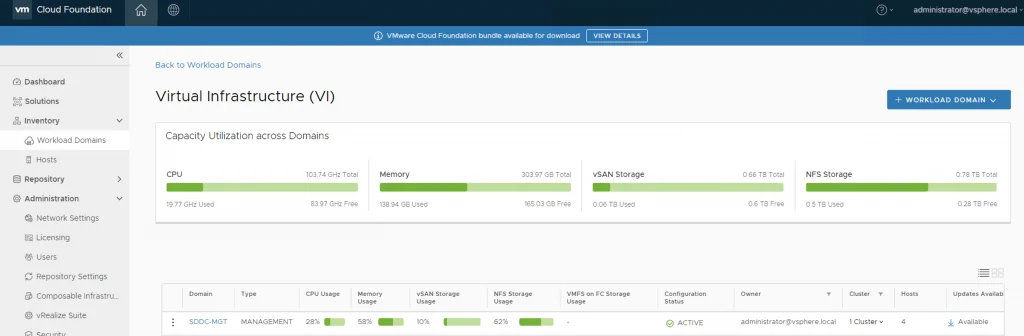
This VMware Cloud Foundation Upgrade 4.0.1.0 to 4.0.1.1 contains critical bugs and security fixes. For more information, see https://docs.vmware.com/en/VMware-Cloud-Foundation/4.0.1/rn/VMware-Cloud-Foundation-401-Release-Notes.html#4.0.1.1-Release For VCF on VxRail see https://docs.vmware.com/en/VMware-Cloud-Foundation/4.0.1/rn/vmware-cloud-foundation-on-dell-emc-vxrail-19-release-notes.html#Patch%20Releases If you dont see any updates you can follow the first couple of steps in my other post here: https://cosmin.us/upgrading-vcf-4-0-to-vcf-4-0-1/ Downloading the Update Bundle Once I logged on to my SDDC Manager I was able to see that na update is already available for me to download: ...

Upgrading VCF 4.0.1 to 4.0.1.1
Dashboard shows VMware account authorization needed for updates.

Upgrading VCF 4.0 to VCF 4.0.1

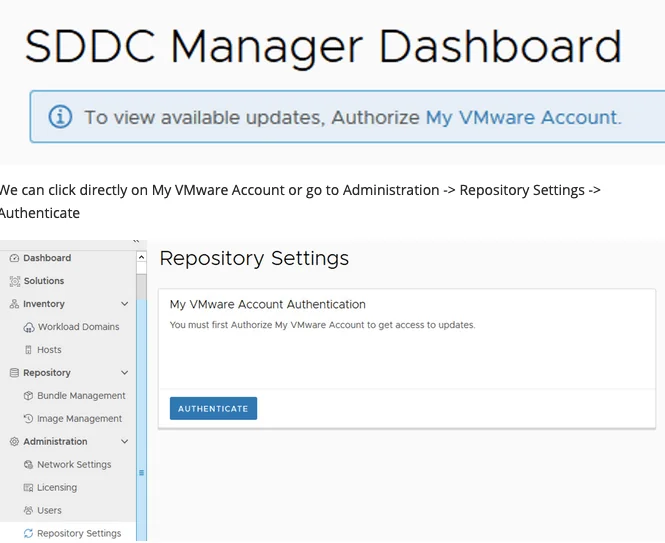
With the release of VCF 4.0.1 I wanted to go through the patch in my lab. The release notes can be found here: https://docs.vmware.com/en/VMware-Cloud-Foundation/4.0.1/rn/VMware-Cloud-Foundation-401-Release-Notes.html Authorizing the Account and Downloading the Bundle When I logged on to my SDDC Manager I noticed that there weren’t any updates available and I was prompted with an information bar To view available updates, Authorize My VMware Account. ...

 · Updated  · 
Upgrading VCF 4.0 to VCF 4.0.1