Screenshot of VMware Aria Suite Lifecycle 8.18 with options like Lifecycle Operations, Locker, Identity Management, Content Management, Marketplace, VMware Aria Cloud, and Migration.

Aria Suite Lifecycle 8.18 Product Support Pack upgrade (PSPACK5)

In this guide I will go over the manual steps of getting an existing 8.x Aria Suite Lifecycle appliance to support the latest product releases available. Here is a great blog that goes in to the details about what the Product Support Pack is https://blogs.vmware.com/management/2019/01/vrslcm-pspak.html. Typically the newer Product Support Pack is included part of the upgrade for Aria Suite Lifecycle, however sometimes there are product releases in between releases where product support packs come in handy. As of 8.16.0 Product Support Pack 4 we can no longer automatically download the Product Support Pack upgrade files. I covered the previous PSPACK4 manual upgrade in this guide. The release notes for 8.16 can be found here. The release notes for 8.18 Product Support Pack 5 can be found here. ...

February 4, 2025 · Cosmin Trif

Setting User SSH Keys in NSX

In VMware NSX, configuring SSH keys for users with specific labels and types provides a tailored access control approach that enhances both security and management capabilities. This blog walks through the process of setting user-specific SSH keys in NSX, using customized labels and types for better organization and identification. Before You Begin Overview SSH keys are crucial for secure authentication in NSX environments, allowing administrators to manage access without exposing systems to the risks of password-based logins. By setting SSH keys with specific labels and types, you can streamline user access management and improve security configurations. ...

January 28, 2025 · Cosmin Trif
Broadcom portal with a menu for VMware Cloud Foundation, highlighting the 'My Downloads' section and a step in upgrading Aria Operations.

Upgrading Aria Operations to 8.18.2 Using a .PAK File

Upgrading Aria Operations (formerly VMware vRealize Operations) is a crucial task to ensure you’re using the latest features, security patches, and performance improvements. In this guide, we’ll walk through the step-by-step process of upgrading Aria Operations using a .pak file. Preparing for the Upgrade Prerequisites Before starting the upgrade, ensure the following prerequisites are met: Backup the Existing Deployment: Take a snapshot of all nodes in the Aria Operations (Master, Cloud proxies, and any other nodes). ...

January 16, 2025 · Cosmin Trif
Settings page for VMware Aria Suite Lifecycle showing options for system administration and server accounts.

Upgrading Aria Automation to 8.18.1 Patch 1

In this post, I will cover upgrading my 8.x Aria Automation appliance to version 8.18.1 Patch 1. As a prerequisite, we need to have Aria Suite Lifecycle upgraded to 8.18. Instructions can be found here. Note that the upgrade does not include the latest PSPACK containing the 8.18.1 Patch 1 Aria Automation release. Instructions for obtaining the PSPACK are available in here. Note: Following the VMware by Broadcom Day 2 transition on May 6, 2024, Customer Connect has been migrated to the Broadcom Support. This migration impacts the VMware Aria Suite Lifecycle as follows: All Product Support Packs, along with product and patch binaries, will now need to be downloaded from the Broadcom Support Portal Users must then manually map these into the VMware Aria Suite Lifecycle VMware Aria Suite Lifecycle can be upgraded using “Check Online” method. Product Support Packs are cumulative, incorporating all updates from previous product support packs as well as patches into the latest version. Downloading the Patch Binaries The Aria Automation Patch 1 binaries can be downloaded from here. In my case, it was VMware Aria Automation 8.18.1 .patch file (vrlcm-vra-8.18.1-8.18.1.36859.patch). Once downloaded, LCM supports local mappings. In my case, I uploaded the patch in /data/temp ...

January 16, 2025 · Cosmin Trif
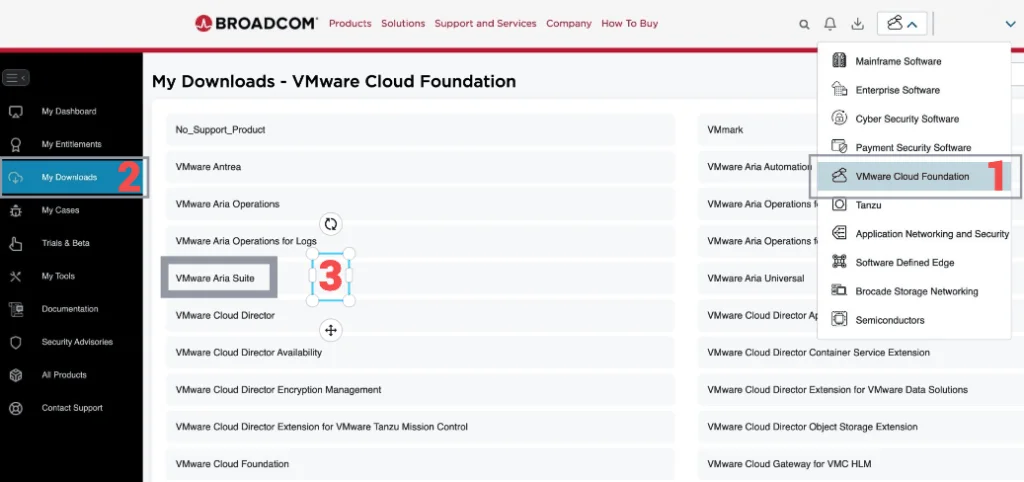
Broadcom portal with 'My Downloads' section, listing VMware products, highlighting 'VMware Aria Suite' for upgrade.

Step-by-Step Guide: Upgrading Aria Operations for Logs to 8.18.1 Using a .PAK File

Upgrading Aria Operations for Logs (formerly VMware vRealize Log Insight) is a crucial task to ensure you’re using the latest features, security patches, and performance improvements. In this guide, we’ll walk through the step-by-step process of upgrading Aria Operations for Logs using a .pak file. Preparing for the Upgrade Prerequisites Before starting the upgrade, ensure the following prerequisites are met: Backup the Existing Deployment: Take a snapshot of all nodes in the Aria Operations for Logs cluster (Master, Worker, and any nodes). ...

January 16, 2025 · Cosmin Trif
Settings page in VMware Aria Suite Lifecycle showing options for system administration and servers/accounts.

Upgrading Aria Operations for Logs to 8.18.1 via VMware Aria Suite Lifecycle

In this post, I will guide you through upgrading your 8.x vRLI appliance to Aria Operations for Logs 8.18.1 using VMware Aria Suite Lifecycle. Before proceeding, ensure that your VMware Aria Suite Lifecycle is upgraded to version 8.18. You can find the upgrade instructions here. Note that the upgrade does not include the latest PSPACK containing the 8.18.1 Aria Operations for Logs release. Instructions for obtaining the PSPACK are available in here. ...

January 16, 2025 · Cosmin Trif
VMware Aria Suite Lifecycle dashboard showing services like Lifecycle Operations, Locker, Identity Management, Content Management, Marketplace, VMware Aria Cloud, and Migration.

Aria Suite Lifecycle 8.18 Product Support Pack (PSPACK4) upgrade - manual version

In this guide I will go over the manual steps of getting an existing 8.x Aria Suite Lifecycle appliance to support the latest product releases available. Here is a great blog that goes in to the details about what the Product Support Pack is https://blogs.vmware.com/management/2019/01/vrslcm-pspak.html. Typically the newer Product Support Pack is included part of the upgrade for Aria Suite Lifecycle, however sometimes there are product releases in between releases where product support packs come in handy. As of 8.16.0 Product Support Pack 4 we can no longer automatically download the Product Support Pack files. The release notes can be found here. ...

January 16, 2025 · Cosmin Trif
VMware Cloud Foundation dashboard showing Aria Operations for Logs details and connected workload domain.

Connecting a VI Workload Domain to VMware Aria Operations for Logs in VMware Cloud Foundation (VCF)

Integrating your VI Workload Domain with VMware Aria Operations for Logs enhances log management and analytics within VMware Cloud Foundation. This guide provides a step-by-step process to establish this connection using the SDDC Manager. Before You Begin Prerequisites: Administrative Access: Ensure you have admin credentials for SDDC Manager. Deployed Components: Both VMware Aria Operations for Logs and the VI Workload Domain should be deployed and operational. Connecting Through SDDC Manager Steps to Connect: ...

December 7, 2024 · Cosmin Trif
This image lists VMware ESXi versions and their support status.

Patching/Upgrading ESXi 8 to ESXi 8.0 Update 3b via esxcli

This lab procedure updates an ESXi 8 host to ESXi 8.0 Update 3b, build 24280767, with esxcli. Review the ESXi 8.0 U3b release notes and confirm compatibility before continuing. Prepare the Host and Enter Maintenance Mode Do not apply an image profile while the host is carrying workloads. Broadcom’s current esxcli patching procedure requires maintenance mode before esxcli software profile update. Before continuing: Confirm the target ESXi release, server firmware, hardware, vCenter Server and integrated products are compatible. Use the hardware vendor’s custom image when required. Back up the ESXi host configuration and verify the recovery path. Migrate or shut down every user VM. DRS can evacuate workloads when configured; do not manually power off or migrate vCLS VMs unless Broadcom Support directs you to do so. Confirm that the remaining cluster can satisfy the intended vSphere HA failover policy while this host is unavailable. For vSAN, verify cluster health and object compliance, confirm there are no active resynchronizations, select the data-migration option appropriate to the storage policies and available capacity, and wait for evacuation to finish. Do not choose No data migration without understanding the resulting availability risk. If the host is NSX-prepared, follow the matching NSX kernel-module and upgrade requirements in Broadcom KB 312013. VCF-managed environments should use the supported VCF lifecycle workflow. Enter maintenance mode from the vSphere Client, then confirm the state from the ESXi shell: ...

November 9, 2024 · Cosmin Trif
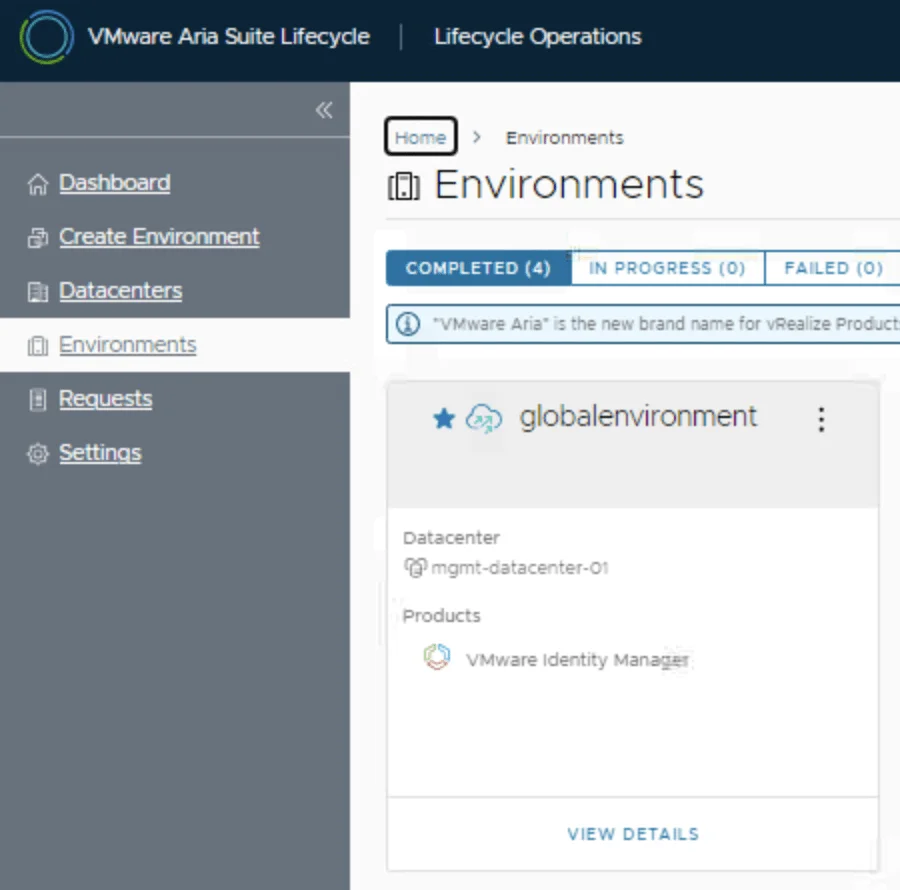
VMware Aria Suite Lifecycle dashboard showing environments, datacenters, and options for managing products.

Deploying VMware Aria Operations for Logs in a VCF 5.2.1 Environment: Step-by-Step Guide

In a VMware Cloud Foundation (VCF) environment, managing logs effectively is crucial for monitoring, troubleshooting, and ensuring compliance. VMware Aria Operations for Logs (formerly vRealize Log Insight) provides centralized log collection, real-time analytics, and intelligent log correlation, making it an essential tool for proactive infrastructure management. This guide walks you through the step-by-step process of deploying VMware Aria Operations for Logs in a VCF 5.2.1 environment. Before You Begin Prerequisites VMware Cloud Foundation (VCF) 5.2.1: Confirm that your VCF environment is operational. Aria Lifecycle Manager (ALCM): Aria Lifecycle Manager 8.18 or compatible version installed and accessible. Network and DNS Configurations: Proper DNS and network settings to allow seamless communication among VMware components. VMware Identity Manager (vIDM): Configured and deployed for unified authentication across VMware products. If needed a guide can be found here. Adding the Product in Aria Lifecycle Manager Step 1: Access Aria Lifecycle Manager Log in to the Aria Lifecycle Manager (ALCM) console with admin credentials. Ensure compatibility between ALCM and VCF 5.2.1 for a smooth deployment. Step 2: Add product in existing environment. Navigate to Lifecycle Operations. Under the existing environment click on the ellipsis. Click Add Product. ...

October 18, 2024 · Cosmin Trif