Safely Canceling and Deleting Alerts with the VCF Operations API

The VCF Operations API uses different payloads for finding, canceling, and deleting alerts. Treating those operations as interchangeable can either fail validation or broaden a cleanup beyond the alerts you intended to remove. This follow-up corrects the API section in Bulk Delete Alerts in VCF Operations. The safe sequence is: Query candidate alerts without changing them. Review every returned alert ID and account for pagination. Cancel only the approved IDs with a uuid-values body. Verify those IDs are now CANCELED. Delete the same IDs with a direct AlertQuery body. Query again to confirm that they are gone. Before You Begin Fix or tune the alert definition first. Deleting alert history does not stop the condition from generating new alerts. Use a VCF Operations account whose application role and object scope permit the required alert operations. Take any database backup required by your change policy before a large cleanup. Start with one small batch. The API documents a default query page size of 1,000, so a single response is not proof that you found every match. Use a trusted certificate. The examples intentionally do not bypass TLS verification. Set the appliance name, create a private working directory, and read an existing session token without placing it in shell history. Store the authorization header in a mode-600 file so the token is not expanded into each curl process argument, then remove it as soon as the cleanup is verified: ...
Safely Canceling and Deleting Alerts with the VCF Operations API

Using a 90-Day Planning Horizon Correctly in VCF Operations

A 90-day capacity goal can describe three different things in VCF Operations: past demand used by the projection, future warning lead time, or the future period considered by VM rightsizing. They are controlled separately. This article replaces the earlier 90-day capacity procedure, which incorrectly treated Time Remaining thresholds as a historical lookback setting. The Three Meanings of 90 Days Planning question Relevant control What it does not control Should the forecast consider up to 90 days of past demand? Historical Data window, if that value is available in the installed build Alert severity or procurement lead time Should an alert become critical when exhaustion is projected within 90 days? Time Remaining criticality thresholds Historical lookback Should Recommended Size cover demand projected across a 90-day future horizon? The applicable Time Remaining warning/green threshold plus the documented 30-day extension Past-data retention Changing one row does not configure the other two. ...

Using a 90-Day Planning Horizon Correctly in VCF Operations
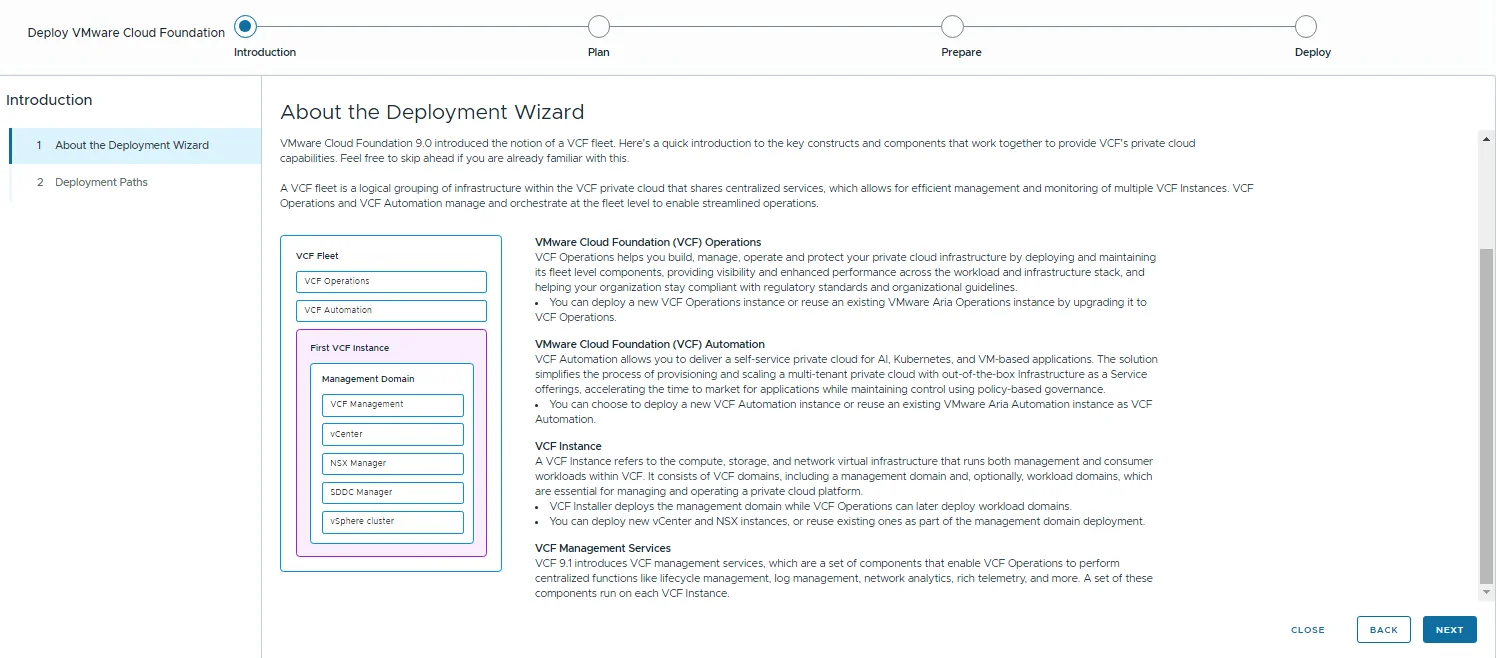
The VCF Installer deployment wizard introduction page showing the VCF fleet diagram with VCF Operations, VCF Automation, and the first VCF instance's management domain.

Deploying a VCF 9.1 Fleet with the VCF Installer

Last year, when VCF 9.0 shipped, I covered the VCF Installer in three posts: deploying the appliance, configuring it, and deploying a VCF 9 instance. With VCF 9.1 generally available since May 12, 2026, it was time to run the whole flow again in the lab, and enough has changed that it earns a fresh walkthrough. This post covers the complete path in one go: downloading and deploying the 9.1 installer appliance, connecting the depot, downloading binaries, and deploying a new VCF fleet on top of an existing vCenter. I used the 9.1.0.0400 installer from the July 2026 refresh. ...

 · Updated  · 
Deploying a VCF 9.1 Fleet with the VCF Installer
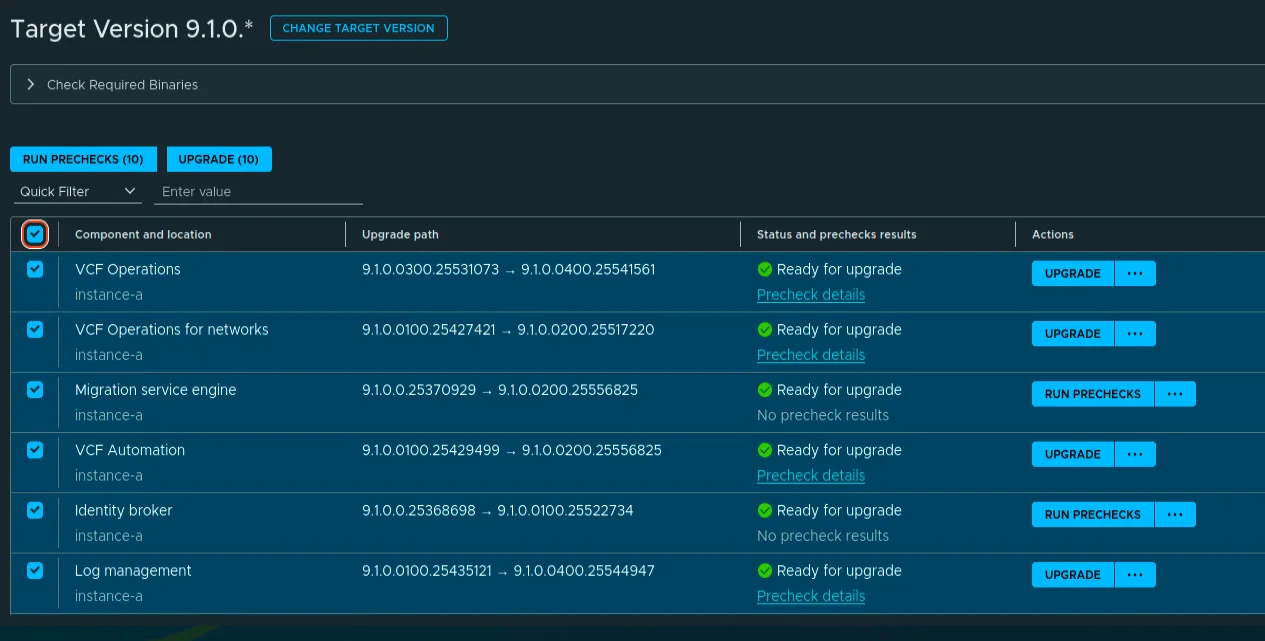
VCF Management target version component list showing mixed 9.1.0.0400, 9.1.0.0200, and 9.1.0.0100 target versions ready for upgrade.

Upgrading VCF 9.1 Management Services to 9.1.0.0400 Step by Step

On July 13, 2026 Broadcom shipped the next VCF 9.1 patch wave, and this post walks through the part of it that lives under Build -> Lifecycle -> VCF Management -> Upgrade: the VCF Management services. The headline releases on this surface are VCF Operations 9.1.0.0400 and VCF Automation 9.1.0.0200, mostly security enhancements plus a batch of fixes. This post is the follow-up to my 9.1.0.0300 walkthrough. To be clear on scope: this post covers only the management services. SDDC Manager 9.1.0.0400 and the core components (vCenter, NSX, ESX, vSAN) go through the VCF Instances flow and are not covered here; see the short section at the end. ...

 · Updated  · 
Upgrading VCF 9.1 Management Services to 9.1.0.0400 Step by Step

Fixing Swagger’s localhost:8600 URL in VCF Automation 9.1

While putting together the VCF Automation 9.1 API getting started post, I spent some time in the in-product API Help Center. Log into the VM Apps tenant, click your username, API Help Center > Explore Automation APIs. The Swagger pages render fine, but the moment you try an actual call, it fails. The Servers box for the VCF Automation (Blueprint) API shows: http://localhost:8600 Swagger UI builds Try It Out requests from servers[0].url, so the browser dutifully sends every request to port 8600 on your own workstation. Connection refused, every time. The documentation is correct; the advertised host is not. ...

 · Updated  · 
Fixing Swagger’s localhost:8600 URL in VCF Automation 9.1

VCF Automation 9.1 API Getting Started

Back in 2022 I wrote vRA 8 API getting started, two curl calls and you had a bearer token. Since then the product has been renamed twice (vRealize Automation → VMware Aria Automation → VCF Automation) and, more importantly for anyone with scripts in production, the authentication flow changed in VCF 9.x. Neither of the two calls from that post works against a 9.1 appliance. This is the 9.1 version of the same post: the minimum you need to do before you can actually query the API, with curl. ...

 · Updated  · 
VCF Automation 9.1 API Getting Started

VCF Operations 9.1 Patch Stuck at “Installing PAK File”

The 9.1.0.0300 patch went through this lab without drama at the beginning of July. Three weeks later, the 9.1.0.0400 express patch for VCF Operations hit the same single-node appliance and stopped dead at Installing PAK file: no progress, no error, and a reboot later, still nothing. What followed was a proper archaeology dig through every layer of state the upgrade machinery keeps, and almost every layer turned out to be holding a different version of the truth. ...

 · Updated  · 
VCF Operations 9.1 Patch Stuck at “Installing PAK File”

VCF Operations for Networks 9.1 Search Queries: The vRNI Query Language Lives On

If you spent years typing flows where firewall action = deny into vRealize Network Insight, then watched the product get renamed to Aria Operations for Networks and then absorbed into VCF Operations as VCF Operations for Networks, you probably have one practical question: did the search language survive? It did, completely. I compared the VCF Operations for Networks 9.1 search documentation against the legacy Aria Operations for Networks 6.13 docs page by page, and the query grammar is identical: same entity types, same where operators, same group by / order by / limit clauses, same planning and path queries. Even the REST API still answers under the old /api/ni/ (Network Insight) namespace. Your saved searches and your muscle memory carry over as-is. ...

 · Updated  · 
VCF Operations for Networks 9.1 Search Queries: The vRNI Query Language Lives On

VCF 9.1 NSX Rotation Error: PASSWORD_MANAGER_NSX_USER_API_FAILED

Continuing the credential cleanup in the same 9.1 environment from the expired password sync and VCFOPSPWID03 posts, one credential refused to settle: the service account SDDC Manager uses to talk to the NSX Manager API, svc-sddcmanager-a-nsx-mgmt--8199 in my lab. It showed up as disconnected, every remediation attempt failed, and the environment kept trying to rotate it in a loop. This one took several wrong turns before the actual root cause surfaced, and almost every wrong turn taught me something worth writing down. The short version: ...

 · Updated  · 
VCF 9.1 NSX Rotation Error: PASSWORD_MANAGER_NSX_USER_API_FAILED
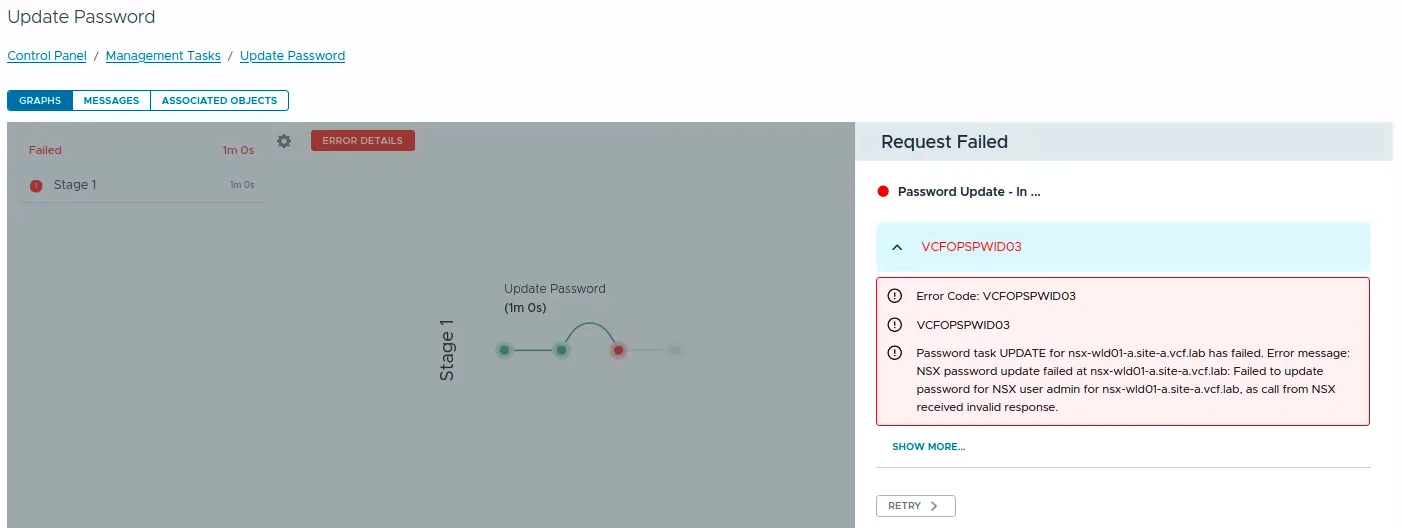
VCF Operations Update Password task failed with error code VCFOPSPWID03.

Fixing VCFOPSPWID03: NSX Password Update Failed as Call from NSX Received Invalid Response (VCF 9.1)

While rotating credentials in the same 9.1 environment I covered in the expired password sync post, an Update of the NSX Manager admin password (credential type API) from VCF Operations kept failing after about a minute with error code VCFOPSPWID03 and a spectacularly unhelpful message: “call from NSX received invalid response.” The actual cause turned out to be simple, NSX rejected the new password because it had already been used on that manager. This being a lab, I was deliberately recycling a previous password. That goes against best practices, and NSX enforces it. But the way the error surfaces (and the way the reuse policy behaves in this build) is worth writing down. ...

 · Updated  · 
Fixing VCFOPSPWID03: NSX Password Update Failed as Call from NSX Received Invalid Response (VCF 9.1)