Expired certificate alert in NSX UI, showing AR Corfu client certificate details.

Replacing the AR Corfu certificate in NSX

I replaced the expired AR Corfu certificate in NSX by generating a self-signed certificate in the UI and sending the replacement through the API. Identifying the Expired AR Corfu Certificate In my case the AR Corfu certificate has already expired Generating a Self-Signed Certificate in the NSX UI In the top menu bar I went to Generate -> Generate Self Signed Certificate ...


Replacing the AR Corfu certificate in NSX

Certificate delete failed: Certificate cannot be deleted because it is used by 1 MP node

I was recently trying to replace some service certificates and I accidentally associated the certificate with the wrong service. When trying to delete the certificate I was presented with an error “Certificate delete failed: Certificate cannot be deleted because it is used by 1 MP node” The first step I did was try to figure out what service is associated with the certificate. For that I leveraged the instructions in KB 75277. Performing a GET /api/v1/trust-management/certificates/{cert-id} I was able to identify that CBM_API service was using the certificate. ...

Certificate delete failed: Certificate cannot be deleted because it is used by 1 MP node
Expired certificate warning shown for API-Corfu client certificate.

Replacing the Corfu API certificate in NSX

In this blog we will go over replacing the Corfu API certificate in NSX. In this example I will be using the UI to generate the self signed certificate and then an API call to replace the certificate. Identifying the Expired Corfu Certificate In my case the Corfu API certificate has already expired Generating a New Self-Signed Certificate In the top menu bar I went to Generate -> Generate Self Signed Certificate ...
Replacing the Corfu API certificate in NSX
Expired LocalManager certificate shown in NSX UI, needs replacement.

Replacing the LocalManager certificate in NSX

In this blog we will go over replacing the LocalManager certificate in NSX. In this example I will be using the UI to generate the self signed certificate and then an API call to replace the certificate. Reviewing the Expired Certificate In my case the LocalManager certificate has already expired Generating a Self Signed Certificate In the top menu bar I went to Generate -> Generate Self Signed Certificate ...

 · Updated  · 
Replacing the LocalManager certificate in NSX

Simplifying NSX Edge Removal in VMware Cloud Foundation (VCF) Environment

Important correction (August 25, 2026): The original article incorrectly implied that the NSX Edge Removal Tool preserves attached dependencies and that dependencies could be addressed after removal. Broadcom’s current instructions require administrators to remove or disconnect added services, interfaces, segments, and other dependencies before running the cleaner. The tool must not be used for an Edge cluster serving Workload Control Plane (WCP). The old direct-download link, version-specific filename, executable command, and post-removal dependency workflow have been removed so they cannot be mistaken for current instructions. ...

 · Updated  · 
Simplifying NSX Edge Removal in VMware Cloud Foundation (VCF) Environment
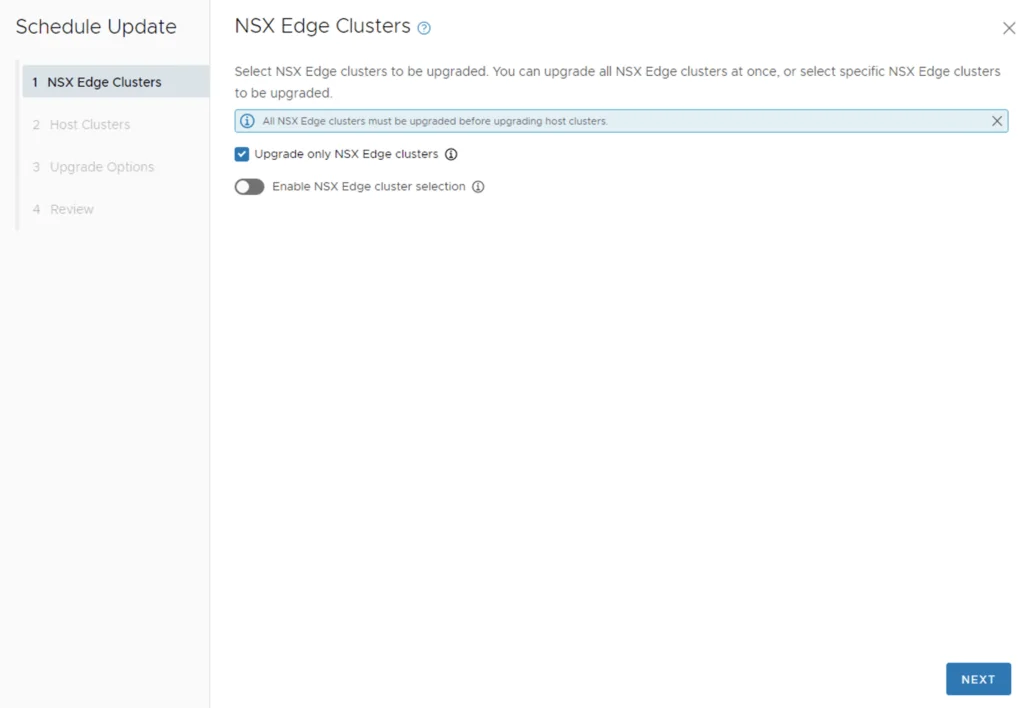
'NSX Edge Clusters' step in a VCF upgrade wizard, with options to upgrade all or specific clusters.

Upgrading VCF 4.3.x to VCF 5 Step by Step

With the release of of VCF 5 I wanted to get my lab upgraded. The release blog can be found here and the release notes are here Please note that some of the components within the VCF will still need additional upgrading. Please read the release notes for additional details. Downloading the VCF 5.0 Bundles We can start by going to Inventory -> Workload Domains -> Select the domain -> Update/Patches -> Select the VCF version -> Download now. If you do not see the newest releases go to Administration -> Online Depot and add a VMware Customer Connect account that has access to perform downloads. ...

Upgrading VCF 4.3.x to VCF 5 Step by Step
Settings page for vRSLCM showing System Administration options and System Upgrade step.

Upgrading vRSLCM (vRealize Lifecycle Manager) to 8.12

In this guide I will go over the steps of getting an existing 8.x vRSLCM appliance upgraded to the latest 8.12 release. The release notes can be found here The first step is to log in to vRealize Suite Lifecycle Manager under the Lifecycle Operations section Go to settings -> System Upgrade ...

Upgrading vRSLCM (vRealize Lifecycle Manager) to 8.12
Settings page with options for System Administration and Servers & Accounts, relevant for upgrading SSC using vRSLCM.

Upgrading SSC (SaltStack Config) to 8.12.1 using vRSLCM

In this post I will go over upgrading my 8.x SSC appliance to 8.12.1. As a pre requirement we do need to have VMware Aria Suite Lifecycle upgraded to 8.12. Instructions can be found here. The upgrade does not include the latest PSPACK that contains the 8.12.1 SaltStack Config release. Instructions to get the PSPACK can be found on my other blog post here. Downloading the Upgrade Binary via Binary Mapping To get started we can go to vRealize Lifecycle Manager -> Lifecycle Operations -> Settings -> Binary Mapping. (If you haven’t added your My VMware credentials you will need to do that first by going to vRealize Lifecycle Manager -> Lifecycle Operations -> Settings -> My VMware) ...

Upgrading SSC (SaltStack Config) to 8.12.1 using vRSLCM
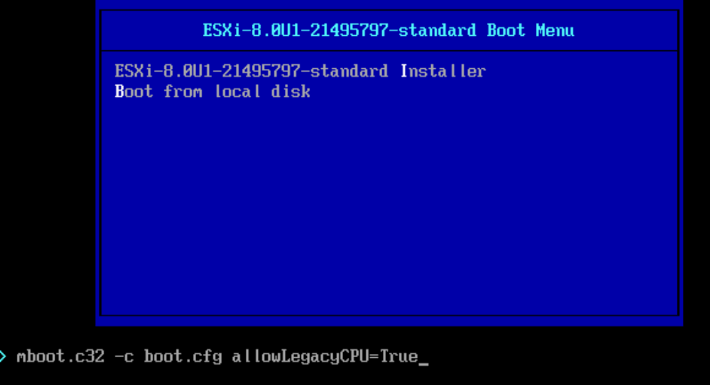
Boot menu shows ESXi-8.0U1-21495797-standard options, including Installer and local disk.

Install/Upgrade ESXi 8.0 on unsupported hardware.

As I was installing\upgrading my lab environment to ESXi 7.0 I received an error that the CPU was unsupported. As per the release notes vSphere 8.0 release notes my CPU is no longer on the compatibility list. Since this is a lab environment I wanted to continue using my current hardware. It goes without saying that this method should not be used in a production environment. To allow the legacy CPU all I had to do is boot up from the ISO, on the boot Menu I pressed TAB or Shift + O and added allowLegacyCPU=True option as seen in the screenshot below ...

Install/Upgrade ESXi 8.0 on unsupported hardware.

VMware Aria Operations Compliance Pack for HIPAA

I was trying to find some documentation around the metrics monitored by the VMware Aria Operations Compliance Pack for HIPAA. Since VMware is now including the management pack as a native solution as of vRealize Operations 8.1 I wasn’t able to find a lot of documentation around it so I exported the symptoms monitored. Here is a list of the symptoms from version 8.10 HIPAA 164.312(c)(1) - Integrity - NTP time synchronization service is not configured on the host HIPAA 164.312(a)(1) - Access Control - Count of maximum failed login attempts is nto set HIPAA 164.312(c)(1) - Integrity - launchmenu feature is enabled HIPAA 164.312(c)(1) - Integrity - Unity taskbar feature is enabled HIPAA 164.312(c)(1) - Integrity - Shellaction is enabled HIPAA 164.312(c)(1) - Integrity - Independent nonpersistent disks are being used HIPAA 164.312(a)(1) - Access Control - Default setting for intra-VM TPS is incorrect HIPAA 164.312(c)(1) - Integrity - NTP Server is not configured to startup with the host HIPAA 164.312(a)(1) - Access Control - Dvfilter network APIs is nto configured to prevent unintended use HIPAA 164.312(a)(1) - Access Control - HGFS file transfers are enabled HIPAA 164.312(b) - Audit Control - Persistent logging is not configured for ESXi host HIPAA 164.312(c)(1) - Integrity - Toprequest feature is enabled HIPAA 164.312(b) - Audit Control - Remote logging for ESXi hosts is not configured HIPAA 164.312(c)(1) - Integrity - PCI pass through device is configured on the virtual machine HIPAA 164.312(c)(1) - Integrity - Bios Boot Specification feature is enabled HIPAA 164.312(a)(1) - Access Control - Timeout to automatically terminate idle sessions is not configured HIPAA 164.312(a)(1) - Access Control - Access to VM console is not controlled via VNC protocol HIPAA 164.312(a)(1) - Access Control - VIX messages are enabled on the VM HIPAA 164.312(c)(1) - Integrity - Protocolhandler feature is enabled HIPAA 164.312(a)(1) - Access Control - Copy/paste operations are enabled HIPAA 164.312(c)(1) - Integrity - Tray icon feature is enabled HIPAA 164.312(a)(1) - Access Control - GUI Copy/paste operations are enabled HIPAA 164.312(c)(1) - Integrity - version get feature is enabled HIPAA 164.312(c)(1) - Integrity - Informational messages from the VM to the VMX file are not limited HIPAA 164.312(a)(1) - Access Control - Timeout value for DCUI is not configured HIPAA 164.312(a)(1) - Access Control - Guests can recieve host information HIPAA 164.312(c)(1) - Integrity - Users and processes without privileges can remove, connect and modify devices HIPAA 164.312(c)(1) - Integrity - NTP time synchronization server is not configured HIPAA 164.312(c)(1) - Integrity - Unity active feature is enabled HIPAA 164.312(c)(1) - Integrity - Autologon feature is enabled HIPAA 164.312(a)(1) - Access Control - drag-n-drop - Copy/paste operations are enabled HIPAA 164.312(c)(1) - Integrity - Intra VM Transparent Page Sharing is Enabled HIPAA 164.312(c)(1) - Integrity - GetCreds feature is enabled HIPAA 164.312(a)(1) - Access Control - Time after which a locked account is automatically unlocked is not configured HIPAA 164.312(c)(1) - Integrity - Versionset feature is enabled HIPAA 164.312(a)(1) - Access Control - Auto install of tools is enabled HIPAA 164.312(a)(1) - Access Control - Access to DCUI is not set to allow trusted users to override lockdown mode HIPAA 164.312(a)(1) - Access Control - Access to VMs are not controlled through dvfilter network APIs HIPAA 164.312(a)(1) - Access Control - Copy/paste operations are enabled HIPAA 164.312(a)(1) - Access Control - Managed Object Browser (MOB) is enabled HIPAA 164.312(c)(1) - Integrity - Trash folder state is enabled HIPAA 164.312(c)(1) - Integrity - Unity feature is enabled HIPAA 164.312(a)(1) - Access Control - Timeout is not set for the ESXi Shell and SSH services HIPAA 164.312(c)(1) - Integrity - Image Profile and VIB Acceptance Levels are not configured to desired level HIPAA 164.312(c)(1) - Integrity - Firewall is not configured for NTP service HIPAA 164.312(c)(1) - Integrity - Unity push feature is enabled HIPAA 164.312(c)(1) - Integrity - Users and processes without privileges can connect devices HIPAA 164.312(c)(1) - Integrity - Memsfss feature is enabled HIPAA 164.312(c)(1) - Integrity - Unity Interlock is enabled HIPAA 164.312(c)(1) - Integrity - Unity window contents is enabled HIPAA 164.312(e)(1) - Transmission Security - NFC on the vCenter is not configured for SSL HIPAA 164.312(e)(1) - Transmission Security - Restrict port-level configuration overrides on VDS HIPAA 164.312(c)(1) - Integrity - Virtual disk shrinking wiper is enabled HIPAA 164.312(c)(1) - Integrity - Virtual disk shrinking is enabled HIPAA 164.312(e)(1) - Transmission Security - The Forged Transmits policy is not set to reject HIPAA 164.312(e)(1) - Transmission Security - MAC Address Changes policy is set to reject HIPAA 164.312(e)(1) - Transmission Security - SNMP Server is running on the host HIPAA 164.312(e)(1) - Transmission Security - The Promiscuous Mode policy is not set to reject HIPAA 164.312(d) - Person or Entity Authentication - Active directory is not used for local user authentication HIPAA 164.312(e)(1) - Transmission Security - Host firewall is not configured to restrict access HIPAA 164.312(e)(1) - Transmission Security - BPDU filter is not enabled on the host HIPAA 164.312(e)(1) - Transmission Security - The MAC Address Changes policy is not set to reject HIPAA 164.312(d) - Person or Entity Authentication - Password policy for password complexity is not set HIPAA 164.312(e)(1) - Transmission Security - VDS network healthcheck for Teaming Health Check is enabled HIPAA 164.312(d) - Person or Entity Authentication - Bidirection CHAP auhtentication is not enabled HIPAA 164.312(e)(1) - Transmission Security - Forged Transmits policy is set to reject HIPAA 164.312(e)(1) - Transmission Security - Promiscuous Mode policy is configured to reject

VMware Aria Operations Compliance Pack for HIPAA