SaltStack Config vs. Ansible Tower: A Comparison of Two Powerful Configuration Management Solutions

SaltStack Config and Ansible Tower are two powerful configuration management and infrastructure automation tools that cater to the needs of DevOps teams across the globe. While SaltStack Config is an open-source solution, Ansible Tower is the commercial, enterprise-ready version of Ansible Open Source. In this blog post, we will compare SaltStack Config and Ansible Tower in terms of architecture, ease of use, scalability, and features to help you make an informed decision on which tool is best suited for your requirements. ...
March 23, 2023 · 3 min · Cosmin

SaltStack Config vs. Ansible Open Source: A Technical Comparison

SaltStack Config and Ansible Open Source are two popular configuration management and infrastructure automation tools used by DevOps teams across the globe. Both solutions have their own unique set of features, advantages, and drawbacks. In this blog post, we will compare SaltStack Config (formerly known as Salt) and Ansible Open Source in terms of their architecture, ease of use, scalability, and community support, to help you make an informed decision on which tool is best suited for your needs. ...

March 23, 2023 · 3 min · Cosmin

A Step-by-Step Guide to Convert Native Cloud Virtual Machines to On-Prem vSphere with VMware Converter

Migrating virtual machines (VMs) from a cloud environment to an on-premises VMware vSphere infrastructure can be a daunting task. However, with the right tools and processes in place, it can be a seamless and efficient process. One such tool is the VMware Converter, which enables users to convert native cloud VMs\physical servers to vSphere machines. In this blog post, we will discuss the benefits and challenges of converting cloud VMs and provide a step-by-step guide for using VMware Converter to achieve this goal. ...

March 20, 2023 · 4 min · Cosmin

Overview of deploying a 3 tier app in vRA 8, Terraform, and Ansible

Introduction When it comes to deploying a three-tier application in Google Cloud Platform (GCP), there are several tools available, including vRealize Automation (vRA) 8, Terraform, and Ansible. Each tool has its own strengths and weaknesses, and choosing the right one for your project depends on several factors. In this blog post, we will compare these three tools and discuss how vRA 8 stands out as the best option for deploying a three-tier application in GCP. ...

March 7, 2023 · 4 min · Cosmin

Deploying a 3 tier app in GCP from Ansible

Ansible is an open-source automation tool that allows you to automate configuration management, application deployment, and task automation. In this blog post, we will explore how to deploy a three-tier application in Google Cloud Platform (GCP) using Ansible. GCP Overview Google Cloud Platform (GCP) is a suite of cloud computing services offered by Google. It provides a wide range of services such as virtual machines, storage, and networking, among others, that can be used to deploy and run applications in the cloud. One of the advantages of using GCP is its high availability and scalability, which makes it an excellent option for deploying enterprise-grade applications. ...

March 7, 2023 · 6 min · Cosmin

Deploying a 3 tier app in GCP from Terraform

Deploying a three-tier application using Terraform is a popular approach because it provides infrastructure-as-code benefits. Terraform is an open-source infrastructure-as-code tool that allows you to define, configure, and manage infrastructure in a declarative language. In this blog post, we will explore how to deploy a three-tier application in Google Cloud Platform (GCP) using Terraform. GCP Overview Google Cloud Platform (GCP) is a suite of cloud computing services offered by Google. It provides a wide range of services such as virtual machines, storage, and networking, among others, that can be used to deploy and run applications in the cloud. One of the advantages of using GCP is its high availability and scalability, which makes it an excellent option for deploying enterprise-grade applications. ...

March 7, 2023 · 5 min · Cosmin

Deploying a 3 tier app in GCP from vRA

Deploying a three-tier application is a common task for many organizations, and as more companies move to the cloud, it’s essential to understand how to deploy such applications in the cloud environment. In this blog post, we will explore how to deploy a three-tier application from vRealize Automation 8 in Google Cloud Platform (GCP) using a blueprint. GCP Overview Google Cloud Platform (GCP) is a suite of cloud computing services offered by Google. It provides a wide range of services such as virtual machines, storage, and networking, among others, that can be used to deploy and run applications in the cloud. One of the advantages of using GCP is its high availability and scalability, which makes it an excellent option for deploying enterprise-grade applications. ...

March 7, 2023 · 5 min · Cosmin
Article cover image

How to forcibly delete an NSX-T 3 Segment

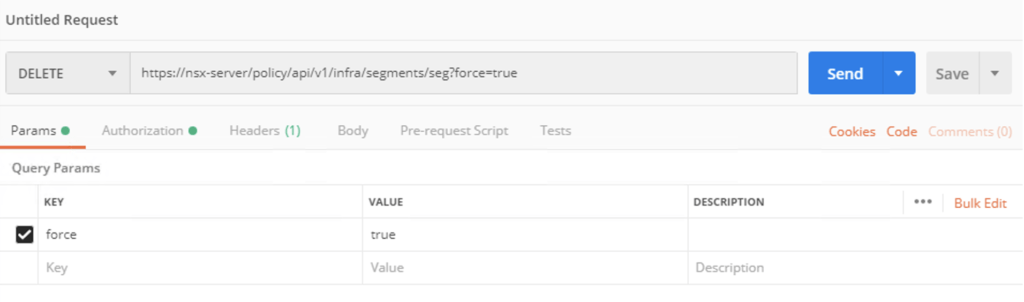
I recently ran in to a problem where i couldnt delete an NSX segment so i went exploring the API. The API guide can be found here The method used is delete policy/api/v1/infra/segments/{segment-id}?force=true It would look like this in Postman: To list the segments we can use a get request towards /policy/api/v1/infra/segments/

March 3, 2023 · 1 min · Cosmin

Removing NSX stale packages from ESXi host

I recently ran in to a problem where i wanted to perform a clean configuration of one of my ESXi hosts from an NSX perspective, however i ran in to a problem where NSX was reporting that the packages are already installed. To fix the issue i had to run the following to list the packages installed: esxcli software vib list | grep -i nsx Once i had the list all i had to do is uninstall them using: ...

March 3, 2023 · 1 min · Cosmin
Article cover image

Configure NSX-T to use vIDM as authentication

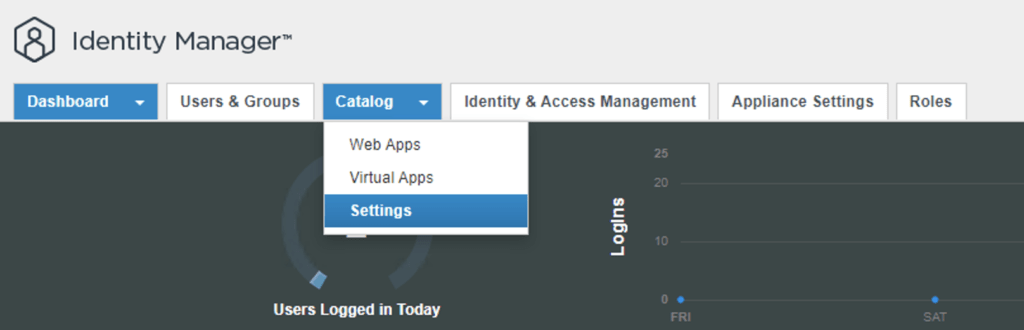
I needed to create a few additional accounts in NSX-T for outside sources. Instead of creating individual accounts i wanted to use the existing ones from AD. To get started we need to get the certificate from the vIDM server. Log on to the vIDM server as root and run the following: openssl1 s_client -connect <FQDN of vIDM host>:443 < /dev/null 2> /dev/null | openssl x509 -sha256 -fingerprint -noout -in /dev/stdin Next we need to create the OAuth client ID in vIDM. Log in to the vIDM UI using the url SAAS/admin/app/page#!/dashboard as admin and Navigate to Catalog -> Settings ...

March 3, 2023 · 2 min · Cosmin
VCF Assistant
Hi! I'm the VCF Assistant. Ask me anything about VMware Cloud Foundation, ESXi, vCenter, NSX, Aria Suite, or infrastructure automation.