Settings page with options for system administration and server accounts, including upgrade, patches, and accounts management.

Upgrading VMware Aria Automation Config to 8.16.2

In this post i will go over upgrading my 8.x SSC appliance to 8.16.2. As a pre requirement we do need to have VMware Aria Suite Lifecycle upgraded to 8.16. Instructions can be found here. The upgrade does not include the latest PSPACK that contains the 8.16.2 Aria Automation Config release. Instructions to get the PSPACK can be found on my other blog post here. To get started we can go to VMware Aria Suite Lifecycle -> Lifecycle Operations -> Settings -> Binary Mapping. (If you haven’t added your My VMware credentials you will need to do that first by going to VMware Aria Suite Lifecycle -> Lifecycle Operations -> Settings -> My VMware) ...

March 25, 2024 · Cosmin Trif
Settings page with options for system administration and servers/accounts.

Upgrading VMware Aria Automation to 8.16.2

In this post i will go over upgrading my 8.x vRA appliance to 8.16.2. As a pre requirement we do need to have VMware Aria Suite Lifecycle upgraded to 8.16. Instructions can be found here. The upgrade does not include the latest PSPACK that contains the 8.16.2 VMware Aria Automation release. Instructions to get the PSPACK can be found on my other blog post here. To get started we can go to VMware Aria Suite Lifecycle -> Lifecycle Operations -> Settings -> Binary Mapping. (If you haven’t added your My VMware credentials you will need to do that first by going to VMware Aria Suite Lifecycle -> Lifecycle Operations -> Settings -> My VMware) ...

March 22, 2024 · Cosmin Trif
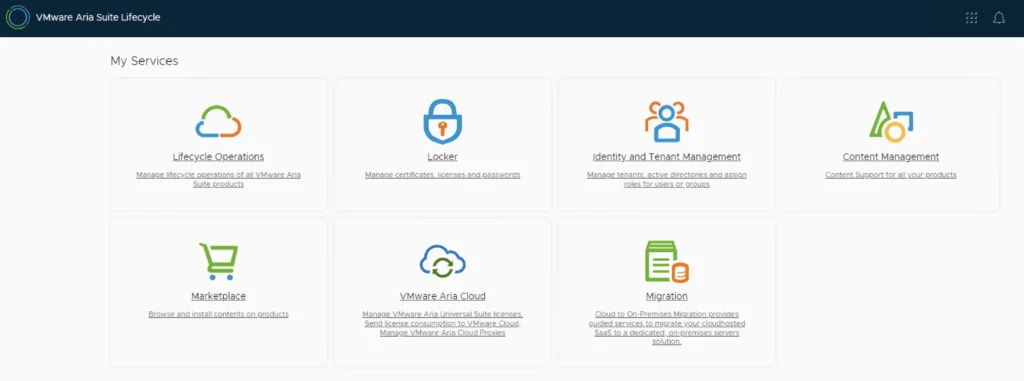
A screenshot shows VMware Aria Suite Lifecycle Operations, Marketplace, Locker, Identity Management, Content Management, and VMware Aria Cloud options.

VMware Aria Suite Lifecycle Product Support Pack (PSPAK) Upgrade

In this guide i will go over the steps of getting an existing 8.x VMware Aria Suite Lifecycle (formerly vRSLCM vRealize Lifecycle Manager) appliance to support the latest product releases available. Here is a great blog that goes in to the details about what the Product Support Pack is https://blogs.vmware.com/management/2019/01/vrslcm-pspak.html. Typically the newer Product Support Pack is included part of the upgrade for LCM, however sometimes there are product releases in between releases where product support packs come in handy. ...

March 22, 2024 · Cosmin Trif

Enhancing vCenter Server Firewall Management with Ansible

In today’s dynamic IT environments, maintaining a secure and efficient infrastructure is paramount. For VMware vSphere administrators, managing the firewall settings on vCenter servers is a critical task that ensures the security of the entire virtualized infrastructure. Ansible, an open-source automation tool, offers a streamlined approach to managing firewall settings across multiple vCenter servers. This blog post will guide you through automating vCenter server firewall configurations using Ansible, showcasing how to apply these changes across multiple servers seamlessly. ...

March 21, 2024 · Cosmin Trif

Streamlining vCenter Server Firewall Management with SaltStack Config

In the realm of VMware vSphere management, securing your vCenter Server is critical to maintaining a robust and secure infrastructure. SaltStack Config, integrated into VMware’s vRealize Automation suite, offers a powerful way to automate and manage configurations across your VMware environment, including firewall settings. This blog explores how to leverage SaltStack Config to automate firewall adjustments on your vCenter servers, ensuring consistent security policies and simplifying the process across multiple instances. ...

March 21, 2024 · Cosmin Trif

Automating vCenter Server Firewall Configuration with PowerShell: A Guide for Scaling to Multiple Environments

The vCenter Server acts as the central nervous system for VMware vSphere environments, providing crucial management capabilities. As with any critical component of your infrastructure, ensuring the vCenter Server is secured is paramount. The firewall settings play a vital role in protecting your vCenter Server against unauthorized access. This blog post dives into how you can programmatically change the firewall settings on the vCenter Server using PowerShell, and how to scale this automation across multiple vCenter servers efficiently. ...

March 21, 2024 · Cosmin Trif

Mastering the /v1/credentials API in SDDC Manager for Enhanced Security Management

In the rapidly evolving landscape of VMware’s Cloud Foundation, security management is a cornerstone for maintaining the integrity and confidentiality of the software-defined data center (SDDC). The SDDC Manager, a critical component of VMware’s Cloud Foundation, offers a comprehensive suite of APIs for managing various aspects of the SDDC, including credentials management. This blog post delves into the specifics of leveraging the /v1/credentials API in SDDC Manager, offering a detailed guide for VMware professionals to enhance their security posture through efficient credentials management. ...

March 16, 2024 · Cosmin Trif
The image shows a URL path for a SDDC Manager API explorer task subtask.

Stopping a Running Task in SDDC Manager: A Step-by-Step Guide

In the world of VMware’s Cloud Foundation, the SDDC Manager plays a pivotal role in streamlining and automating the deployment, management, and orchestration of the software-defined data center components. However, administrators occasionally face the need to halt an ongoing task for various reasons, such as incorrect parameters or prioritizing other operations. This blog post provides a detailed walkthrough on how to gracefully stop a running task in SDDC Manager, ensuring minimal impact on the environment and maintaining system integrity. ...

March 16, 2024 · Cosmin Trif
The image shows a VMware Aria Suite lifecycle upgrade interface with options like Lifecycle Operations, Locker, Identity and Tenant Management, Content Management, Marketplace, and VMware Aria Cloud.

VMware Aria Suite Lifecycle upgrade to 8.16

In this guide i will go over the steps of getting an existing 8.x vRSLCM appliance upgraded to the latest 8.16 release. The release notes can be found here. We can upgrade from vRealize Lifecycle Manager to VMware Aria Suite Lifecycle. The first step is to log in to VMware Aria Suite Lifecycle under the Lifecycle Operations section ...

March 13, 2024 · Cosmin Trif

Upgrading Aria Automation without Lifecycle Manager: A Step-by-Step Guide

Upgrading Aria Automation (formerly known as vRealize Automation, vRA) is crucial for maintaining the efficiency, security, and compatibility of your automation tasks. For environments without VMware Aria Suite Lifecycle, you can still perform the upgrade using the vracli command-line utility. This blog post will guide you through the process of upgrading Aria Automation using two different methods: from a mounted ISO (CD-ROM) and from an online update repository URL. Prerequisites SSH access to your Aria Automation appliance. Sufficient backup of your Aria Automation environment. Downloaded ISO for the Aria Automation upgrade, if using the CD-ROM method. Access to the Aria Automation appliance with root privileges. Method 1: Upgrading from a Mounted ISO (CD-ROM) Prepare the ISO Image: Before starting, ensure that the ISO image for the Aria Automation upgrade is downloaded and available. Mount the ISO to the Appliance: Mount the ISO image to your Aria Automation appliance. This step might require physical access to the server or through the management interface provided by your hypervisor (e.g., ESXi). To mount the CD-ROM we can use: mount /dev/sr0 /mnt/cdrom SSH into the Aria Automation Appliance: Access your appliance via SSH as the root user. Execute the Upgrade Command: Run the following command to start the upgrade process: vracli upgrade exec -y --profile lcm --repo cdrom:// This command will automatically start the upgrade process using the ISO mounted on the CD-ROM drive. The -y flag automates the acceptance of the upgrade process, and --profile lcm specifies the use of the lifecycle manager upgrade profile, even though the Lifecycle Manager itself is not being used. Monitor the Upgrade Process: The upgrade process will provide output to the console. Monitor this output for any errors or prompts that require manual intervention. Use 'vracli upgrade status --follow' to monitor the progress. Finalize the Upgrade: Once the upgrade completes, follow any on-screen instructions to finalize the upgrade. This may include rebooting the Aria Automation appliance. Method 2: Upgrading from an Online Update Repository URL SSH into the Aria Automation Appliance: Ensure you have SSH access to the appliance as the root user. Determine the Repository URL: Identify the URL of the update repository you intend to use for the upgrade. This URL should point to the VMware online repository or an internally hosted repository mirror. Execute the Upgrade Command: Use the following command to initiate the upgrade from the online repository: vracli upgrade exec --profile lcm -r <url> Replace <url> with the actual URL of your update repository. Similar to the CD-ROM method, --profile lcm indicates the lifecycle manager upgrade profile. Monitor the Upgrade Process: As with the ISO method, keep an eye on the console output for any actions required on your part. Use 'vracli upgrade status --follow' to monitor the progress. Complete the Upgrade: After the upgrade process finishes, perform any additional steps prompted by the system, which may include system reboots. Post-Upgrade Steps Verify the Upgrade: Log in to the Aria Automation user interface to verify that the upgrade was successful and all services are running correctly. Review Logs: Check the upgrade logs for any warnings or errors that might need attention. Test Deployments: Execute a few test deployments to ensure that all functionalities are working as expected. Conclusion Upgrading Aria Automation without the Lifecycle Manager is straightforward with the vracli utility. Whether you’re upgrading from a mounted ISO or an online repository, the process is designed to be seamless. Always ensure that you have backups and a rollback plan in case of any issues. I also covered a release-specific run of this CLI method in upgrading Aria Automation to 8.18 via CLI.

February 14, 2024 · Cosmin Trif