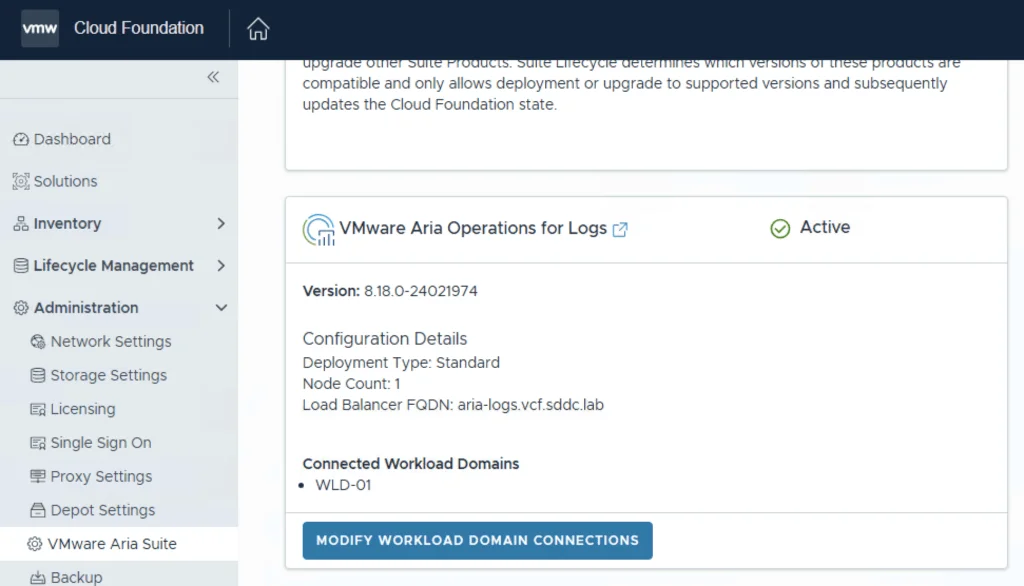
VMware Aria Suite deployment guide shows steps for lifecycle setup, product deployment, and domain connection.

Deploying the Aria Suite Lifecycle using VCF 5

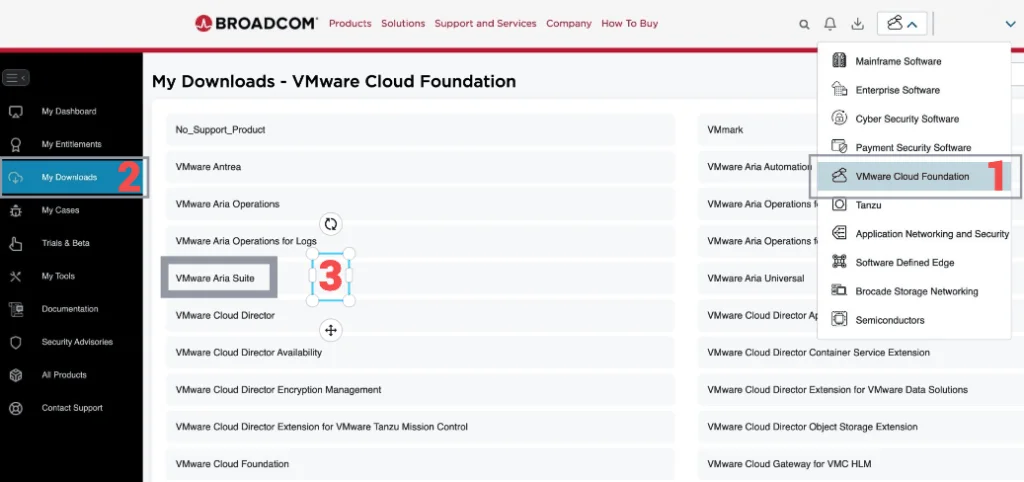
The official documentation for deploying the Aria Suite can be found here First step is to download the bundle by going to sddc-manager -> Repository -> Bundle management. Look for VMware Software Install Bundle - vRealize Suite Lifecycle Manager 8.16.0-23377566 After the download is complete we can go to Administration -> VMware Aria Suite and a deploy button should be available. If the deploy button is not available due to X-Region Application Virtual Network is not created errorplease follow the instructions found here: ...

April 7, 2024 · Cosmin Trif
The image shows the NSX CLI enabling SSH service on the appliance.

How to Enable SSH on the NSX appliance

Enabling SSH on NSX appliances via the CLI (Command Line Interface) is an essential skill for VMware administrators, providing a more direct and scriptable approach to managing and configuring the NSX environment. Here’s how to enable SSH on NSX from the CLI, allowing for secure, remote administration of your virtual network infrastructure. Pre-Requisites Ensure you have local or console access to the NSX appliance (NSX Manager, NSX Edge, or Controller) for initial setup. Administrative credentials will be required to execute the following commands. The instructions have been tested on NSX 4.1.2.3 ...

April 6, 2024 · Cosmin Trif
UI shows Bundle Management with Download History tab and VMware Software Update details.

Properly cleaning up VCF bundles

With all the recent releases for VCF i noticed that my file system was getting full and once the updates are complete i wanted to reclaim all that used space. The first step was to identify the Bundle ID. We can find this by going to the bundle itself and checking out the details by clicking on View Details For example this specific Bundle ID is 86da0038-b68d-4368-8be1-576568a68c54 ...

April 6, 2024 · Cosmin Trif
UI shows upgrade details for VMware Cloud Foundation 5.1.1, including version, bundles, and download options.

Upgrading VCF 5.x to VCF 5.1.1 Step by Step

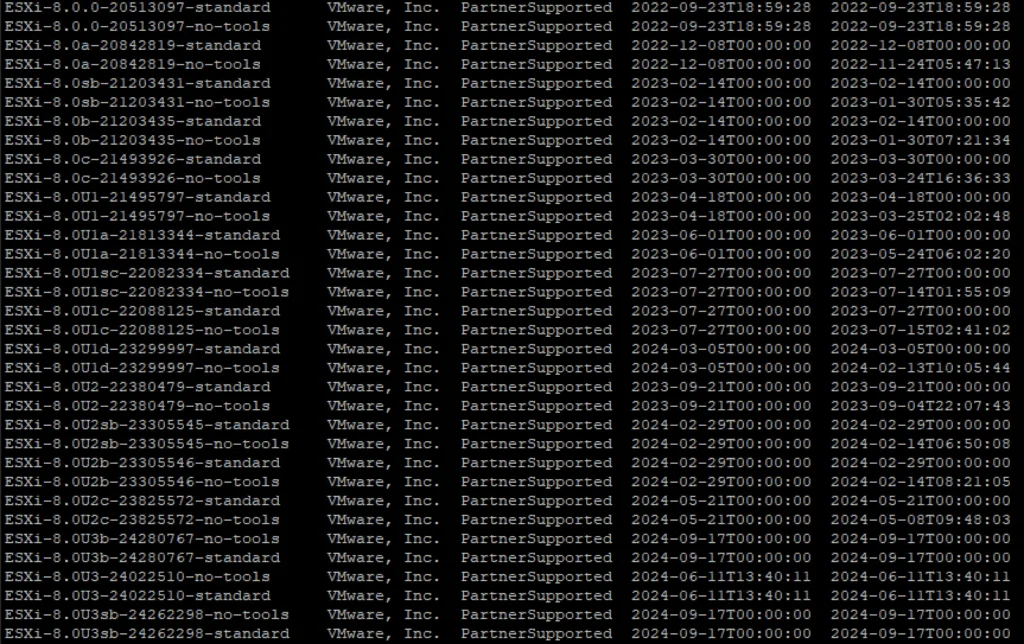
With the release of of VCF 5.1.1 I wanted to get my lab upgraded. The release blog can be found here and the release notes are here Please note that some of the components within the VCF will still need additional upgrading. Please read the release notes for additional details. We can start by going to Inventory -> Workload Domains -> Select the domain -> Update/Patches -> Select the VCF version -> Download now. If you do not see the newest releases go to Administration -> Online Depot and add a VMware Customer Connect account that has access to perform downloads. ...

April 6, 2024 · Cosmin Trif

VCF depot build numbers

Bundle Product Version Size Bundle Component Bundle Type bundle-111778 5.1.1.0 605.7 ESX_HOST-8.0.2-23305546 PATCH bundle-111779 5.1.1.0 11381.3 NSX_T_MANAGER-4.1.2.3.0-23382408 PATCH bundle-111777 5.1.1.0 0 SDDC_MANAGER_VCF-5.1.1.0-23480823 PATCH (Drift) bundle-111776 5.1.1.0 2331.6 SDDC_MANAGER_VCF-5.1.1.0-23480823 PATCH bundle-111781 5.1.1.0 17064.2 VCENTER-8.0.2.00200-23319993 PATCH bundle-111780 5.1.1.0 14664.6 NSX_T_MANAGER-4.1.2.3.0-23382408 INSTALL bundle-111782 5.1.1.0 10742.4 VCENTER-8.0.2.00200-23319993 INSTALL bundle-110346 5.1.1.0 1847.9 VRSLCM-8.16.0-23377566 INSTALL bundle-99536 5.1.0.0 640 ESX_HOST-8.0.2-22380479 PATCH bundle-99541 5.1.0.0 10500.4 NSX_T_MANAGER-4.1.2.1.0-22667789 PATCH bundle-99539 5.1.0.0 2089.2 SDDC_MANAGER_VCF-5.1.0.0-22688368 PATCH bundle-99540 5.1.0.0 0 SDDC_MANAGER_VCF-5.1.0.0-22688368 PATCH (Drift) bundle-99537 5.1.0.0 16801.6 VCENTER-8.0.2.00100-22617221 PATCH bundle-99542 5.1.0.0 14606.2 NSX_T_MANAGER-4.1.2.1.0-22667789 INSTALL bundle-99538 5.1.0.0 10493 VCENTER-8.0.2.00100-22617221 INSTALL bundle-98366 5.1.0.0 1817.8 VRSLCM-8.14.0-22630472 INSTALL bundle-94375 5.0.0.1 2044.9 SDDC_MANAGER_VCF-5.0.0.1-22485660 PATCH bundle-94376 5.0.0.1 251.5 SDDC_MANAGER_VCF-5.0.0.1-22485660 PATCH (Drift) bundle-80035 5.0.0.0 599.5 ESX_HOST-8.0.1-21813344 PATCH bundle-80031 5.0.0.0 10089.9 NSX_T_MANAGER-4.1.0.2.0-21761691 PATCH bundle-80030 5.0.0.0 251.3 SDDC_MANAGER_VCF-5.0.0.0-21822418 PATCH (Drift) bundle-80029 5.0.0.0 2044.7 SDDC_MANAGER_VCF-5.0.0.0-21822418 PATCH bundle-80033 5.0.0.0 9867.6 VCENTER-8.0.1.00100-21815093 PATCH bundle-80032 5.0.0.0 13874.6 NSX_T_MANAGER-4.1.0.2.0-21761691 INSTALL bundle-80034 5.0.0.0 9867.6 VCENTER-8.0.1.00100-21815093 INSTALL bundle-79587 5.0.0.0 1091.8 VRSLCM-8.10.0-21331275 INSTALL bundle-83610 4.5.2.0 382.1 ESX_HOST-7.0.3-21930508 PATCH bundle-87318 4.5.2.0 8615.4 NSX_T_MANAGER-3.2.3.1.0-22104592 PATCH bundle-88445 4.5.2.0 2012.6 SDDC_MANAGER_VCF-4.5.2.0-22223457 PATCH bundle-88446 4.5.2.0 250.5 SDDC_MANAGER_VCF-4.5.2.0-22223457 PATCH (Drift) bundle-81146 4.5.2.0 6420 VCENTER-7.0.3.01500-21784236 PATCH bundle-87319 4.5.2.0 10618.2 NSX_T_MANAGER-3.2.3.1.0-22104592 INSTALL bundle-81147 4.5.2.0 8575.4 VCENTER-7.0.3.01500-21784236 INSTALL bundle-84015 4.5.2.0 1091.3 VRSLCM-8.10.0-21950667 INSTALL bundle-73789 4.5.1.0 381.8 ESX_HOST-7.0.3-21424296 PATCH bundle-73785 4.5.1.0 8402.7 NSX_T_MANAGER-3.2.2.1.0-21487560 PATCH bundle-77261 4.5.1.0 2150 SDDC_MANAGER_VCF-4.5.1.0-21682411 PATCH bundle-77262 4.5.1.0 250.2 SDDC_MANAGER_VCF-4.5.1.0-21682411 PATCH (Drift) bundle-73787 4.5.1.0 6419.8 VCENTER-7.0.3.01400-21477706 PATCH bundle-73786 4.5.1.0 10461.8 NSX_T_MANAGER-3.2.2.1.0-21487560 INSTALL bundle-73788 4.5.1.0 8575.1 VCENTER-7.0.3.01400-21477706 INSTALL bundle-61598 4.5.0.0 382.9 ESX_HOST-7.0.3-20328353 PATCH bundle-62768 4.5.0.0 8064 NSX_T_MANAGER-3.2.1.2.0-20541212 PATCH bundle-63600 4.5.0.0 247.6 SDDC_MANAGER_VCF-4.5.0.0-20612863 PATCH (Drift) bundle-63599 4.5.0.0 2106 SDDC_MANAGER_VCF-4.5.0.0-20612863 PATCH bundle-61594 4.5.0.0 6381.1 VCENTER-7.0.3.01000-20395099 PATCH bundle-62769 4.5.0.0 10053.7 NSX_T_MANAGER-3.2.1.2.0-20541212 INSTALL bundle-61596 4.5.0.0 8344.2 VCENTER-7.0.3.01000-20395099 INSTALL bundle-62801 4.5.0.0 1085.4 VRSLCM-8.8.2-20080494 INSTALL bundle-58347 4.4.1.1 10246.1 SDDC_MANAGER_VCF-4.4.1.1-19948546 PATCH bundle-58348 4.4.1.1 233.8 SDDC_MANAGER_VCF-4.4.1.1-19948546 PATCH (Drift) bundle-56937 4.4.1.0 395.5 ESX_HOST-7.0.3-19482537 PATCH bundle-57347 4.4.1.0 7127.2 NSX_T_MANAGER-3.1.3.7.4-19762317 PATCH bundle-57344 4.4.1.0 10246.2 SDDC_MANAGER_VCF-4.4.1.0-19766960 PATCH bundle-57346 4.4.1.0 233.8 SDDC_MANAGER_VCF-4.4.1.0-19766960 PATCH (Drift) bundle-55743 4.4.1.0 7139 VCENTER-7.0.3.00500-19480866 PATCH bundle-57348 4.4.1.0 8535.7 NSX_T_MANAGER-3.1.3.7.4-19762317 INSTALL bundle-55745 4.4.1.0 9202.7 VCENTER-7.0.3.00500-19480866 INSTALL bundle-52995 4.4.0.0 395.3 ESX_HOST-7.0.3-19193900 PATCH bundle-52980 4.4.0.0 7154.5 NSX_T_MANAGER-3.1.3.5.0-19068434 PATCH bundle-56535 4.4.0.0 230.4 SDDC_MANAGER_VCF-4.4.0.0-19617653 PATCH (Drift) bundle-53432 4.4.0.0 230.3 SDDC_MANAGER_VCF-4.4.0.0-19312029 PATCH (Drift) bundle-53431 4.4.0.0 10188.6 SDDC_MANAGER_VCF-4.4.0.0-19312029 PATCH bundle-52986 4.4.0.0 7223.8 VCENTER-7.0.3.00300-19234570 PATCH bundle-52611 4.4.0.0 905.6 VRSLCM-8.6.2-19221620 PATCH bundle-52982 4.4.0.0 8610 NSX_T_MANAGER-3.1.3.5.0-19068434 INSTALL bundle-52990 4.4.0.0 9244.9 VCENTER-7.0.3.00300-19234570 INSTALL bundle-52610 4.4.0.0 1111.3 VRSLCM-8.6.2-19221620 INSTALL bundle-52704 4.3.1.1 10695.5 SDDC_MANAGER_VCF-4.3.1.1-19235535 PATCH bundle-52705 4.3.1.1 230.5 SDDC_MANAGER_VCF-4.3.1.1-19235535 PATCH (Drift) bundle-47505 4.3.1.0 389.4 ESX_HOST-7.0.2-18426014 PATCH bundle-47501 4.3.1.0 7105.9 NSX_T_MANAGER-3.1.3.1.0-18504668 PATCH bundle-48392 4.3.1.0 230.5 SDDC_MANAGER_VCF-4.3.1.0-18624509 PATCH (Drift) bundle-48390 4.3.1.0 10336.5 SDDC_MANAGER_VCF-4.3.1.0-18624509 PATCH bundle-47503 4.3.1.0 5394 VCENTER-7.0.2.00500-18455184 PATCH bundle-47700 4.3.1.0 6207.1 VRA-8.5.0-18472703 PATCH bundle-47696 4.3.1.0 759.9 VRLI-8.4.1-18136317 PATCH bundle-47698 4.3.1.0 3141.6 VROPS-8.5.0-18255622 PATCH bundle-47703 4.3.1.0 847.8 VRSLCM-8.4.1-18537943 PATCH bundle-47502 4.3.1.0 8501.4 NSX_T_MANAGER-3.1.3.1.0-18504668 INSTALL bundle-47504 4.3.1.0 7383.3 VCENTER-7.0.2.00500-18455184 INSTALL bundle-47701 4.3.1.0 6632.3 VRA-8.5.0-18472703 INSTALL bundle-47695 4.3.1.0 1414.8 VRLI-8.4.1-18136317 INSTALL bundle-47697 4.3.1.0 2563.3 VROPS-8.5.0-18255622 INSTALL bundle-47702 4.3.1.0 1037.1 VRSLCM-8.4.1-18537943 INSTALL bundle-43745 4.3.0.0 390.1 ESX_HOST-7.0.2-17867351 PATCH bundle-46466 4.3.0.0 7123.1 NSX_T_MANAGER-3.1.3.0.0-18328989 PATCH bundle-47006 4.3.0.0 10331.2 SDDC_MANAGER_VCF-4.3.0.0-18433963 PATCH bundle-47008 4.3.0.0 230.3 SDDC_MANAGER_VCF-4.3.0.0-18433963 PATCH (Drift) bundle-46468 4.3.0.0 5394.4 VCENTER-7.0.2.00400-18356314 PATCH bundle-40064 4.3.0.0 6360.7 VRA-8.4.1-18054500 PATCH bundle-43778 4.3.0.0 742.7 VRLI-8.4.0-17828109 PATCH bundle-39857 4.3.0.0 2191.3 VROPS-8.4.0-17863947 PATCH bundle-40066 4.3.0.0 841.3 VRSLCM-8.4.1-18067607 PATCH bundle-40908 4.3.0.0 3478.7 WSA-3.3.5-18049997 PATCH bundle-46467 4.3.0.0 8568.5 NSX_T_MANAGER-3.1.3.0.0-18328989 INSTALL bundle-46469 4.3.0.0 7383.7 VCENTER-7.0.2.00400-18356314 INSTALL bundle-40080 4.3.0.0 6773.8 VRA-8.4.1-18054500 INSTALL bundle-43777 4.3.0.0 1414.2 VRLI-8.4.0-17828109 INSTALL bundle-43774 4.3.0.0 2538.2 VROPS-8.4.0-17863947 INSTALL bundle-40906 4.3.0.0 1032.7 VRSLCM-8.4.1-18067607 INSTALL bundle-40907 4.3.0.0 4180.7 WSA-3.3.5-18049997 INSTALL bundle-42515 4.2.1.0 6995.1 NSX_T_MANAGER-3.1.2.0.0-17883596 PATCH bundle-42906 4.2.1.0 209.3 SDDC_MANAGER_VCF-4.2.1.0-18016307 PATCH (Drift) bundle-42905 4.2.1.0 10142.7 SDDC_MANAGER_VCF-4.2.1.0-18016307 PATCH bundle-42521 4.2.1.0 5114.4 VCENTER-7.0.1.00301-17956102 PATCH bundle-42519 4.2.1.0 8394.9 NSX_T_MANAGER-3.1.2.0.0-17883596 INSTALL bundle-42522 4.2.1.0 7722.8 VCENTER-7.0.1.00301-17956102 INSTALL bundle-37983 4.2.0.0 369 ESX_HOST-7.0.1-17551050 PATCH bundle-32810 4.2.0.0 7057.7 NSX_T_MANAGER-3.1.0.0.0-17107167 PATCH bundle-37979 4.2.0.0 10070 SDDC_MANAGER_VCF-4.2.0.0-17559673 PATCH bundle-37982 4.2.0.0 209.3 SDDC_MANAGER_VCF-4.2.0.0-17559673 PATCH (Drift) bundle-35321 4.2.0.0 5140.8 VCENTER-7.0.1.00200-17327517 PATCH bundle-31385 4.2.0.0 5706 VRA-8.2.0-17018654 PATCH bundle-31221 4.2.0.0 687.3 VRLI-8.2.0-16957702 PATCH bundle-31219 4.2.0.0 2560.1 VROPS-8.2.0-16949153 PATCH bundle-32076 4.2.0.0 947 VRSLCM-8.2.0-17513665 PATCH bundle-32079 4.2.0.0 3286.2 WSA-3.3.4-17498518 PATCH bundle-32811 4.2.0.0 8427.7 NSX_T_MANAGER-3.1.0.0.0-17107167 INSTALL bundle-35322 4.2.0.0 7749.3 VCENTER-7.0.1.00200-17327517 INSTALL bundle-30921 4.2.0.0 6515.4 VRA-8.2.0-16980951 INSTALL bundle-32927 4.2.0.0 1325.1 VRLI-8.2.0-16957702 INSTALL bundle-30919 4.2.0.0 2861.4 VROPS-8.2.0-16949153 INSTALL bundle-32074 4.2.0.0 1138.9 VRSLCM-8.2.0-17513665 INSTALL bundle-32078 4.2.0.0 4115.3 WSA-3.3.4-17498518 INSTALL bundle-33257 4.1.0.1 343.9 ESX_HOST-7.0.1-17168206 PATCH bundle-33416 4.1.0.1 9787.6 SDDC_MANAGER_VCF-4.1.0.1-17206953 PATCH bundle-52820 4.1.0.1 1132.9 SDDC_MANAGER_VCF-4.1.0.1-17206953 PATCH (Drift) How to use: Downloading specific VCF bundles via CLI ...

April 1, 2024 · Cosmin Trif
Error Code: LCMVSSC10013 shown in a VMware Aria Automation Config import request details, highlighting failed Stage 1 with error message.

Error Code: LCMVSSC10013

While trying to upgrade my SaltStack Config environment to 8.16.2 I encountered Error Code: LCMVSSC10013 in VMware Aria Suite Lifecycle. The error details: Error Code: LCMVSSC10013 Failed to import VMware Aria Automation Config. Exception occurred while importing VMware Aria Automation Config host. Exception message: Import of VMware Aria Automation Config failed for tenant Standalone vRASSC com.vmware.vrealize.lcm.vsse.common.exception.VsscImportFailureException: Import of VMware Aria Automation Config failed for tenant Standalone vRASSC at com.vmware.vrealize.lcm.vsse.core.task.VsscImportTask.execute(VsscImportTask.java:185) at com.vmware.vrealize.lcm.platform.automata.service.Task.retry(Task.java:158) at com.vmware.vrealize.lcm.automata.core.TaskThread.run(TaskThread.java:60) at java.base/java.util.concurrent.ThreadPoolExecutor.runWorker(Unknown Source) at java.base/java.util.concurrent.ThreadPoolExecutor$Worker.run(Unknown Source) at java.base/java.lang.Thread.run(Unknown Source) Caused by: java.lang.RuntimeException: Cannot execute ssh commands. Exception encountered : Session.connect: java.security.spec.InvalidKeySpecException: key spec not recognized at com.vmware.vrealize.lcm.util.SshUtils.execute(SshUtils.java:721) at com.vmware.vrealize.lcm.util.SshUtils.runCommand(SshUtils.java:532) at com.vmware.vrealize.lcm.util.SshUtils.runCommand(SshUtils.java:516) at com.vmware.vrealize.lcm.util.SshUtils.runCommand(SshUtils.java:628) at com.vmware.vrealize.lcm.vsse.core.task.VsscImportTask.fetchFipsStatus(VsscImportTask.java:342) at com.vmware.vrealize.lcm.vsse.core.task.VsscImportTask.getProductDetails(VsscImportTask.java:260) at com.vmware.vrealize.lcm.vsse.core.task.VsscImportTask.execute(VsscImportTask.java:158) ... 5 more Caused by: java.lang.RuntimeException: Cannot create session for ssh://root@ssc-01a.corp.local at com.vmware.vrealize.lcm.util.SessionHolder.newSession(SessionHolder.java:57) at com.vmware.vrealize.lcm.util.SessionHolder.<init>(SessionHolder.java:37) at com.vmware.vrealize.lcm.util.SshUtils.execute(SshUtils.java:663) ... 11 more Caused by: com.jcraft.jsch.JSchException: Session.connect: java.security.spec.InvalidKeySpecException: key spec not recognized at com.jcraft.jsch.Session.connect(Session.java:550) at com.vmware.vrealize.lcm.util.SessionHolder.newSession(SessionHolder.java:53) ... 13 more Caused by: java.security.spec.InvalidKeySpecException: key spec not recognized at org.bouncycastle.jcajce.provider.asymmetric.util.BaseKeyFactorySpi.engineGeneratePublic(Unknown Source) at org.bouncycastle.jcajce.provider.asymmetric.edec.KeyFactorySpi.engineGeneratePublic(KeyFactorySpi.java:212) at java.base/java.security.KeyFactory.generatePublic(Unknown Source) at com.jcraft.jsch.jce.XDH.getSecret(XDH.java:71) at com.jcraft.jsch.DHXEC.next(DHXEC.java:134) at com.jcraft.jsch.Session.connect(Session.java:328) ... 14 more To get around it I had to enable FIPS mode in Aria Suite Lifecycle under Lifecycle Operations -> Settings -> Tips Mode Compliance -> check the enabled box -> Click Update ...

March 25, 2024 · Cosmin Trif
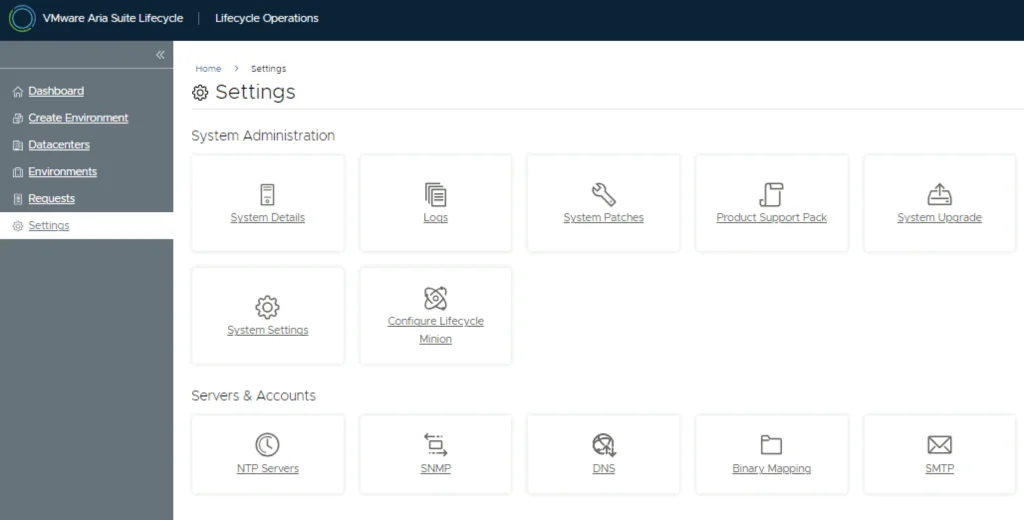
Settings page with options for system administration and server accounts, including upgrade, patches, and accounts management.

Upgrading VMware Aria Automation Config to 8.16.2

In this post i will go over upgrading my 8.x SSC appliance to 8.16.2. As a pre requirement we do need to have VMware Aria Suite Lifecycle upgraded to 8.16. Instructions can be found here. The upgrade does not include the latest PSPACK that contains the 8.16.2 Aria Automation Config release. Instructions to get the PSPACK can be found on my other blog post here. To get started we can go to VMware Aria Suite Lifecycle -> Lifecycle Operations -> Settings -> Binary Mapping. (If you haven’t added your My VMware credentials you will need to do that first by going to VMware Aria Suite Lifecycle -> Lifecycle Operations -> Settings -> My VMware) ...

March 25, 2024 · Cosmin Trif
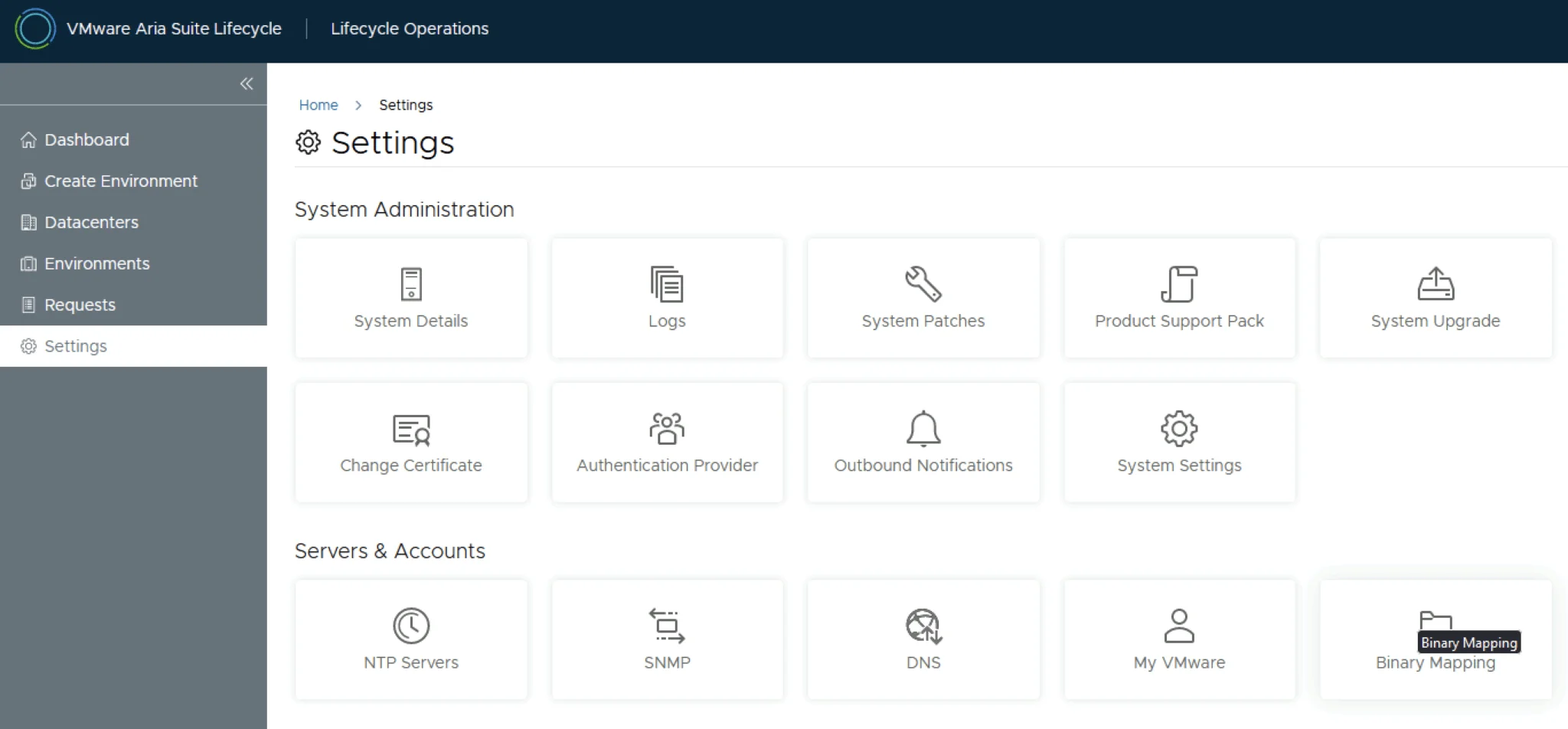
Settings page with options for system administration and servers/accounts.

Upgrading VMware Aria Automation to 8.16.2

In this post i will go over upgrading my 8.x vRA appliance to 8.16.2. As a pre requirement we do need to have VMware Aria Suite Lifecycle upgraded to 8.16. Instructions can be found here. The upgrade does not include the latest PSPACK that contains the 8.16.2 VMware Aria Automation release. Instructions to get the PSPACK can be found on my other blog post here. To get started we can go to VMware Aria Suite Lifecycle -> Lifecycle Operations -> Settings -> Binary Mapping. (If you haven’t added your My VMware credentials you will need to do that first by going to VMware Aria Suite Lifecycle -> Lifecycle Operations -> Settings -> My VMware) ...

March 22, 2024 · Cosmin Trif
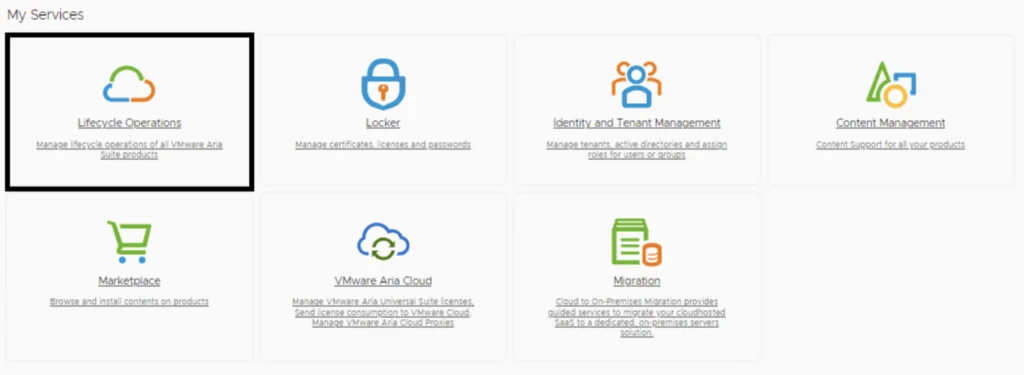
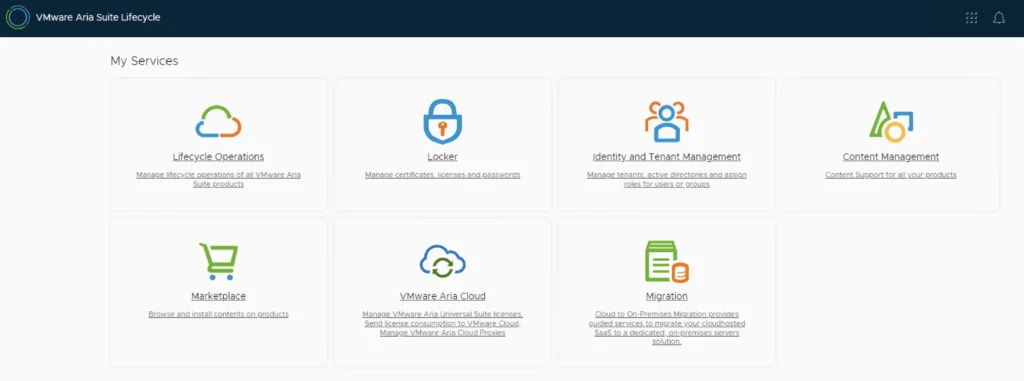
A screenshot shows VMware Aria Suite Lifecycle Operations, Marketplace, Locker, Identity Management, Content Management, and VMware Aria Cloud options.

VMware Aria Suite Lifecycle Product Support Pack (PSPAK) Upgrade

In this guide i will go over the steps of getting an existing 8.x VMware Aria Suite Lifecycle (formerly vRSLCM vRealize Lifecycle Manager) appliance to support the latest product releases available. Here is a great blog that goes in to the details about what the Product Support Pack is https://blogs.vmware.com/management/2019/01/vrslcm-pspak.html. Typically the newer Product Support Pack is included part of the upgrade for LCM, however sometimes there are product releases in between releases where product support packs come in handy. ...

March 22, 2024 · Cosmin Trif

Enhancing vCenter Server Firewall Management with Ansible

In today’s dynamic IT environments, maintaining a secure and efficient infrastructure is paramount. For VMware vSphere administrators, managing the firewall settings on vCenter servers is a critical task that ensures the security of the entire virtualized infrastructure. Ansible, an open-source automation tool, offers a streamlined approach to managing firewall settings across multiple vCenter servers. This blog post will guide you through automating vCenter server firewall configurations using Ansible, showcasing how to apply these changes across multiple servers seamlessly. ...

March 21, 2024 · Cosmin Trif