I was working with a customer, and we were going through William Lam’s post on running VCF 9.1.1 on a single ESX host. They wanted a vSphere Supervisor so they could run VCF Private AI Services later, but only one of their hosts had GPUs in it. Buying two more GPU hosts just to meet a cluster minimum was not an option. So the question was simple: can we add a one-host cluster to the existing VCF domain and run a Supervisor on it?
The answer is yes, with a few workarounds. Before we touched their environment, I built the whole thing end to end in my Holodeck lab. This series is what I did, in the order I did it, including the parts that failed.
Lab and POC only. A one-host cluster has no redundancy, and the SDDC Manager properties below are lab workarounds, not a supported production design. Host maintenance means shutting down everything on that host.
What we are building
- The existing management domain
mgmt-astays as it is: vCentervc-mgmt-a, NSX Managernsx-mgmt-aand the 4-host clustercluster-mgmt-01a. - A new cluster,
cluster-mgmt-02a, with one host (esx-05a) on vSAN ESA, added to that same domain. - A Supervisor with a single control plane VM on the new cluster.
- NSX VPC networking with no edges: a distributed transit gateway connected to one VLAN, plus two Virtual Network Appliances (VNAs) on the existing cluster for NAT and load balancing.
No new vCenter and no new NSX Manager. Everything lands in the management domain we already had.
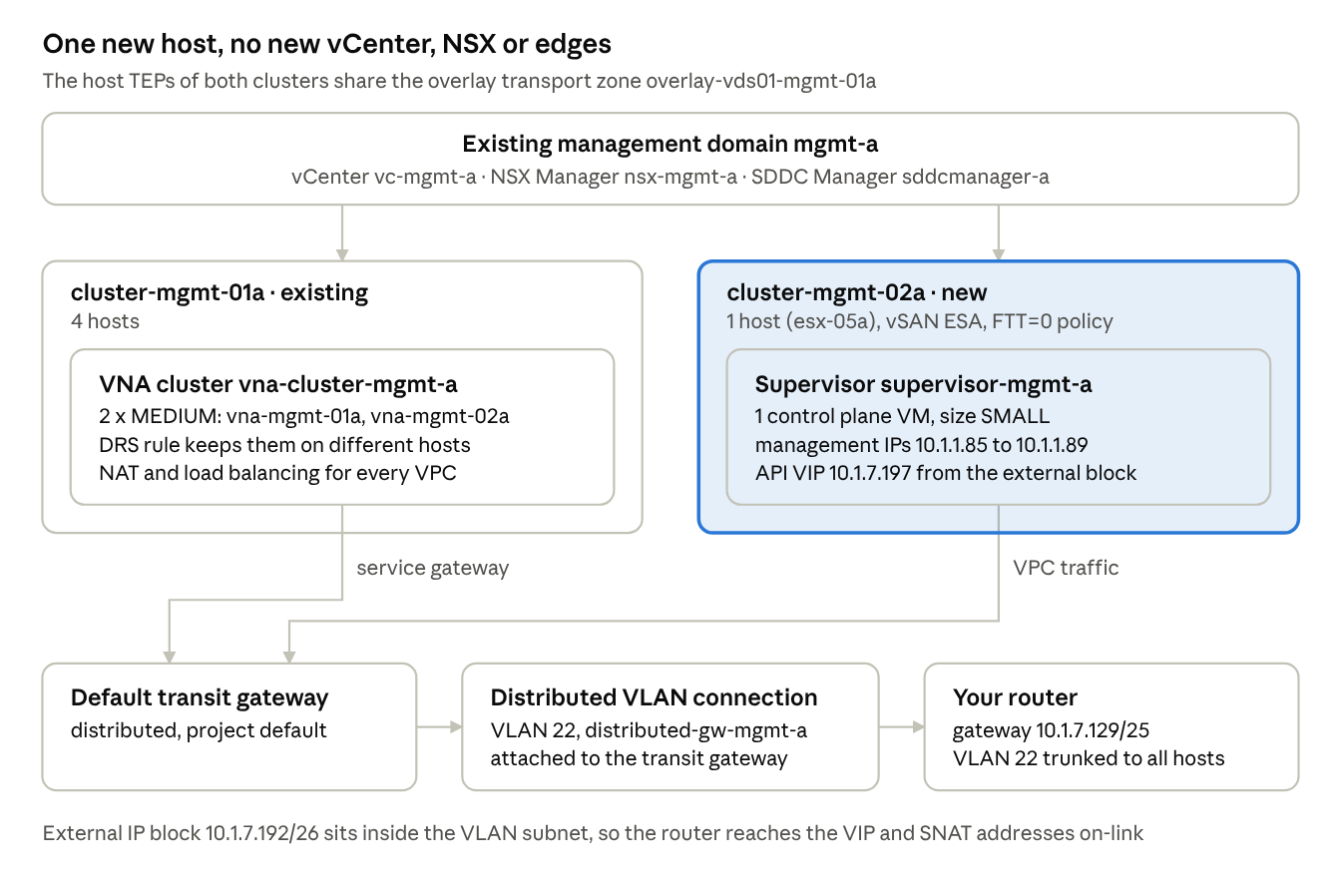
The Supervisor’s VPC traffic leaves through the distributed transit gateway and VLAN 22, with the two VNAs on the existing cluster as its service gateway.
Versions in my lab
| Component | Version |
|---|---|
| SDDC Manager | 9.1.0.0.25371088 |
| vCenter | 9.1.0, build 25370922 |
| NSX | 9.1.0.0.25318225 |
| ESXi | 9.1.0, build 25370933 |
William’s post targets 9.1.1, and my lab was on 9.1.0. The gap is smaller than I expected. His 9.1.1 cluster script still lists the single-host feature flag and the minimum cluster size as manual prerequisites on SDDC Manager, so Step 2 below applies to both versions. Only the three ESA disk-claim keys are specific to 9.1.0. Either way this is API work: per his post, the 9.1.1 UI only supports a single host for a new VCF fleet, and adding a single-host cluster to an existing domain goes through the SDDC Manager API on both versions.
The series
- Part 1 (this post): allowing single-host clusters in SDDC Manager
- Part 2: building the one-host vSAN ESA cluster
- Part 3: NSX VPC networking without edges
- Part 4: enabling a Supervisor with one control plane VM
Before you begin
- Take a memory-less snapshot of the SDDC Manager VM. Take NSX Manager and vCenter backups too; later posts change both.
- Make sure SDDC Manager has no running tasks. The service restart below kills whatever workflow is in flight.
- You need SSH as
vcfand the root password of the SDDC Manager appliance.
Step 1: See what SDDC Manager says today
If we send a one-host cluster spec to POST /v1/clusters/validations now, validation fails right away:
{ "errorCode": "INVALID_NUMBER_OF_HOSTS", "message": "Number of hosts is less than expected. Actual 3, Provided 1" }
SDDC Manager wants three hosts in a vSAN cluster. The properties below lower that to one.
Step 2: Set the properties
These come from William’s VCF 9.1 Installer and SDDC Manager workarounds post. The first two allow a single host, on 9.1.0 and 9.1.1 alike. The last three let vSAN ESA claim disks that are not on the HCL, which nested hosts need on 9.1.0. William’s 09/03 update says the ESA disk-claim workaround is no longer required on 9.1.1.
| File | Key | Why |
|---|---|---|
/home/vcf/feature.properties | feature.vcf.vgl-29121.single.host.domain=true | allows a single-host domain or cluster |
/etc/vmware/vcf/domainmanager/application-prod.properties | bringup.mgmt.cluster.minimum.size=1 | lowers the cluster minimum |
/home/vcf/feature.properties | feature.vcf.vgl-43370.vsan.esa.sddc.managed.disk.claim=true | ESA disk claim without the HCL (9.1.0) |
/etc/vmware/vcf/domainmanager/application-prod.properties | vsan.esa.sddc.managed.disk.claim=true | pairs with the line above |
/etc/vmware/vcf/operationsmanager/application-prod.properties | vsan.esa.sddc.managed.disk.claim=true | pairs with the line above |
Two things I ran into:
- On 9.1.0, both
application-prod.propertiesfiles are symlinks toapplication.propertiesin the same folder. Edit the real file, and back it up first. - In my case, the Holodeck-built SDDC Manager already had the three ESA disk-claim keys. Only the two single-host keys were missing. Check with
grepbefore you append anything, so you don’t end up with duplicate keys.
SSH to SDDC Manager as vcf, then su -:
f=$(readlink -f /etc/vmware/vcf/domainmanager/application-prod.properties)
cp -p "$f" "$f.bak"
cp -p /home/vcf/feature.properties /home/vcf/feature.properties.bak

# add a key only if it is not there yet (the leading line break covers a file that does not end with one)
addkey() { grep -q "^$2=" "$1" || printf '\n%s=%s\n' "$2" "$3" >> "$1"; }

addkey /home/vcf/feature.properties feature.vcf.vgl-29121.single.host.domain true
addkey "$f" bringup.mgmt.cluster.minimum.size 1

# 9.1.0 with disks that are not on the HCL: the three ESA disk-claim keys as well
# o=$(readlink -f /etc/vmware/vcf/operationsmanager/application-prod.properties); cp -p "$o" "$o.bak"
# addkey /home/vcf/feature.properties feature.vcf.vgl-43370.vsan.esa.sddc.managed.disk.claim true
# addkey "$f" vsan.esa.sddc.managed.disk.claim true
# addkey "$o" vsan.esa.sddc.managed.disk.claim true

# check the result
grep -nE 'vgl-29121|vgl-43370' /home/vcf/feature.properties
grep -nE 'bringup.mgmt.cluster.minimum.size|vsan.esa.sddc.managed.disk.claim' "$f"
If a key is already there with a different value, addkey leaves it alone. Fix that line by hand.
Step 3: Restart the SDDC Manager services
echo 'y' | /opt/vmware/vcf/operationsmanager/scripts/cli/sddcmanager_restart_services.sh
The services restart one after another. In my case the API was answering again in under two minutes, while the restart was still going. An API that answers is not the same as a restart that is done, so wait until the script has exited and every service is back:
systemctl is-active commonsvcs domainmanager lcm operationsmanager sddc-manager-ui-app
Step 4: Prove the flag is live
The /v1/features endpoint lists every feature flag with its state. The single-host flag should show enabled: true. This needs PowerShell 7 for -SkipCertificateCheck:
$sddc  = 'sddcmanager-a.site-a.vcf.lab'
$cred  = Get-Credential administrator@vsphere.local
$body  = @{ username = $cred.UserName; password = $cred.GetNetworkCredential().Password } | ConvertTo-Json
$token = (Invoke-RestMethod -Method Post -Uri "https://$sddc/v1/tokens" -Body $body -ContentType 'application/json' -SkipCertificateCheck).accessToken
$h     = @{ Authorization = "Bearer $token" }

# the parentheses matter: the endpoint returns one JSON array, and Invoke-RestMethod passes it down the pipeline as a single object
(Invoke-RestMethod -Uri "https://$sddc/v1/features" -Headers $h -SkipCertificateCheck) |
    Where-Object name -like '*vgl-29121*'
Then run the same cluster validation again. This time it came back SUCCEEDED, and SDDC Manager was ready for a one-host cluster.
Keep the SDDC Manager snapshot until the whole series is done and verified, then delete it.
In the next post we commission the host and build the one-host vSAN ESA cluster, including the first failure of the series.