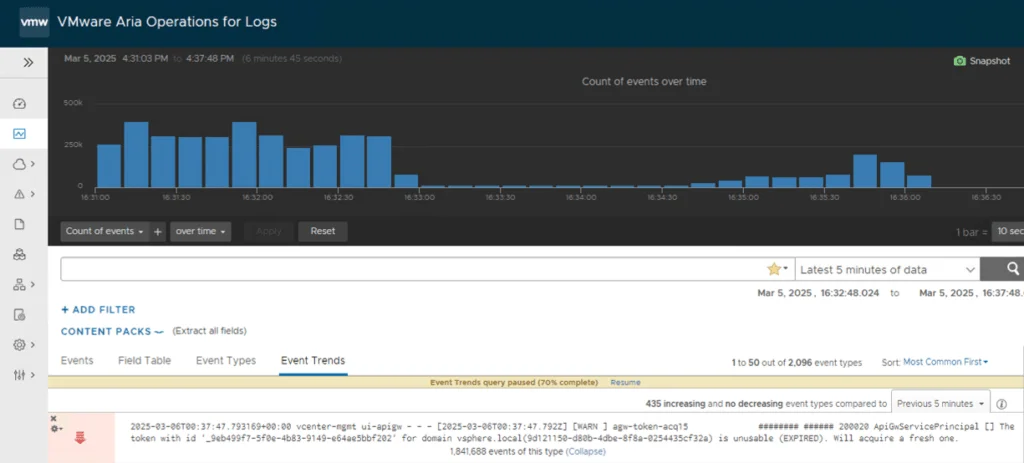
Repeated ApiGwServicePrincipal expired-token warnings in apigw.log are a known vCenter Server 8.0 issue. Broadcom identifies a possible Security Token Service (STS) condition that causes an endless loop in the vsphere-ui service. The permanent resolution is to upgrade to vCenter Server 8.0 Update 3e or a later supported release.
An earlier version of this article recommended changing the rsyslog imfile severity assigned to apigw.log. That does not stop the messages, reduce how often vCenter writes them, or correct the STS/UI loop. The procedure has been removed.
Confirm That This Is the Same Issue
Broadcom KB 378091 applies when vCenter Server 8.0 continuously generates and forwards warnings similar to this entry:
[WARN ] ... ApiGwServicePrincipal [] The token with id '_<token-id>' for domain <sso-domain>(<domain-id>) is unusable (EXPIRED). Will acquire a fresh one.
The local file is:
/var/log/vmware/vsphere-ui/logs/apigw.log

Match the class name and expired-token text, not merely the filename. Other apigw.log errors can have different causes and remedies.
Affected and Fixed Versions
Broadcom scopes KB 378091 to VMware vCenter Server 8.0 systems exhibiting this exact behavior. The KB states that the issue is fixed in vCenter Server 8.0 Update 3e.
If the appliance is older than 8.0 U3e and shows the matching signature, plan an update to U3e or a later supported version that is compatible with the rest of the environment. If the appliance already runs U3e or later and the same messages continue at high volume, do not assume the old defect is the cause; collect current logs and investigate or open a Broadcom support case.
Cause
According to Broadcom, a possible STS issue can place vsphere-ui into an endless loop. The loop repeatedly encounters an expired API Gateway service-principal token, acquires another token, and emits the warning again. This is a product issue rather than a normal token-renewal message that should be hidden by relabeling its forwarded severity.
Permanent Resolution
- Confirm the installed vCenter Server version and build.
- Review interoperability, backup, Enhanced Linked Mode, vCenter HA, and product-specific prerequisites for the target update.
- Create a current file-based backup and follow the supported vCenter Server update procedure for the deployment.
- Upgrade to vCenter Server 8.0 U3e or a later supported release.
- After the update, confirm appliance and service health, then monitor
apigw.logand the remote syslog destination for recurrence of the exact signature.
Use the current Broadcom KB 378091 and the target release notes while planning the change.
Temporary Relief Before the Update
Broadcom notes that restarting vsphere-ui stops the repeated logging temporarily, but the behavior can return after a few days:
service-control --restart vsphere-ui
Treat this only as short-lived relief while the update is scheduled. Restarting the service interrupts active vSphere Client sessions, so perform it in an appropriate change window. KB 378091 does not require restarting vmware-stsd for this issue.
Why Changing Severity Was Not a Fix
The removed procedure changed this rsyslog input setting:
input(type="imfile"
      File="/var/log/vmware/vsphere-ui/logs/apigw.log"
      Tag="ui-apigw"
      Severity="info"
      Facility="local0")
In rsyslog’s imfile module, Severity is the syslog severity assigned to lines read from the file. It is not a content filter and does not change the logging level inside vsphere-ui. Changing it from info to error can cause every forwarded line from that input to be labeled more severely while leaving the original flood intact.
Do not modify /etc/vmware-syslog/vmware-services-vsphere-ui.conf for this defect unless Broadcom Support provides a procedure for the exact deployed build. Use the product fix instead.
Verification
After updating, verify all of the following:
- The appliance reports vCenter Server 8.0 U3e or a later supported build.
service-control --status vsphere-uireports the UI service as running.- The exact
ApiGwServicePrincipalexpired-token warning no longer repeats continuously. - The remote syslog destination no longer receives the matching flood.
- vSphere Client authentication, inventory access, and normal API operations succeed.
If only remote forwarding remains noisy while the local file is quiet, troubleshoot the syslog pipeline separately. If the local file still loops on a fixed build, preserve the logs and engage Broadcom Support rather than suppressing the evidence.