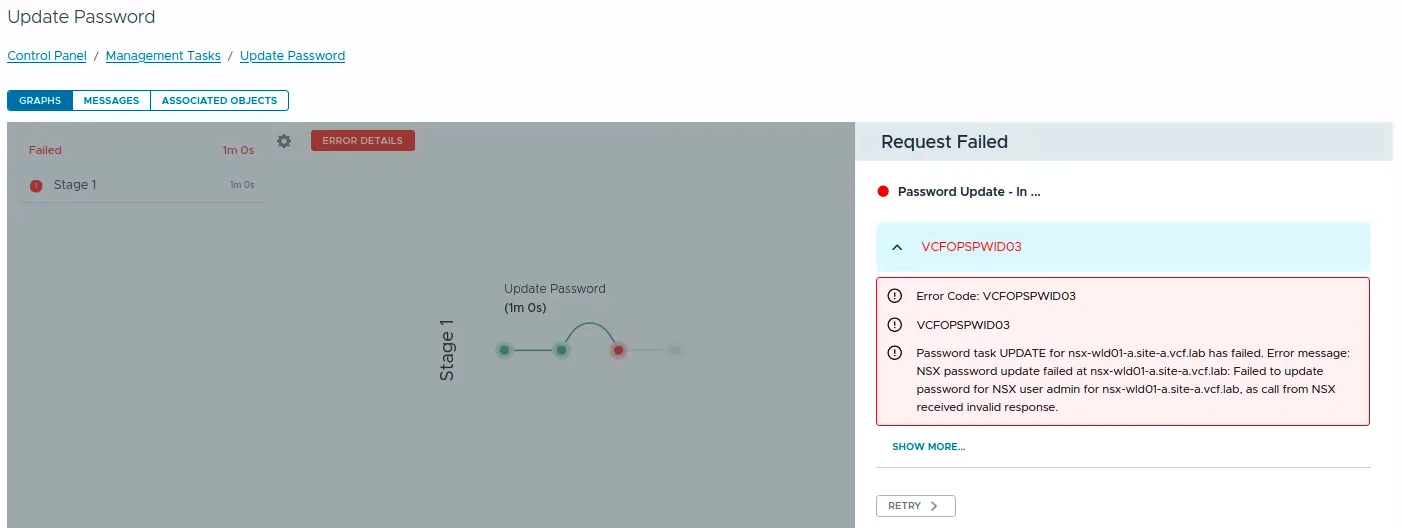
While rotating credentials in the same 9.1 environment I covered in the expired password sync post, an Update of the NSX Manager admin password (credential type API) from VCF Operations kept failing after about a minute with error code VCFOPSPWID03 and a spectacularly unhelpful message: “call from NSX received invalid response.”
The actual cause turned out to be simple, NSX rejected the new password because it had already been used on that manager. This being a lab, I was deliberately recycling a previous password. That goes against best practices, and NSX enforces it. But the way the error surfaces (and the way the reuse policy behaves in this build) is worth writing down.
The Error: “Call from NSX Received Invalid Response”
The password update banner in VCF Operations:

The failed request under Management Tasks, with the task failing in Stage 1 after roughly a minute:

The full error text:
Error Code: VCFOPSPWID03
Password task UPDATE for <nsx-manager-fqdn> has failed. Error message:
NSX password update failed at <nsx-manager-fqdn>: Failed to update password
for NSX user admin for <nsx-manager-fqdn>, as call from NSX received
invalid response.
The same failure is visible on the VCF Operations node in the component-manager-plugin-*.log (in a support bundle it is under logs/; on the appliance under /storage/log/vcops/log/):
[...UpdatePasswordTask.execute] - Executing Update password task...
[...PasswordTaskUtil.monitorPasswordTask] - Password Task : <task-id> Status: IN_PROGRESS
[...PasswordTaskUtil.monitorPasswordTask] - Password Task : <task-id> Status: FAILED
[...Task.injectFailedEventWithLocale] - Injecting task failure event. Error Code : 'VCFOPSPWID03', Retry : 'false'
java.lang.RuntimeException: Password task UPDATE for <nsx-manager-fqdn> has failed. [...]
as call from NSX received invalid response.
“Invalid response” suggests connectivity or certificate problems, and that is exactly the wrong place to go digging. NSX was up, reachable, and answering; it just did not like the request.
Finding the Real Error
Drill into the failed password task and expand the details. The Cause field carries the message that the top-level error flattened away:

Description:        Password update for resource : <nsx-manager-fqdn>,
                    user : admin and credential type : API
Progress Messages:  Failed to get NSX user details.
Cause:              Specified password invalid: Password has been already
                    used. Choose another.
There it is. Not a connectivity issue, not a certificate issue, password reuse. NSX checked the new password against its password history and refused it.
The NSX Password Reuse Policy
Password history on NSX is not the classic PAM /etc/security/opasswd mechanism (mine was empty; that was my first dead end). It is governed by the password_remembrance setting in the node authentication policy, alongside the complexity settings.
Prompt for the admin password once instead of putting it inline: passwords containing ! get mangled by history expansion in interactive shells (set +H disables that in bash; in zsh use unsetopt BANG_HIST), and inline credentials linger in shell history:
set +H
read -rsp "NSX admin password: " NSXPASS; echo
curl -k -u admin:"$NSXPASS" \
  https://<nsx-manager-fqdn>/api/v1/node/aaa/auth-policy
{
  "api_failed_auth_lockout_period": 900,
  "api_max_auth_failures": 5,
  "minimum_password_length": 12,
  "password_remembrance": 5,
  ...
}
Or on the NSX CLI: get password-complexity.
Per the VCF 9.1 NSX documentation, password_remembrance is the number of previous passwords a user cannot reuse. Three details matter here:
- NSX supports one password policy (you cannot exempt a single user like
adminfrom history checks) and the manager password-policy settings synchronize across the management cluster nodes. - In VCF 9.1 the default value is 5 and the documented valid range is 1 to 12 for new configurations. Out of the box, the last five passwords are blocked, which is why my recycled lab password was refused without anyone ever hardening this environment. (The same doc notes that policy settings customized before an upgrade are retained afterward, so upgraded environments may be carrying older values.)
- Older NSX 4.x documentation describes
0as “check disabled”. This 9.1 build rejects0outright, as I found out next.
Note: These examples use
curl -k, which skips TLS certificate verification, fine in a lab where the manager still has a self-signed certificate. In production, drop-kand trust the NSX CA instead. When you are done,unset NSXPASS.
Why You Cannot Just Disable Password History
My first instinct was to turn the history check off entirely, since 0 was the documented disabled/default value in NSX 4.x. Both the CLI (set password-complexity) and the API refuse it in this build:
curl -k -u admin:"$NSXPASS" -X PUT \
  https://<nsx-manager-fqdn>/api/v1/node/aaa/auth-policy \
  -H "Content-Type: application/json" \
  -d '{"password_remembrance": 0}'
{
  "error_code": 255,
  "error_message": "Request body not valid - PasswordComplexityProperties.password_remembrance: value '0' must be greater than or equal to '1'",
  "module_name": "common-services"
}
That matches the 9.1 documentation, which lists a valid range of 1 to 12 for new password_remembrance configurations. In this build there is no accepted way to set 0: the lowest you can configure is 1, which blocks only the single most recent password.
Recommended Fix: Use a New Compliant Password
In production (and honestly in most labs too) the right response to “Password has been already used” is the boring one: leave the history policy alone, pick a new password that satisfies the policy (minimum length, character classes, no dictionary-based words, not among the remembered previous passwords), and re-run the Update action in VCF Operations. The workflow completes, and the appliance password, the stored credential, and the expiration metadata all stay in sync.
The next section covers the lab case, where re-using one specific password was the whole point.
Lab-Only Workaround: Temporarily Lower Password History to 1
Treat this as a reversible change, not a new setting:
Confirm the cause first. The failed task’s
Causemust actually say “Password has been already used”; this workaround fixes nothing else.Record the current value, so you can restore it exactly:
curl -sk -u admin:"$NSXPASS" \
  https://<nsx-manager-fqdn>/api/v1/node/aaa/auth-policy | jq .password_remembrance
- Lower it to
1(the minimum of the valid range) so NSX only blocks reuse of the immediately previous password; anything older becomes acceptable again:
curl -k -u admin:"$NSXPASS" -X PUT \
  https://<nsx-manager-fqdn>/api/v1/node/aaa/auth-policy \
  -H "Content-Type: application/json" \
  -d '{"password_remembrance": 1}'
Read the value back before retrying. API policy changes take about 20 seconds to apply and synchronize across the manager cluster nodes, rerun the
GETfrom step 2 and confirm it returns1.Re-run the Update action in VCF Operations. In my case the task completed with the recycled password, and because the change went through the supported workflow, the appliance password, the stored credential, and the expiration metadata all ended up in sync, no manual vault surgery required.
Restore the exact value you recorded in step 2: not “whatever the default is”:
curl -k -u admin:"$NSXPASS" -X PUT \
  https://<nsx-manager-fqdn>/api/v1/node/aaa/auth-policy \
  -H "Content-Type: application/json" \
  -d '{"password_remembrance": <original-value>}'
Two follow-ups worth knowing:
- Even with
password_remembrance: 1, you can never “change” to the password that is currently set (the workflow requires current and new to differ) and the most recent entry in the history may still be blocked. If you absolutely must land back on a very recently used password (labs again), rotate through one or two throwaway passwords first. - Keep an eye on
api_max_auth_failures: enough failed update attempts with a wrong current password will lock the account on top of everything else.
If Reuse Is Not Your Problem
The same flattened “call from NSX received invalid response” error can hide any password policy rejection, not just reuse. Start with the failed task’s Cause field: in this environment it carried NSX’s real error text, and reading it costs nothing.
If the Cause is still too vague, you can provoke NSX into stating its verbatim reason by attempting the change directly against the node API, with one important caveat:
⚠️ This is not a validation call.
PUT /api/v1/node/users/<userid>is the real password-change API; there is no dry-run. If the request succeeds, the NSXadminpassword has just changed outside VCF Operations: the Fleet vault and SDDC Manager still hold the old credential, and every workflow that authenticates to NSX inherits that drift until you rotate once more through the VCF Operations Update action (entering the just-set password as the current one). Only run this with a password you actually intend to keep.
First find the user ID (the built-in admin is typically 10000):
curl -k -u admin:"$NSXPASS" \
  https://<nsx-manager-fqdn>/api/v1/node/users
Then attempt the change, letting jq build the payload so special characters survive the shell:
read -rsp "New password: " NEWPASS; echo

jq -nc --arg old "$NSXPASS" --arg new "$NEWPASS" \
  '{password: $new, old_password: $old}' |
curl -k -u admin:"$NSXPASS" -X PUT \
  -H "Content-Type: application/json" -d @- \
  https://<nsx-manager-fqdn>/api/v1/node/users/<userid>

unset NEWPASS
Whatever check is failing comes back in plain text: reuse, minimum length, character classes, or the Linux PAM dictionary baseline. That last one deserves a mention: the docs state the default password complexity rules “as enforced by the Linux PAM module” always apply on top of the configurable settings, and there is no auth-policy knob to turn them off. Dictionary-based passwords (including the <VendorName>1!-style classics every lab inherits) get rejected on API-driven changes even when they satisfy length and character-class rules. If the error says “dictionary word” or “too simplistic,” no password_remembrance setting will save you; pick a password without recognizable words.
If the direct call succeeds but the VCF Operations workflow still fails, then you genuinely have a workflow-side problem, and the component-manager-plugin-*.log on the VCF Operations node is the place to look, but remember the vault is now behind, so plan one more rotation through Update once the workflow is fixed.
Verification
After the update task completes:
- The Update Password request in Management Tasks completes successfully.
- The new password authenticates against the NSX API: a quick policy read doubles as a credential check (prompt again so the variable holds the new password, and
unset NSXPASSwhen done):
read -rsp "New NSX admin password: " NSXPASS; echo
curl -k -u admin:"$NSXPASS" \
  https://<nsx-manager-fqdn>/api/v1/node/aaa/auth-policy
- UI login to NSX Manager with the new password works.
password_remembranceis restored to the exact value you recorded before the workaround, not whatever the troubleshooting session left behind.- The password entry in Fleet shows a healthy status and refreshed expiration metadata, the account query from the expired password sync post works for this.
Final Notes
The error message is the villain of this story. “Call from NSX received invalid response” sent me looking at connectivity and certificates, when the task details had the real answer one click deeper: “Password has been already used. Choose another.” When a VCF Operations password task fails with VCFOPSPWID03, expand the task and read the Cause before touching anything else.
The second lesson is that the NSX build in VCF 9.1 rejects disabling password history, new password_remembrance values are limited to 1 through 12, with a default of 5. In a lab, temporarily dropping it to 1 is a reasonable escape hatch for recycling a password, as long as you restore the original value afterward. In production, reusing passwords is the actual problem, use a new compliant password and keep the history policy strict.