On Friday, October 30, I was checking that everything in my lab sent its logs to the collector. Both ESXi hosts were sending, but one had gone from about 18,000 syslog lines an hour to between 68,000 and 81,000. Most of the extra traffic came from dcbd, repeating ** STORE: TOO_MANY_NGHBRS.
By then, each host was generating roughly 50,000 dcbd lines an hour. Neither host used the Data Center Bridging features the daemon was trying to negotiate. Stopping and disabling the unused service ended the flood without an immediate reboot; I then rebooted the standby host to verify persistence.
The useful clue was what happened to the other host. When I stopped dcbd on esx-02a, the untouched esx-01a also dropped from more than 900 lines a minute to about a dozen. Here is the investigation, the workaround, and what I checked before applying it to the host running my VMs.
Versions in My Lab
| Component | Version or configuration |
|---|---|
| ESXi | 9.1.1, build 25714478, on both hosts |
| NIC | Mellanox ConnectX-4 Lx, MT27710 family; two ports per host at 10 Gb/s |
| NIC driver | nmlx5_core 4.25.1.2, inbox driver |
| NIC firmware | 14.32.2104 |
| Network | A managed switch with an unmanaged 10G switch connected to one port |
The results below apply to this lab configuration.
All times below are Eastern Daylight Time, UTC-4, unless they appear inside a log entry. The log timestamps are UTC. The investigation covers October 29–31, 2026.
Before You Begin
Do not disable dcbd until you have confirmed that the host has no DCB dependencies. FCoE and RoCE storage designs, including iSER, NVMe over RDMA, and vSAN over RDMA, need particular attention. If the host uses these technologies, investigate its DCBX configuration with the relevant vendor guidance before changing the service.
In my lab, PFC was disabled, its counters were zero on every port, no storage adapter used the driver’s vmrdma0 or vmrdma1 devices, and neither host ran vSAN. The storage configuration mattered as much as the counters: zero PFC frames alone do not prove that RDMA is unused.
You need root access through SSH or the ESXi Shell. Keep out-of-band console access available, and start with a host whose workloads you can move or stop. I used the empty standby host first.
Step 1: Identify the dcbd Log Flood
The host writes these messages to /var/log/syslog.log. The first entries in esx-01a’s retained logs appeared on Thursday afternoon:
2026-10-29T18:55:04.448Z -ERROR dcbd 2099418 [esx@4413] [error]    ** set TOO_MANY_NGHBRS
2026-10-29T18:55:04.448Z -ERROR dcbd 2099418 [esx@4413] [error]    ** set tooManyNghbrsTimer (CEE)
2026-10-29T18:55:06.060Z -ERROR dcbd 2099418 [esx@4413] [error]    ** set TOO_MANY_NGHBRS
2026-10-29T18:55:06.060Z -ERROR dcbd 2099418 [esx@4413] [error]    ** set tooManyNghbrsTimer (CEE)
During the flood, the STORE variant arrived in bursts about 20 milliseconds apart:
2026-10-30T17:00:00.011Z -ERROR dcbd 2099418 [esx@4413] [error]    ** STORE: TOO_MANY_NGHBRS
2026-10-30T17:00:00.034Z -ERROR dcbd 2099418 [esx@4413] [error]    ** STORE: TOO_MANY_NGHBRS
2026-10-30T17:00:00.052Z -ERROR dcbd 2099418 [esx@4413] [error]    ** STORE: TOO_MANY_NGHBRS
2026-10-30T17:00:00.071Z -ERROR dcbd 2099418 [esx@4413] [error]    ** STORE: TOO_MANY_NGHBRS
2026-10-30T17:00:00.086Z -ERROR dcbd 2099418 [esx@4413] [error]    ** STORE: TOO_MANY_NGHBRS
There were also groups of three messages about priority groups, PFC, and FCoE:
2026-10-30T23:38:46.273Z -ERROR dcbd 2099418 [esx@4413] [error]    Message ID(19) MSG_ERR_PG_NONOPER: {98 03 9b xx xx xx}
2026-10-30T23:38:46.273Z -ERROR dcbd 2099418 [esx@4413] [error]    Message ID(18) MSG_ERR_PFC_NONOPER: {98 03 9b xx xx xx}
2026-10-30T23:38:46.273Z -ERROR dcbd 2099418 [esx@4413] [error]    Message ID(2) MSG_ERR_APP_NONOPER: {98 03 9b xx xx xx} (FCoE)
The value in braces is a MAC address, masked here. On esx-01a, these messages always identified vmnic0. On esx-02a, they identified vmnic1. Both ports connected to the unmanaged 10G switch.
I counted messages whose application name was dcbd, rather than every line containing the word. A text search also catches SSH command echoes, watchdog events, and boot messages, which would inflate the count.
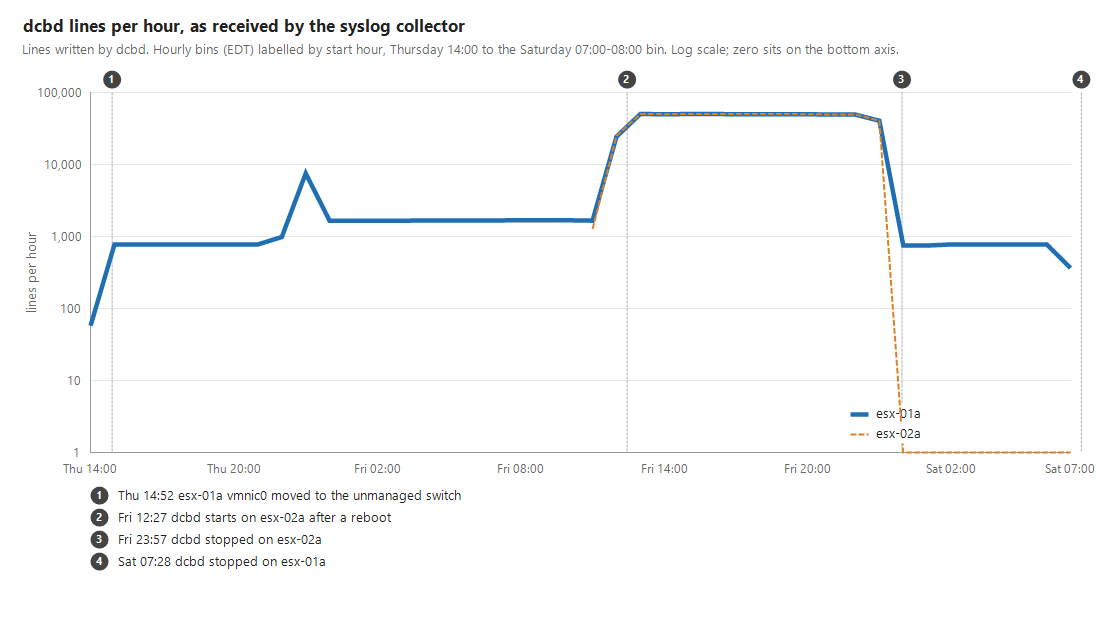
Hourly bins are labeled by their start time. The final bin covers Saturday 07:00–08:00 and includes the 07:28 stop on esx-01a. The chart uses a logarithmic scale; zero values are drawn on the bottom axis.
esx-01a initially produced about 800 dcbd lines an hour, later about 1,700. On Friday at 12:27, both hosts began climbing toward 50,000 an hour each. Between 13:00 and 19:00, dcbd accounted for about 68% of esx-01a’s logs and 83% of esx-02a’s.
Step 2: Check DCB Status and Storage Dependencies
Data Center Bridging adds features such as Priority Flow Control (PFC), Enhanced Transmission Selection (ETS), and application priority mappings to Ethernet. DCBX exchanges those settings with a directly connected peer using LLDP. NVIDIA documents software DCBX support in its ESXi inbox drivers.
dcbd is ESXi’s Data Center Bridging daemon. To inspect a port, run:
esxcli network nic dcb status get -n vmnic0
Repeat the check for the other physical NICs. In my case, DCB was enabled on every port, but PFC was disabled and all PFC counters were zero.
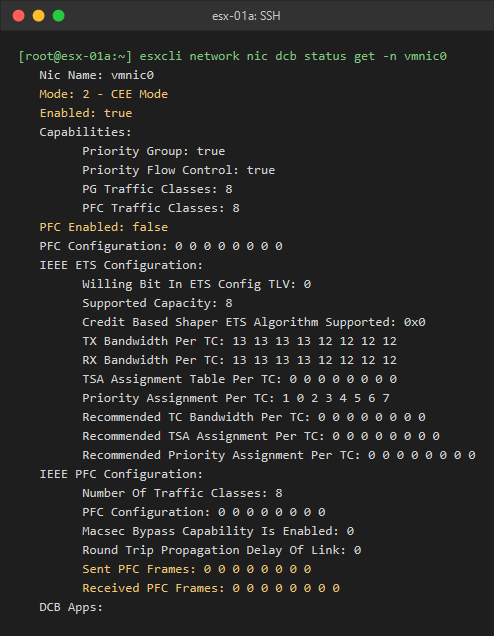
Rendered from captured command output. This read was taken after the service stopped; the displayed mode, enabled state, and PFC counters matched the earlier checks.
Mode: 2 - CEE Mode identifies the older CEE form of DCBX. Enabled: true does not mean that a storage workload is using it, and PFC Enabled: false does not establish that every RDMA dependency is absent.
These read-only commands help inventory the RDMA and storage configuration:
esxcli rdma device list
esxcli storage core adapter list
esxcli nvme adapter list
esxcli nvme controller list --protocol RDMA
The RDMA command reference describes the logical device inventory; the NVMe reference includes adapter and transport-specific controller lists. Review these alongside the actual storage design and vSAN configuration. The existence of a vmrdma device shows a capability, not necessarily an active workload.
With that context, this is how I read the messages:
| Message | Interpretation in this investigation |
|---|---|
** set TOO_MANY_NGHBRS | Consistent with the DCBX agent detecting multiple neighbors on a link |
** set tooManyNghbrsTimer (CEE) | A timer associated with that CEE neighbor condition |
** STORE: TOO_MANY_NGHBRS | The repeated neighbor condition that dominated the flood; I found no public explanation of the STORE label |
MSG_ERR_PG_NONOPER, MSG_ERR_PFC_NONOPER, MSG_ERR_APP_NONOPER | Reports that priority groups, PFC, or the named application are not operational for the port |
Every quoted dcbd entry carries -ERROR, including the shutdown entries later in this post, so severity alone was not a useful measure of impact.
Step 3: Trace the LLDP Neighbors
Before any change, the managed switch’s LLDP table showed entries from three devices on the single port leading to the unmanaged switch: esx-01a, esx-02a, and a third server.
Ordinary LLDP frames addressed to 01:80:c2:00:00:0e are meant to stay on their local link. Standards-conforming MAC bridges do not forward them, as described in the Wireshark LLDP reference.
Seeing those downstream devices on one managed-switch port indicated that LLDP advertisements were crossing the unmanaged switch. That gave me a plausible explanation for the multiple-neighbor errors on the two ESXi ports.
The first TOO_MANY_NGHBRS entry on esx-01a was at 14:55 on Thursday, October 29. A few minutes earlier, I had moved vmnic0 from a direct managed-switch connection to the new unmanaged switch. The retained host logs went back about six weeks and contained no earlier occurrence.
Step 4: Compare the Flood With the Reboots
Late on Thursday, around the time I installed ESXi on esx-02a, esx-01a logged two short bursts of 510–693 lines a minute. It then settled at roughly twice its earlier rate. The sustained flood began during Friday’s reboots.
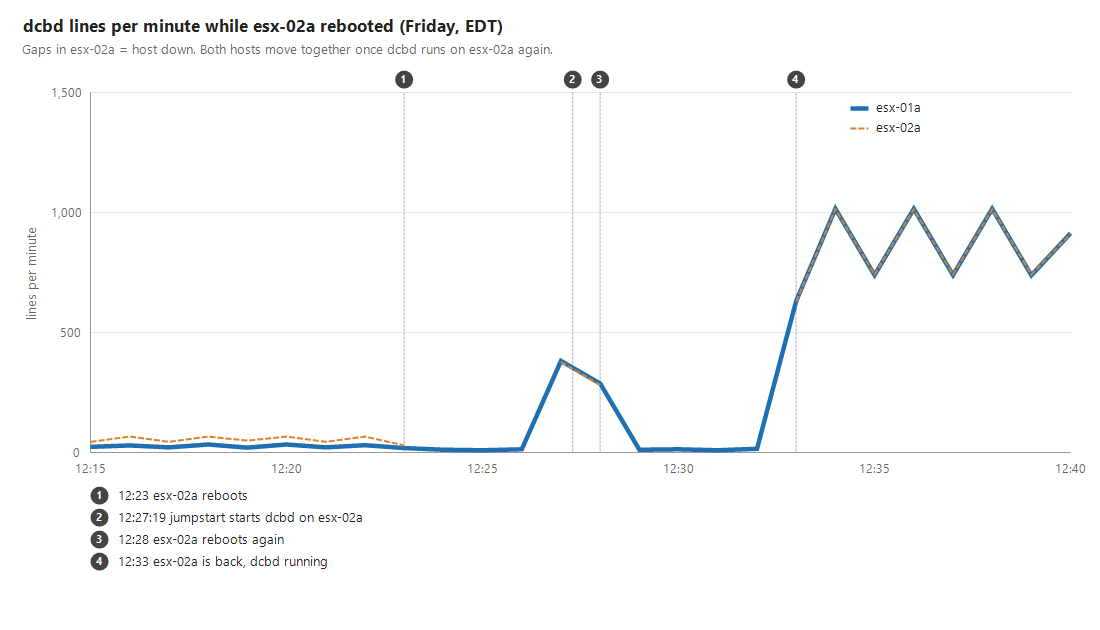
| Friday, October 30 | Observation |
|---|---|
| While esx-02a was down | esx-01a fell to 10–16 dcbd lines a minute |
| 12:27:19 | Jumpstart started dcbd on esx-02a; both hosts’ counts rose within the same minute |
| 12:29–12:32 | esx-02a was down again during a second reboot |
| 12:33:12 onward | dcbd was running again on esx-02a, and both hosts settled into closely matching high counts |
From 12:33, the counts were almost identical: 1,016 and 1,014 lines one minute, then 740 and 742 the next. The pattern lasted for about eleven hours.
I could not establish why the Friday boots triggered a sustained flood when Thursday’s installation did not. In the observed windows, the high rate appeared while both daemons were running and subsided when esx-02a’s daemon was absent. That points to an interaction between them, but a packet capture would be needed to establish the exchange itself.
What the Vendor Articles Cover
My October 31 search did not turn up a Broadcom, NVIDIA, or Dell article documenting TOO_MANY_NGHBRS. I did find several related cases:
| Reference | Documented issue and relevance |
|---|---|
| Dell KB 000227431: PowerFlex ESXi syslog full of dcbd messages | Stops and disables dcbd on PowerFlex hosts where DCB is unused. This supplied the service-management procedure I tested. |
| Broadcom KB 433257: Host not responding with DCBD errors | Covers ESXi 8.x, set_hw_pg: Failed, and NIC driver/firmware compatibility. Stopping dcbd is a temporary workaround. |
| Broadcom KB 454866: DCBD failures and Dell BOSS degradation | Covers an ESXi 8.0 Update 3 scenario with host unresponsiveness and boot-device degradation. |
| Broadcom KB 393760: Excessive multiline dcbd logs | Covers verbose logging before ESXi 7.0 Update 3l, a different problem from this 9.1.1 incident. |
| Broadcom KB 417909: Hardware flow control and PFC | Discusses nmlx5_core PFC parameters and the reboot needed for module-parameter changes. |
None describes this exact error on ESXi 9.1.1, and my hosts did not have the set_hw_pg errors in the other cases. Dell’s article applies to PowerFlex; using its commands in this lab does not make it a vendor-confirmed fix for this incident.
Step 5: Choose a Workaround
Because my hosts had no DCB dependency, I chose to stop the unused service. I considered these options:
| Option | Effect | Reboot required | Tested here |
|---|---|---|---|
Stop and disable dcbd | Stops the daemon and its software DCBX activity | No immediate reboot | Yes, including persistence checks |
Set the nmlx5_core parameter dcbx=0 | Disables DCBX through the driver’s configuration | Yes, to load the changed parameters | No |
| Apply an ESXi log filter | Suppresses matching log output; the daemon continues running | No | No |
Correcting the LLDP behavior or changing the cabling is another avenue to investigate, especially where DCB is required. I did not test a switch replacement or recabling during this change.
On these hosts, the driver’s parameter help described dcbx as follows:
dcbx    Set DCBX operational mode
        Values : 0 - Disabled, 1 - Enabled Hardware Mode, 2 - Enabled Software Mode, 3 - If Hardware Mode is supported Enable Hardware Mode, else Enable Software Mode
        Default: 3
If you investigate that alternative, preserve the existing module parameters. esxcli system module parameters set replaces the configured parameter string unless --append is specified. I did not change that parameter in this lab.
Step 6: Stop and Disable dcbd on One Host
I started with esx-02a, the standby host with no VMs running. After confirming its DCB dependencies were absent, I ran:
/etc/init.d/dcbd stop
chkconfig dcbd off
/sbin/auto-backup.sh
stop ends the running service. chkconfig disables its startup, and auto-backup.sh saves the host configuration immediately. Broadcom describes the normal hourly configuration-save cycle in KB 306902. Check that the save completes successfully.
Then verify both the running state and the startup setting:
/etc/init.d/dcbd status
chkconfig --list | grep dcbd
The expected results are dcbd is not running and dcbd off.
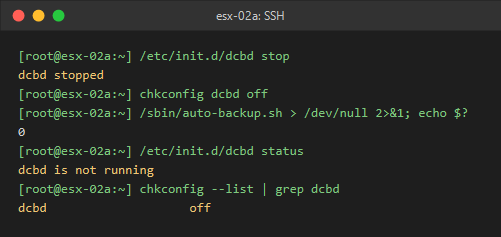
Rendered from captured command output. The command blocks above leave the backup output visible so any failure can be investigated.
The init script also removed the service from the watchdog. /var/log/watchdog.log recorded:
2026-10-31T03:57:33.689Z -INFO watchdog 2123616 [esx@4413] Forgetting watchdog dcbd (saved in /var/run/vmware/watchdog/.dcbd)
2026-10-31T03:57:33.689Z -INFO watchdog 2123616 [esx@4413] Terminating dcbd pid 2099305 with signo 15
The stop happened at 23:57 on Friday. In the next minute, esx-02a’s dcbd count reached zero and esx-01a returned to 10–16 lines a minute, even though I had not changed esx-01a.
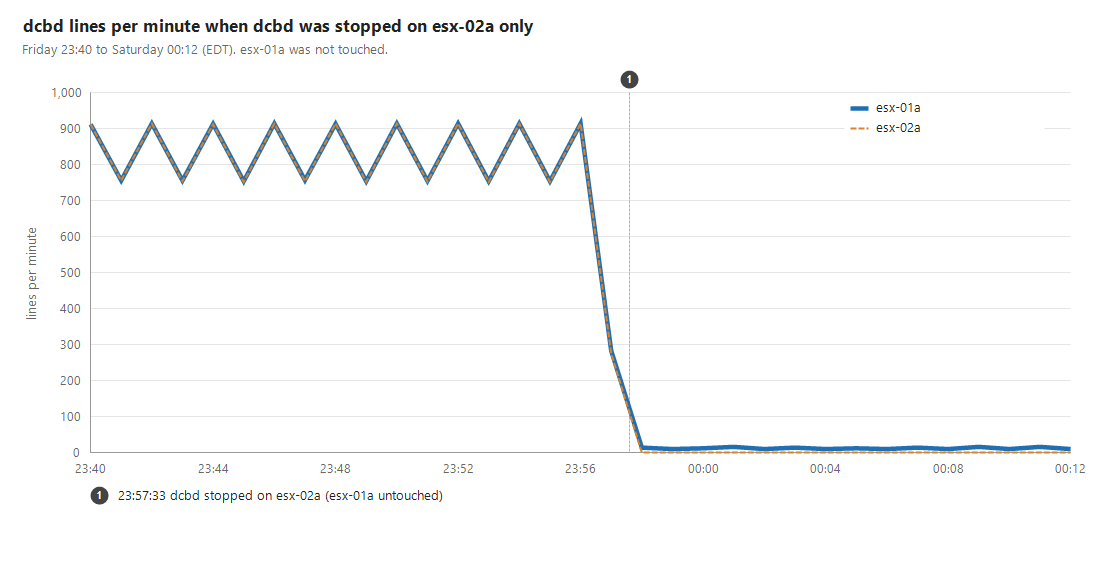
Within two minutes, one LLDP entry associated with esx-02a’s vmnic1 also disappeared from the managed switch. Together with the log counts, this strengthened the case for a DCBX interaction across the unmanaged switch.
Before continuing, I checked both 10 Gb links, the host’s vCenter connection and alarms, and vMotion-network pings in both directions. Those checks passed.
Step 7: Verify Persistence and Networking
I put esx-02a in maintenance mode and rebooted it. It returned to vCenter about four and a half minutes later. The service and startup checks still showed:
[root@esx-02a:~] /etc/init.d/dcbd status
dcbd is not running
[root@esx-02a:~] chkconfig --list | grep dcbd
dcbd                    off
Jumpstart did write messages containing the service name during boot:
2026-10-31T04:03:40.437Z -ERROR Jumper2 2098056 [esx@4413] Failed to remove bin/dcbd from cleanup list.
2026-10-31T04:03:40.438Z -ERROR Jumper2 2098056 [esx@4413] Failed to remove etc/init.d/dcbd from cleanup list.
2026-10-31T04:03:40.440Z -ERROR Jumper2 2098056 [esx@4413] Failed to remove etc/vmware/secpolicy/domains/dcbdDom from cleanup list.
The same messages were present during Friday’s boots, when dcbd was enabled and started normally. They were not evidence that disabling the service had failed. The service status and startup setting were the checks that mattered.
I also tested the network paths:
| Test | Observed result |
|---|---|
| 30-second failover from the primary uplink to the backup | One ping lost at switchover |
| vMotion-network pings over the backup uplink | Passed |
| vMotion of a test VM to esx-02a and back | Completed in about four seconds each way |
By the end of the investigation, dcbd had remained disabled through two reboots of esx-02a after the change.
Step 8: Apply the Change to the Active Host
esx-01a ran my lab’s active VMs, so I waited for a quiet window before applying the same three commands at 07:28 on Saturday. Its last dcbd entries were:
2026-10-31T11:28:01.282Z -ERROR dcbd 2099418 [esx@4413] [error]    remove_adapter: dcb support found
2026-10-31T11:28:01.282Z -ERROR dcbd 2099418 [esx@4413] [error]    rem_mac: mac not found
esx-02a had written the same pair during its stop. Neither daemon emitted further entries after shutdown.
In the half hour after the esx-01a change, the host logs showed no link-state changes on vmnic0 or vmnic1 and no hostd or vpxa disconnects. vCenter recorded no VM-scoped events in that window. I did not reboot esx-01a for this change.
Re-enabling dcbd and Checking After Upgrades
Stopping the daemon did not change the NIC’s reported Enabled: true DCB flag. That state came from the driver; stopping dcbd was not equivalent to disabling every DCB feature in the NIC.
If DCB becomes necessary later, review the complete host and switch configuration before enabling the service again. The service rollback is:
chkconfig dcbd on
/etc/init.d/dcbd start
/sbin/auto-backup.sh
I did not execute this rollback during the investigation. Starting the daemon alone is not a complete RoCE or FCoE configuration procedure.
After an ESXi upgrade or rebuild, check the running state and chkconfig setting again. The init script is enabled by default, so I would expect a fresh installation to restore the service, but I did not test that scenario.
Result
Once the flood stopped, total syslog volume returned to roughly 19,000–21,000 lines an hour on esx-01a and 6,000–8,000 on esx-02a. During the flood, those ranges had been 68,000–81,000 and 56,000–72,000 respectively. After I stopped the remaining daemon on Saturday morning, both hosts produced zero new dcbd entries in the observed period.
The reason for the rapid logging remains unconfirmed. In this lab, the flood appeared while both daemons ran behind the unmanaged switch, and stopping the unused service ended it.