Settings page with options like System Details, Logs, System Patches, and Authentication Provider.

Upgrading vRLI (vRealize Log Insight) to 8.6 via vRSLCM

In this post I will go over upgrading my 8.x vRLI appliance to 8.6 using vRSLCM (vRealize Suite Lifecycle Manager). As a pre requirement we do need to have vRSLCM (vRealize Lifecycle Manager) upgraded to 8.6. Instructions can be found here. The upgrade already includes the latest Product Support Pack so an update to the Product Support Pack is not required. Downloading the Upgrade Binary via Binary Mapping To get started we can go to vRealize Lifecycle Manager -> Lifecycle Operations -> Settings -> Binary Mapping. (If you haven’t added your My VMware credentials you will need to do that first by going to vRealize Lifecycle Manager -> Lifecycle Operations -> Settings -> My VMware) ...
October 25, 2021 · Cosmin Trif
Settings page for vROPS upgrade via vRSLCM, showing options like System Details, Logs, and System Upgrade.

Upgrading vROPS (vRealize Operations Manager) to 8.6 via vRSLCM

In this post I will go over upgrading my 8.x vROPS appliance to 8.6 using vRSLCM (vRealize Suite Lifecycle Manager). As a pre requirement we do need to have vRSLCM (vRealize Lifecycle Manager) upgraded to 8.6. Instructions can be found here. The upgrade already includes the latest Product Support Pack so an update to the Product Support Pack is not required. Adding the vROPS 8.6 Upgrade Binaries To get started we can go to vRealize Lifecycle Manager -> Lifecycle Operations -> Settings -> Binary Mapping. (If you haven’t added your My VMware credentials you will need to do that first by going to vRealize Lifecycle Manager -> Lifecycle Operations -> Settings -> My VMware) ...
October 25, 2021 · Cosmin Trif
Settings page for vRA 8.6 upgrade, showing options like System Details, Logs, and Authentication Provider.

Upgrading vRA (vRealize Automation) to 8.6

In this post I will go over upgrading my 8.x vRA appliance to 8.6. As a pre requirement we do need to have vRSLCM (vRealize Lifecycle Manager) upgraded to 8.6. Instructions can be found here. The upgrade already includes the latest Product Support Pack so an update to the Product Support Pack is not required. Downloading the Upgrade Binaries To get started we can go to vRealize Lifecycle Manager -> Lifecycle Operations -> Settings -> Binary Mapping. (If you haven’t added your My VMware credentials you will need to do that first by going to vRealize Lifecycle Manager -> Lifecycle Operations -> Settings -> My VMware) ...

October 23, 2021 · Cosmin Trif
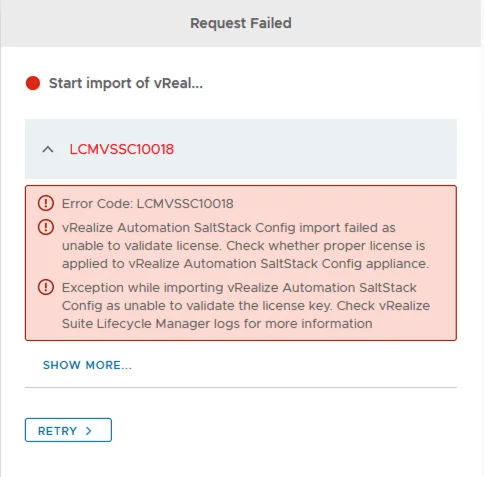
Error LCMVSSC10018: vRealize Automation SaltStack Config import failed due to license validation issue.

Error Code: LCMVSSC10018

If you like me deployed SSC (SaltStack Config) outside of LCM and are now trying to import it under LCM management you probably ran in to the following error: Error Code: LCMVSSC10018 vRealize Automation SaltStack Config import failed as unable to validate license. Check whether proper license is applied to vRealize Automation SaltStack Config appliance. Exception while importing vRealize Automation SaltStack Config as unable to validate the license key. Check vRealize Suite Lifecycle Manager logs for more information ...

October 4, 2021 · Cosmin Trif
Settings page for vRA 8.5 upgrade, showing various system and server management options.

Upgrading vRA (vRealize Automation) to 8.5

In this post I will go over upgrading my 8.x vRA appliance to 8.5. As a pre requirement we do need to have vRSLCM (vRealize Lifecycle Manager) upgraded to 8.4.1. Instructions can be found here. You will also need to apply the latest Product Support Pack (version 8.4.1.4). The instructions can be found here. Downloading the vRA 8.5 Upgrade Binaries To get started we can go to vRealize Lifecycle Manager -> Lifecycle Operations -> Settings -> Binary Mapping. (If you haven’t added your My VMware credentials you will need to do that first by going to vRealize Lifecycle Manager -> Lifecycle Operations -> Settings -> My VMware) ...

August 20, 2021 · Cosmin Trif
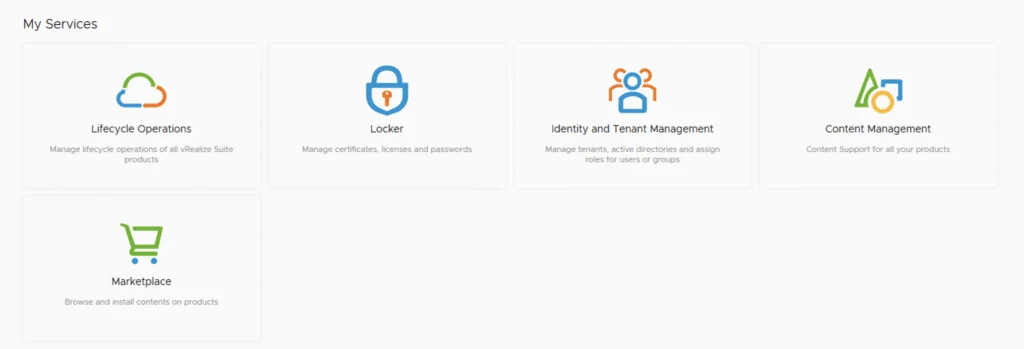
UI showing lifecycle operations, locker, identity management, content, and marketplace options.

Patching vRSLCM (vRealize Lifecycle Manager) to 8.4.1.1 Patch 1

In this guide I will go over the steps of getting an existing 8.x vRSLCM appliance upgraded to the latest 8.4.1 Patch 1 release. The release notes can be found here. If you are not yet on 8.4.1.1, I covered upgrading vRSLCM to 8.4.1.1 in a previous post. The first step is to lo in to vRealize Suite Lifecycle Manager under the Lifecycle Operations section ...

August 4, 2021 · Cosmin Trif
Settings page with options for System Administration and Servers & Accounts.

Upgrading vRA (vRealize Automation) to 8.4

In this post I will go over upgrading my 8.x vRA appliance to 8.4. As a pre requirement we do need to have vRSLCM (vRealize Lifecycle Manager) upgraded to 8.4. Instructions can be found here Adding the Upgrade Binary in vRSLCM To get started we can go to vRealize Lifecycle Manager -> Lifecycle Operations -> Settings -> Binary Mapping. (If you haven’t added your My VMware credentials you will need to do that first by going to vRealize Lifecycle Manager -> Lifecycle Operations -> Settings -> My VMware) ...

May 19, 2021 · Cosmin Trif
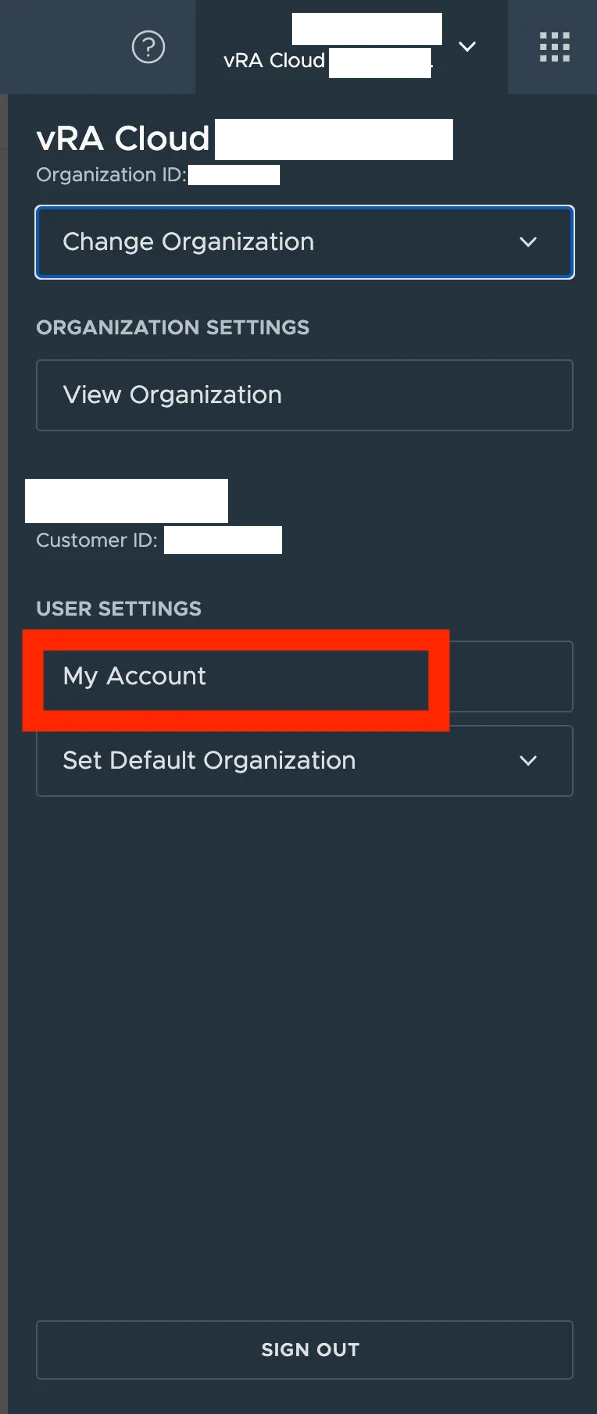
VRA Cloud dashboard with options to change organization, view settings, and manage user account.

vRA cloud API getting started

I wanted to keep track of what needs to be done prior to actually being able to query API on vRA cloud. I’ve been having a hard time finding the documentation I needed in the past First step is to get an API token for the specific username. We can do this by going to My account under User Settings in vRA Cloud ...

February 26, 2021 · Cosmin Trif
Running an update installer for vIDM 3.3.4 online upgrade.

vIDM 3.3.4 online upgrade

I wanted to go through the upgrade of vIDM 3.3.4 outside of lifecycle manager. I wanted to do it using the online upgrade via the console. Official documentation can be found here. First step is to log on to the console via the root credentials and upgrade the upgrade manager to 3.3.4 /usr/local/horizon/update/updatemgr.hzn updateinstaller Set the upgrade version that you are upgrading from in my case was 3.3.2 so I ran ...

February 17, 2021 · Cosmin Trif
Settings page for vRA 8.3 upgrade, showing various administration and server management options.

Upgrading vRA (vRealize Automation) to 8.3

In this post I will go over upgrading my 8.2 vRA appliance to 8.3. As a pre requirement we do need to have vRSLCM (vRealize Lifecycle Manager) upgraded to 8.3. Instructions can be found here Downloading the vRA 8.3 Binaries To get started we can go to vRealize Lifecycle Manager -> Lifecycle Operations -> Settings -> Binary Mapping. (If you haven’t added your My VMware credentials you will need to do that first by going to vRealize Lifecycle Manager -> Lifecycle Operations -> Settings -> My VMware) ...

February 4, 2021 · Cosmin Trif