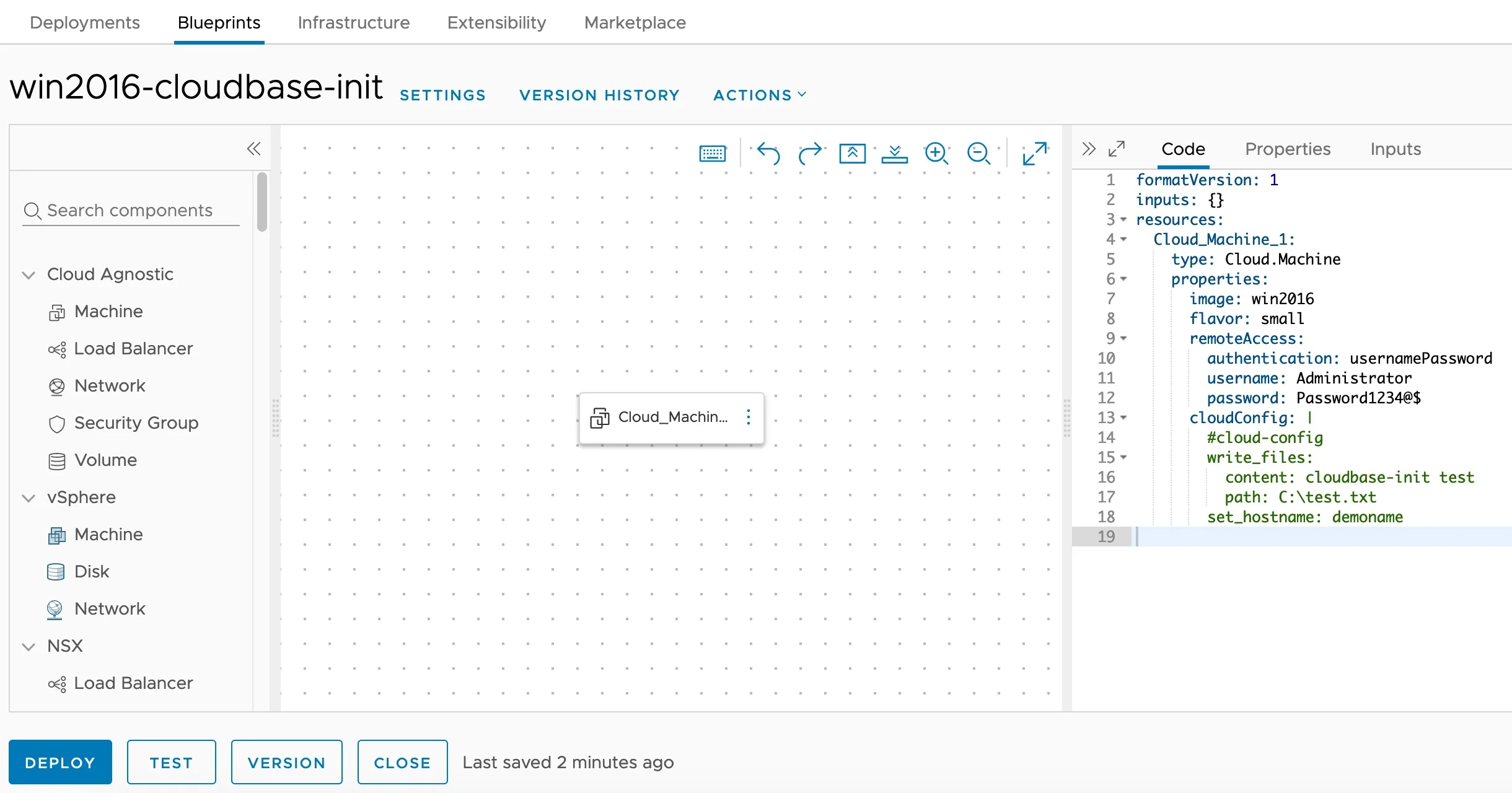
Cloudbase-Init Windows Guest Customization — Blueprint Editor

Installing and Configuring Cloudbase-Init on Windows for VCF Automation Guest Customization

Customizing Windows guest instances in VMware environments has traditionally been handled by the VMware Guest Customization Specification (Sysprep-based). While this approach works, it has limitations — especially when you need cloud-agnostic blueprints that work across vCenter, Azure, AWS, and GCP cloud accounts. Enter Cloudbase-Init — the Windows equivalent of Cloud-Init. It provides powerful guest customization capabilities including user creation, password injection, hostname configuration, SSH public keys, and user-data script execution. This guide walks through the full process of installing and configuring Cloudbase-Init on a Windows Server template for use with VCF Automation (formerly VMware Aria Automation / vRealize Automation). ...

April 16, 2026 · Cosmin Trif
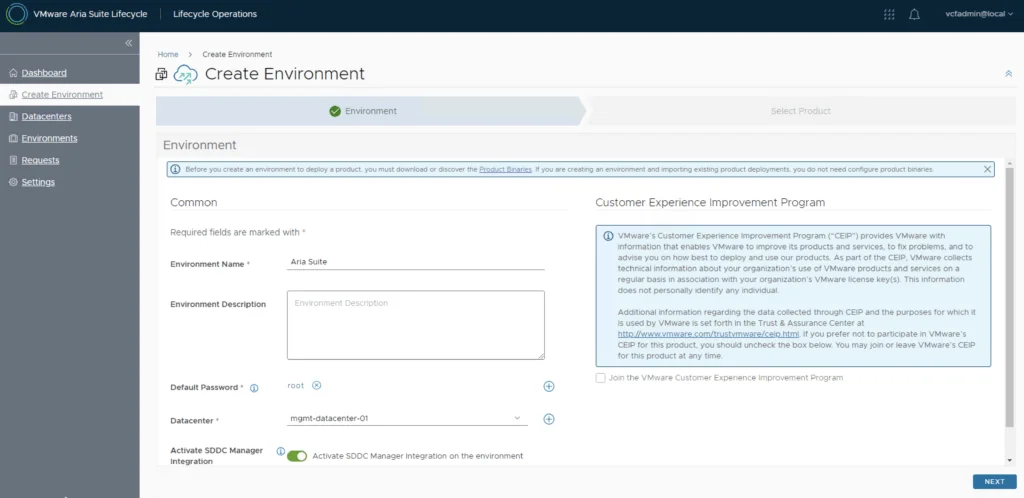
VMware Aria Suite Lifecycle: Create Environment wizard step showing environment details and options.

Deploying VMware Aria Automation in a VCF 5.2.1 Environment: Step-by-Step Guide

Following the deployment of vIDM which can be found here, deploying VMware Aria Automation (formerly known as vRealize Automation) enhances your VCF environment with powerful self-service provisioning, automated operations, and streamlined infrastructure management. This step-by-step guide will walk you through deploying Aria Automation using VMware Aria Lifecycle Manager in a VCF 5.2.1 environment, integrating it seamlessly with vIDM for Single Sign-On (SSO) and access management. Prerequisites VMware Cloud Foundation (VCF) 5.2.1 Environment: Ensure VCF 5.2.1 is fully set up and operational. Aria Lifecycle Manager (ALCM) Appliance: Make sure Aria Lifecycle Manager is installed and accessible. Identity Management (vIDM): Deployed and configured to allow SSO across VMware products. DNS and Network Configurations: Validated for reachability and FQDN resolution. Step 1: Access Aria Lifecycle Manager Log in to the Aria Lifecycle Manager (ALCM) console with admin credentials. Ensure your ALCM version aligns with VCF 5.2.1, ensuring compatibility. Step 2: Add an Environment in ALCM In ALCM, navigate to Environments and Add New Environment. Input environment details, such as name and description, to organize deployments within the ALCM. Select a Datacenter for the deployment. Click Next. ...

October 18, 2024 · Cosmin Trif
The image shows a terminal command for setting alternative IP addresses for Aria Automation 8.x node.

Changing the IP Address of Aria Automation 8.x Node

Changing the IP address of a Aria Automation node requires careful planning to avoid service disruption. Here’s a step-by-step guide: 1. Verify Health of vRealize Automation Run: vracli service status Ensure the cluster or node is healthy before proceeding. 2. Set Alternative IP Address vracli network alternative-ip set --dns <DNS_IP1>,<DNS_IP2> <New_IP>/<subnet> <Gateway_IP> ...

September 5, 2024 · Cosmin Trif
Error Code: LCMVSSC10013 shown in a VMware Aria Automation Config import request details, highlighting failed Stage 1 with error message.

Error Code: LCMVSSC10013

While trying to upgrade my SaltStack Config environment to 8.16.2 I encountered Error Code: LCMVSSC10013 in VMware Aria Suite Lifecycle. The error details: Error Code: LCMVSSC10013 Failed to import VMware Aria Automation Config. Exception occurred while importing VMware Aria Automation Config host. Exception message: Import of VMware Aria Automation Config failed for tenant Standalone vRASSC com.vmware.vrealize.lcm.vsse.common.exception.VsscImportFailureException: Import of VMware Aria Automation Config failed for tenant Standalone vRASSC at com.vmware.vrealize.lcm.vsse.core.task.VsscImportTask.execute(VsscImportTask.java:185) at com.vmware.vrealize.lcm.platform.automata.service.Task.retry(Task.java:158) at com.vmware.vrealize.lcm.automata.core.TaskThread.run(TaskThread.java:60) at java.base/java.util.concurrent.ThreadPoolExecutor.runWorker(Unknown Source) at java.base/java.util.concurrent.ThreadPoolExecutor$Worker.run(Unknown Source) at java.base/java.lang.Thread.run(Unknown Source) Caused by: java.lang.RuntimeException: Cannot execute ssh commands. Exception encountered : Session.connect: java.security.spec.InvalidKeySpecException: key spec not recognized at com.vmware.vrealize.lcm.util.SshUtils.execute(SshUtils.java:721) at com.vmware.vrealize.lcm.util.SshUtils.runCommand(SshUtils.java:532) at com.vmware.vrealize.lcm.util.SshUtils.runCommand(SshUtils.java:516) at com.vmware.vrealize.lcm.util.SshUtils.runCommand(SshUtils.java:628) at com.vmware.vrealize.lcm.vsse.core.task.VsscImportTask.fetchFipsStatus(VsscImportTask.java:342) at com.vmware.vrealize.lcm.vsse.core.task.VsscImportTask.getProductDetails(VsscImportTask.java:260) at com.vmware.vrealize.lcm.vsse.core.task.VsscImportTask.execute(VsscImportTask.java:158) ... 5 more Caused by: java.lang.RuntimeException: Cannot create session for ssh://root@ssc-01a.corp.local at com.vmware.vrealize.lcm.util.SessionHolder.newSession(SessionHolder.java:57) at com.vmware.vrealize.lcm.util.SessionHolder.<init>(SessionHolder.java:37) at com.vmware.vrealize.lcm.util.SshUtils.execute(SshUtils.java:663) ... 11 more Caused by: com.jcraft.jsch.JSchException: Session.connect: java.security.spec.InvalidKeySpecException: key spec not recognized at com.jcraft.jsch.Session.connect(Session.java:550) at com.vmware.vrealize.lcm.util.SessionHolder.newSession(SessionHolder.java:53) ... 13 more Caused by: java.security.spec.InvalidKeySpecException: key spec not recognized at org.bouncycastle.jcajce.provider.asymmetric.util.BaseKeyFactorySpi.engineGeneratePublic(Unknown Source) at org.bouncycastle.jcajce.provider.asymmetric.edec.KeyFactorySpi.engineGeneratePublic(KeyFactorySpi.java:212) at java.base/java.security.KeyFactory.generatePublic(Unknown Source) at com.jcraft.jsch.jce.XDH.getSecret(XDH.java:71) at com.jcraft.jsch.DHXEC.next(DHXEC.java:134) at com.jcraft.jsch.Session.connect(Session.java:328) ... 14 more To get around it I had to enable FIPS mode in Aria Suite Lifecycle under Lifecycle Operations -> Settings -> Tips Mode Compliance -> check the enabled box -> Click Update ...

March 25, 2024 · Cosmin Trif

Enhancing vCenter Server Firewall Management with Ansible

In today’s dynamic IT environments, maintaining a secure and efficient infrastructure is paramount. For VMware vSphere administrators, managing the firewall settings on vCenter servers is a critical task that ensures the security of the entire virtualized infrastructure. Ansible, an open-source automation tool, offers a streamlined approach to managing firewall settings across multiple vCenter servers. This blog post will guide you through automating vCenter server firewall configurations using Ansible, showcasing how to apply these changes across multiple servers seamlessly. ...

March 21, 2024 · Cosmin Trif

Streamlining vCenter Server Firewall Management with SaltStack Config

In the realm of VMware vSphere management, securing your vCenter Server is critical to maintaining a robust and secure infrastructure. SaltStack Config, integrated into VMware’s vRealize Automation suite, offers a powerful way to automate and manage configurations across your VMware environment, including firewall settings. This blog explores how to leverage SaltStack Config to automate firewall adjustments on your vCenter servers, ensuring consistent security policies and simplifying the process across multiple instances. ...

March 21, 2024 · Cosmin Trif
Upgrade wizard step for taking a snapshot during Aria Operations for Logs 8.14.1 upgrade.

Upgrading Aria Operations for Logs to 8.14.1 via VMware Aria Suite Lifecycle

In this post i will go over upgrading my 8.x vRLI appliance to Aria Operations for Logs 8.14.1 using VMware Aria Suite Lifecycle. As a pre requirement we do need to have VMware Aria Suite Lifecycle upgraded to 8.14. Instructions can be found here. The upgrade does not include the latest PSPACK that contains the 8.14.1 Aria Automation Config release. Instructions to get the PSPACK can be found on my other blog post here. ...

December 5, 2023 · Cosmin Trif

SaltStack Config vs. Ansible Tower: A Comparison of Two Powerful Configuration Management Solutions

SaltStack Config and Ansible Tower are two powerful configuration management and infrastructure automation tools that cater to the needs of DevOps teams across the globe. While SaltStack Config is an open-source solution, Ansible Tower is the commercial, enterprise-ready version of Ansible Open Source. In this blog post, we will compare SaltStack Config and Ansible Tower in terms of architecture, ease of use, scalability, and features to help you make an informed decision on which tool is best suited for your requirements. ...

March 23, 2023 · Cosmin Trif

SaltStack Config vs. Ansible Open Source: A Technical Comparison

SaltStack Config and Ansible Open Source are two popular configuration management and infrastructure automation tools used by DevOps teams across the globe. Both solutions have their own unique set of features, advantages, and drawbacks. In this blog post, we will compare SaltStack Config (formerly known as Salt) and Ansible Open Source in terms of their architecture, ease of use, scalability, and community support, to help you make an informed decision on which tool is best suited for your needs. ...

March 23, 2023 · Cosmin Trif

Overview of deploying a 3 tier app in vRA 8, Terraform, and Ansible

Introduction When it comes to deploying a three-tier application in Google Cloud Platform (GCP), there are several tools available, including vRealize Automation (vRA) 8, Terraform, and Ansible. Each tool has its own strengths and weaknesses, and choosing the right one for your project depends on several factors. In this blog post, we will compare these three tools and discuss how vRA 8 stands out as the best option for deploying a three-tier application in GCP. ...

March 7, 2023 · Cosmin Trif