CCP-Corfu Client certificate expired on July 18, 2022.

Replacing the CCP Corfu certificate in NSX

I replaced the expired CCP Corfu certificate in NSX by generating a self-signed certificate in the UI and sending the replacement through the API. In my case the CCP Corfu certificate has already expired Generating a Self-Signed Certificate In the top menu bar I went to Generate -> Generate Self Signed Certificate Next I had to grab the new certificate ID ...

Replacing the CCP Corfu certificate in NSX
Expired certificate alert in NSX UI, showing AR Corfu client certificate details.

Replacing the AR Corfu certificate in NSX

I replaced the expired AR Corfu certificate in NSX by generating a self-signed certificate in the UI and sending the replacement through the API. Identifying the Expired AR Corfu Certificate In my case the AR Corfu certificate has already expired Generating a Self-Signed Certificate in the NSX UI In the top menu bar I went to Generate -> Generate Self Signed Certificate ...

Replacing the AR Corfu certificate in NSX

Certificate delete failed: Certificate cannot be deleted because it is used by 1 MP node

I was recently trying to replace some service certificates and I accidentally associated the certificate with the wrong service. When trying to delete the certificate I was presented with an error “Certificate delete failed: Certificate cannot be deleted because it is used by 1 MP node” The first step I did was try to figure out what service is associated with the certificate. For that I leveraged the instructions in KB 75277. Performing a GET /api/v1/trust-management/certificates/{cert-id} I was able to identify that CBM_API service was using the certificate. ...

Certificate delete failed: Certificate cannot be deleted because it is used by 1 MP node
Expired certificate warning shown for API-Corfu client certificate.

Replacing the Corfu API certificate in NSX

In this blog we will go over replacing the Corfu API certificate in NSX. In this example I will be using the UI to generate the self signed certificate and then an API call to replace the certificate. Identifying the Expired Corfu Certificate In my case the Corfu API certificate has already expired Generating a New Self-Signed Certificate In the top menu bar I went to Generate -> Generate Self Signed Certificate ...


Replacing the Corfu API certificate in NSX
Expired LocalManager certificate shown in NSX UI, needs replacement.

Replacing the LocalManager certificate in NSX

In this blog we will go over replacing the LocalManager certificate in NSX. In this example I will be using the UI to generate the self signed certificate and then an API call to replace the certificate. Reviewing the Expired Certificate In my case the LocalManager certificate has already expired Generating a Self Signed Certificate In the top menu bar I went to Generate -> Generate Self Signed Certificate ...

 · Updated  · 
Replacing the LocalManager certificate in NSX

Simplifying NSX Edge Removal in VMware Cloud Foundation (VCF) Environment

Important correction (August 25, 2026): The original article incorrectly implied that the NSX Edge Removal Tool preserves attached dependencies and that dependencies could be addressed after removal. Broadcom’s current instructions require administrators to remove or disconnect added services, interfaces, segments, and other dependencies before running the cleaner. The tool must not be used for an Edge cluster serving Workload Control Plane (WCP). The old direct-download link, version-specific filename, executable command, and post-removal dependency workflow have been removed so they cannot be mistaken for current instructions. ...

 · Updated  · 
Simplifying NSX Edge Removal in VMware Cloud Foundation (VCF) Environment
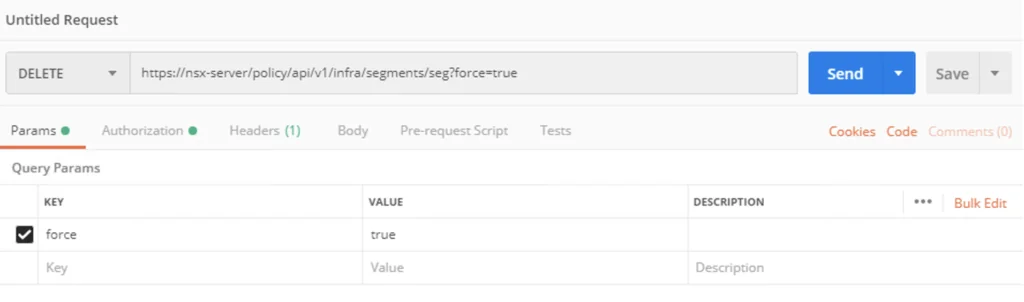
API request setup for forcibly deleting an NSX-T 3 segment using Postman.

How to forcibly delete an NSX-T 3 Segment

I recently ran in to a problem where I couldn’t delete an NSX segment so I went exploring the API. The API guide can be found here The method used is delete policy/api/v1/infra/segments/{segment-id}?force=true It would look like this in Postman: To list the segments we can use a get request towards /policy/api/v1/infra/segments/ ...

How to forcibly delete an NSX-T 3 Segment

Removing NSX stale packages from ESXi host

Important safety update (August 25, 2026): Do not manually remove NSX VIBs with esxcli software vib remove. Broadcom documents that this method is unsupported and can cause loss of management or workload networking. The executable removal guidance previously shown on this page has been removed. Use the current follow-up instead: Safely Removing Stale NSX VIBs from an ESXi Host. It starts with the NSX Manager removal workflow and covers the narrower stale-package condition where Broadcom directs administrators to use nsxcli -c del nsx while the host is in maintenance mode. ...

 · Updated  · 
Removing NSX stale packages from ESXi host
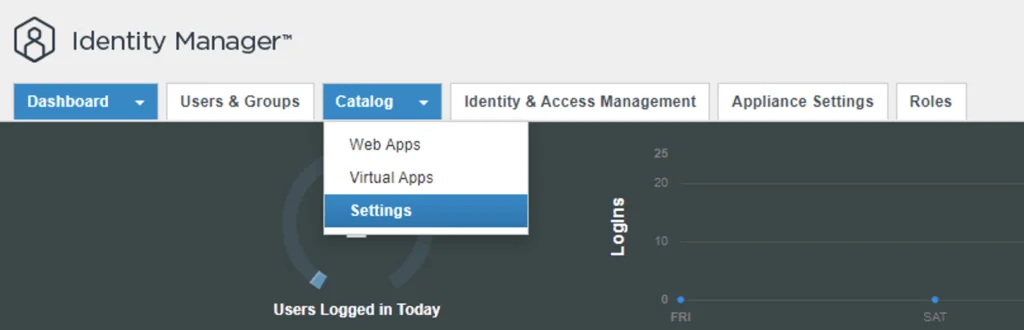
Identity Manager dashboard showing Catalog and Settings options.

Configure NSX-T to use vIDM as authentication

I needed to create a few additional accounts in NSX-T for outside sources. Instead of creating individual accounts I wanted to use the existing ones from AD. To get started we need to get the certificate from the vIDM server. Log on to the vIDM server as root and run the following: openssl1 s_client -connect <FQDN of vIDM host>:443 < /dev/null 2> /dev/null | openssl x509 -sha256 -fingerprint -noout -in /dev/stdin Next, create the OAuth client ID in vIDM. Log in to the vIDM UI as an administrator at https://<FQDN-of-vIDM-host>/SAAS/admin/app/page#!/dashboard, then navigate to Catalog -> Settings. ...

Configure NSX-T to use vIDM as authentication

ccp-backups folder missing in NSX-T backup

If you like me tried to to cleanup the backups in NSX-T and ran into error Cleanup script works only in folders, that contains subfolders "cluster-node-backups", "ccp-backups" and "inventory-summary" this post is for you. I was trying to cleanup the backups before going to the next major release of nsx and I kept getting an error running the nsx_backup_cleaner.py script. It would seem that the ccp-backups folder has been removed from the backup job so it simply doesn’t exist. VMware did fix the script with the 3.2 release. ...

ccp-backups folder missing in NSX-T backup